A rigorous look at whether paid software and AI features actually deliver measurable value over free alternatives — with real data, honest assessments, and frameworks you can apply today.
The “paid vs. free” question gets asked constantly and answered badly. Most comparisons list features side by side, declare a winner, and call it a day. That’s not an analysis — it’s a brochure. What you actually need is a systematic way to evaluate whether the premium you’re paying translates into quantifiable business or personal value, not just more buttons on a dashboard.
This piece lays out 11 specific techniques for making that judgment. Some of them cut against conventional wisdom. A few will make vendor sales teams uncomfortable. All of them are grounded in recent research and real-world spending data, not hypotheticals.
Those four numbers tell a story that doesn’t get told often enough. Most paid tools don’t deliver. A handful genuinely do. The difference lies entirely in how you evaluate them — before signing up, and while you’re using them.
Before getting into the techniques, it’s worth naming the core problem: most organizations don’t measure what matters. They track adoption (how many people logged in), not outcomes (what changed as a result). That gap — between usage and impact — is where billions of dollars quietly evaporate every year.
Before upgrading anything, ask one question: will this save or generate at least twice its monthly cost in measurable value? Not “will it help.” Not “will it be convenient.” Twice. The reason this threshold matters is that it accounts for switching costs, learning curve, and the cognitive overhead of managing yet another paid tool in your stack. A $50/month subscription needs to save at least four hours of labor at a $25/hour baseline — or directly contribute to revenue — to justify its existence.[1]
The 2× threshold also gives you a number to track. After 30 days, pull your actual usage data. If you can’t point to specific time savings or quality improvements that clear that bar, cancel. This sounds obvious, but the average professional’s SaaS stack includes tools where they’ve never done this math — not once.
Set a calendar reminder 27 days after any new paid subscription starts. Force yourself to calculate: hours saved × hourly rate + quality improvements (however you define them) vs. monthly cost. If it doesn’t clear 2×, you have three days to cancel before the next billing cycle.
Measure the Gap, Not the Feature List
Vendor comparison pages compare features. That’s rarely what determines value. What actually matters is the performance gap between the free and paid version on the specific tasks you actually do. A paid tool with 47 features you’ll never use delivers less value than a free tool that does your three core tasks 30% faster.
GitHub Copilot is a good illustration. The paid version costs $10–$39/month depending on tier. Controlled research involving 4,800 developers found task completion speeds 55% higher.[2] Pull request review time dropped from 9.6 days to 2.4 days at organizations that adopted it systematically.[3] Those are gap measurements — paid vs. no tool at all. But the relevant question for someone already using a free alternative like Codeium or Tabnine is narrower: what’s the gap between Copilot and that specific alternative for their codebase and workflow? That number is harder to find, and vendors have little incentive to provide it.
Duolingo’s Copilot rollout
Duolingo reported a 10% speed increase for experienced developers using Copilot — not the headline 55% figure — and a 67% reduction in median code review turnaround time. That’s a real gap, but much more modest than the marketing number.[4] The lesson: always find industry-specific or role-specific benchmark data, not just the vendor’s best-case study.
Separate “Value You Can Get Elsewhere” from “Value That’s Genuinely Exclusive”
Paid features fall into two buckets. The first bucket: things you could get for free or cheaply from another source. The second: capabilities that don’t exist at comparable quality without paying. Most people conflate the two, which is how they end up paying for things that are freely available if they’d look around for 10 minutes.
Take Canva Pro at $15/month. Its premium template library and brand kit tools are genuine value — there’s no free alternative that replicates that workflow for marketing teams producing high-volume content.[5] But the AI writing feature (“Magic Write”) competes directly with free versions of Claude and ChatGPT, which are meaningfully more capable for nuanced copy.[6] So you’re paying $15 for some genuine exclusive value and some features you could replicate for free. Knowing which is which lets you upgrade or avoid with precision rather than guessing.
This same logic applies at enterprise scale. Licenseware’s 2025 analysis found that enterprise software prices increased 67–132% of typical software budgets for organizations with 50–5,000 users. A significant portion of that increase was vendors bundling AI features into existing licenses — features where free alternatives (or already-owned tools) covered most of the use case.
Use the “Superuser Test” to Predict Real ROI
Every tool has a distribution of users. Some extract enormous value. Most extract modest or no value. The question isn’t whether the best users benefit — it’s where in that distribution you and your team realistically sit.
GitHub Copilot usage data makes this concrete. Developers in the highest usage quartile (75–100% of coding time with Copilot active) showed 29.73% acceptance rates and the highest productivity gains. Light users — less than 21% of coding time — showed only 11% acceptance rates with minimal productivity impact.[7] The productivity gains almost entirely went to the heaviest users.
Before paying for a tool, ask yourself honestly: am I likely to be a heavy user, or will this become another subscription that sits mostly idle? If you have a free trial, track your actual usage over 14 days. If you’re not using it every day by day 10, you’re probably not going to.
A reasonable threshold for “worth paying for” is using a tool on 5+ days per week. Copilot data shows 67% of users engage at least five days a week — among those who stick around.[8] The people who don’t reach that cadence tend to derive minimal value relative to cost.
Calculate True Total Cost, Not Just the Sticker Price
The subscription fee is often the smaller number in the real cost calculation. What vendors don’t advertise: time cost of onboarding, workflow disruption during transition, integration overhead, training for your team, and the annual price increases that follow the first year.
Enterprise software price increases in 2025 have been stark. Docker raised prices 67–80%. Microsoft Teams Phone increased 25% across standard licenses. Oracle applied an 8% annual support fee increase. These are compounding — the tool you buy at $X this year likely costs $1.1X–1.25X within 24 months.[9]
Product analytics platforms illustrate the hidden cost problem particularly clearly. Pendo, for example, lists at $30,000–35,000 annually for basic plans, but Vendr’s buyer data shows costs ranging from $25,800 to $132,400 depending on scale — with annual increases of 5–20% and multi-year commitment requirements.[10] Meanwhile, free alternatives like Pendo’s own limited free tier cover up to 500 monthly active users for zero cost. The gap between what you pay and what you use is often large.
True Cost Formula
Subscription fee
+ (Onboarding hours × hourly rate)
+ (Integration/maintenance hours × hourly rate)
+ (Training hours × headcount × rate)
+ Projected Year 2 price increase (assume 10–15% if unknown)
+ Switching cost if you leave (data migration, retraining)
Compare this against the same calculation for the free alternative, including its limitations’ cost to your workflow.
The “Open Source Baseline” Check
Before paying for proprietary software, ask whether an open-source alternative handles 80% of your use case. If it does, you need a very specific reason to pay — and “the paid version is more polished” often isn’t specific enough.
The Linux Foundation’s 2025 report puts this in stark terms: without open source, companies would pay roughly 3.5× more to build the software running their businesses — an estimated $8.8 trillion increase.[11] That’s not a marginal difference. It reflects how comprehensively open-source software has covered the capability curve, particularly in infrastructure, data processing, and increasingly in AI tooling.
In AI coding specifically, free alternatives like Codeium (which offers a genuinely robust free tier), Tabby (self-hosted, open-source), and Google Gemini Code Assist (free tier available) cover meaningful portions of what GitHub Copilot does at $10–$39/month.[12] The question isn’t “is Copilot better” — it probably is, in aggregate — but “is it better enough for my specific workflow to justify the cost differential?”
Reference TablePopular Paid vs. Free Tool Comparisons (2025–2026 Data)
| Tool / Category | Free Version | Paid Tier | Measurable Value Gap | Verdict |
|---|---|---|---|---|
| GitHub Copilot | Free (limited completions since 2024) | $10–$39/user/mo | 55% faster task completion; PR time 9.6→2.4 days for heavy users[2] | Pay if heavy dev user |
| Canva Pro | 1.6M+ templates, 5GB, basic AI (limited credits) | $15/user/mo | 140M+ assets, unlimited brand kits, Magic Studio AI; genuine workflow acceleration for content-heavy teams[5] | Pay for marketing teams |
| Canva Pro (designers) | See above | $15/user/mo | Lacks layers, precision controls, non-destructive editing. Figma Free outperforms for professional design[6] | Skip — use Figma Free |
| Notion AI | Strong core (post-2025 restructure, now Business plan required for full AI) | $20/user/mo (Business) | 15-person startup replaced 2× tool stack, saved ~$150/mo while improving collaboration[13] | Context-dependent |
| ChatGPT Plus | GPT-4o mini, limited usage | $20/mo | BBVA: 2.8 hours saved/employee/week; workers save up to 122 hours/year on admin[14] | Pay for daily professional use |
| Google Analytics 4 | Full-featured, no usage limit for most SMBs | GA4 360: $50K+/yr | Free tier meets needs of most small-to-mid businesses. 360 justified only at very high volume[15] | Stay free unless >10M sessions/mo |
| Figma Professional | Unlimited drafts, full design tools, 3 shared files | $20/user/mo | Team libraries, version control, advanced collaboration. Value realized only in multi-person teams[16] | Free fine for solo designers |
| Microsoft 365 Copilot | Basic M365 features | $30/user/mo | Productivity gains across Word, Excel, Teams. Developers code 55%+ faster; 84% of users say they wouldn’t go back[17] | Pay for knowledge workers >20hrs/wk in Office |
| Grammarly Premium | Basic grammar/spelling checks | $12/mo | Style suggestions, tone detection, plagiarism. Strong for non-native English writers; weaker for advanced writers | Context-dependent |
| Zapier Paid | 100 tasks/mo, 2-step zaps | From $29.99/mo | Multi-step zaps, premium app integrations. Value scales with workflow complexity — minimal for simple automation[18] | Pay only with complex automation needs |
The “Adoption Rate” Reality Check Before Enterprise Buy
Enterprise software purchasing decisions frequently look excellent on paper and perform poorly in practice because adoption lags. When S&P Global data shows 42% of companies abandoned most AI projects in 2025 (up from 17% the year before), citing unclear value as the top reason, it’s worth asking: was the value genuinely absent, or did adoption never reach the threshold where value materializes?[19]
Enterprise AI tools in particular have this problem. Larridin’s 2025 research found that 60–70% of employees in many organizations use AI tools, but organizations can’t answer basic questions like “how much more productive are those users?” without measuring actual outcomes rather than login counts. When you’re evaluating enterprise paid tools, ask vendors for median adoption rates six months post-deployment, not just headline customer count. If they can’t provide it, that tells you something.
If a vendor’s case studies all show ROI from “top customers” or “early adopters” without disclosing median performance, they’re hiding an adoption distribution problem. Ask specifically: what percentage of your customers achieve the outcomes in your published case studies?
Apply the “Integration Tax” Filter
Every new paid tool you add to your stack creates integration overhead. It needs to connect to your CRM, your project management tool, your data warehouse, or at minimum be in the mental map of everyone who uses it. That cost is almost never quantified during purchasing decisions.
Marketing technology stacks now average 120 different tools — a number that’s increased steadily for a decade.[20] The productivity cost of context-switching, maintaining integrations, and training new team members on a large stack is real and often exceeds the subscription costs of the marginal tools within it. Before adding a paid tool, calculate what it replaces (tools you can remove) versus what it adds to your stack. If it adds without replacing, the integration tax may offset most of its claimed value.
HubSpot’s model is worth understanding here: the CRM comes with every Marketing Hub package, meaning you don’t pay an integration tax to connect marketing and sales data. That’s a genuine structural advantage over a best-of-breed stack where each component needs custom integration. Platform consolidation sometimes genuinely beats the sum of specialized free tools.
Time-Limit Your Evaluation Window
One of the least-discussed aspects of the paid-vs-free question is the time dimension. Tools that deliver value quickly are systematically more valuable than tools that require months of configuration before delivering returns. And the honest truth about most enterprise software is that the ROI timeline vendors advertise bears little resemblance to what organizations actually experience.
The pattern that organizations getting strong AI ROI share: they target core business areas where 62% of value is generated, focus on a few high-impact opportunities rather than scattered projects, and expect 2–4 year ROI timelines for complex implementations.[21] If your organization doesn’t have 2–4 years of patience and operational focus to give a complex paid tool, that’s a reason to prefer free alternatives — even if the paid tool is technically superior.
For individual tools, the window should be much shorter. If a paid tool doesn’t improve your work within the first week of serious use, that’s a strong signal it won’t. The most common mistake is subscribing to tools that promise future value but deliver it on a timeline that never quite arrives.[22]
Distinguish “Convenience Premium” from “Capability Premium”
This is perhaps the most important distinction in the whole paid-vs-free analysis. Some paid features genuinely unlock capabilities you cannot access for free at any comparable quality level. Others simply make existing capabilities more convenient — easier to access, better-presented, with less friction. Both can be worth paying for, but they should be evaluated differently.
AlphaSense ($1,200+/year) is a capability premium — it searches millions of documents, earnings calls, and regulatory filings in a way that has no realistic free equivalent for the time investment it saves professionals doing serious market research.[23] Canva Pro’s background removal tool is a convenience premium — free alternatives like remove.bg exist, but the workflow integration saves meaningful time for high-volume users.
The practical rule: capability premiums almost always justify their cost if the capability is core to your workflow. Convenience premiums require the 2× rule calculation — is the convenience worth twice the subscription cost in time saved?
“The winners in 2025 are those who thoughtfully combine free tools for experimentation and basic tasks with carefully chosen paid upgrades where they deliver measurable value.” — AI Top Tier, Free vs Paid AI Tools Guide, 2025
Use Negotiated Pricing as Your First “Free” Feature
This one is genuinely underused, and most vendors won’t bring it up. Published pricing for enterprise and mid-market software bears almost no relationship to what organizations actually pay. Vendr’s buyer intelligence data on Appcues shows list pricing at $70,300 for a specific configuration, with typical negotiated contracts landing at $22,000–$36,000 — a 68–77% discount range.[24]
Before evaluating a paid tool at its listed price, find out what similar organizations are actually paying. Vendr, G2’s pricing pages, and procurement community forums like Reddit’s r/sysadmin or specific industry Slack groups often have real deal data. The “paid vs. free” question sometimes resolves into “the paid tool at negotiated pricing vs. the free alternative” — and that’s a substantially different comparison.
- End of quarter / fiscal year (Q3 and Q4 typically offer deeper discounts)
- Multi-year commitment in exchange for price lock and initial discount
- Named competitor quote — even a real free alternative creates downward pressure
- Reduced seat count with expansion options — start smaller than you think you need
- Ask for free pilot period before any commitment; most vendors will extend it
Putting It TogetherA Decision Framework That Actually Works
These eleven techniques aren’t meant to be applied in sequence like a checklist. They’re lenses. For any given decision, three or four of them will be relevant; the others won’t. The art is knowing which lenses apply.
What they collectively push toward is a different posture than most people bring to software decisions. Most people either default to “free is good enough” without testing that assumption, or they buy paid tools because a colleague recommends them without measuring whether the value materializes for their specific workflow. Both are lazy. Both cost money.
The position worth holding is this: free tools have gotten genuinely excellent over the past five years, particularly in the AI and open-source categories. The Linux Foundation estimates $8.8 trillion in value delivered through open source alone. At the same time, a small number of paid tools deliver productivity gains that are large enough to justify their cost by a significant margin — GitHub Copilot for developers who live in their IDE, specialized enterprise research tools like AlphaSense, and platform consolidators like HubSpot that replace multiple point solutions.
The mistake isn’t paying for tools. It’s paying for tools you haven’t evaluated rigorously, and it’s not paying for tools that would genuinely compound your output — because you haven’t bothered to measure whether they would.
One-Page Decision Checklist
2. Can you measure the specific performance gap vs. your current free tool?
3. Is the value exclusive, or replicable elsewhere for free?
4. Are you realistically a heavy user? (Superuser Test)
5. Have you calculated true total cost including integration and Year 2 price increase?
6. Does open source cover 80% of your use case?
7. What’s the median adoption rate at 6 months? (Enterprise only)
8. Does it eliminate tools from your stack or add to it? (Integration Tax)
9. Can you show value within your time-limit window?
10. Is this a capability premium or a convenience premium?
11. What’s the negotiated price, not the list price?
A Note on AI Tools SpecificallyThe 2025–2026 Reality Check
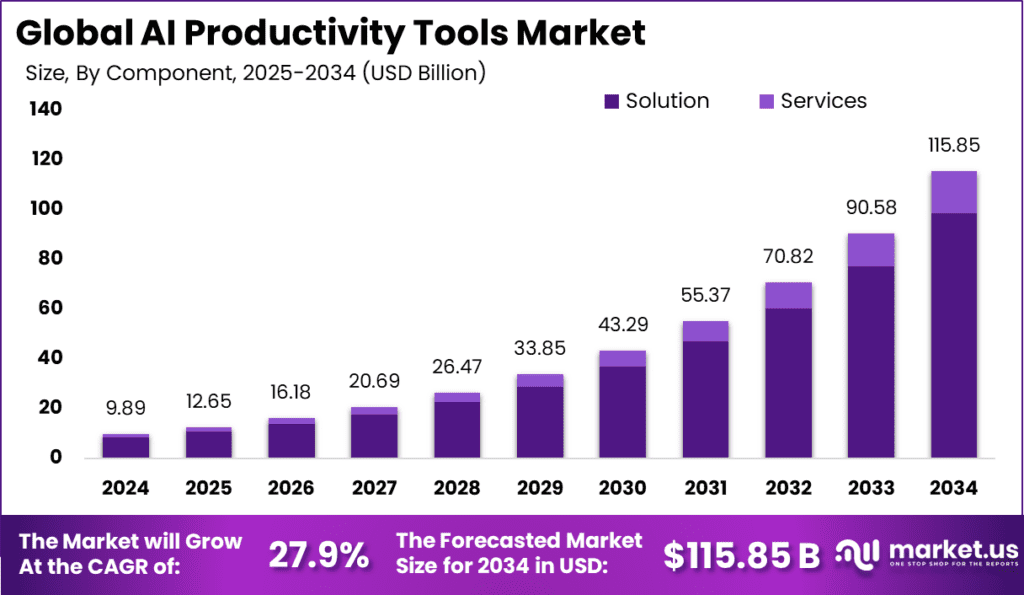
AI tools deserve special mention because they’re where the paid-vs-free question has become most confusing. The market has moved fast: 63% of enterprises now use paid or enterprise LLM versions, while only 17% rely on free tiers. But that adoption gap doesn’t mean paid AI tools are universally delivering value.
What the data actually shows: organizations that get measurable results from paid AI commit at least 20% of their digital budgets to it, invest 70% of AI resources in people and processes rather than technology alone, and budget for 2–4 year ROI timelines.[25] The failure mode — which 70–85% of AI projects still hit — is buying a paid tool, pointing it at a problem without changing surrounding workflows, and measuring adoption instead of outcomes.[26]
For individual AI subscriptions, the calculus is simpler. ChatGPT Plus and Claude Pro at $20/month each are among the clearer value propositions in the paid tool market for anyone who uses them professionally every day. The BBVA data point is illustrative: 2.8 hours saved per employee per week across a large organization.[27] At any reasonable hourly rate, that clears the 2× threshold in the first month.
For enterprise AI, the story is more complicated and more organization-specific. The safest summary: buy less than you think you need, measure more than feels comfortable, and expand based on demonstrated returns rather than projected ones.
More From BestPrompt.art
Explore related guides, prompt libraries, and strategy pieces across our knowledge base.