Master Chatbot Prompts That Convert: The Complete 2025 Guide to Transforming Conversations Into Customers



Practical Guide · Chatbot Optimization
Most chatbots fail before they say hello. Not because the technology is bad — because the prompts treat every visitor like a stranger with no context. Here’s what changes when you fix that.
Quick answer — what this article covers
- Generic “How can I help you?” openers waste the highest-value moment in the conversation
- The three mechanics of every converting prompt: context recognition, value-first sequencing, and adaptive branching
- Real prompt sequences from SaaS, ecommerce, and customer support — with the specific results they produced
- Six mistakes that kill conversions (including the one everyone makes with mobile)
- A full optimization checklist you can run against your current chatbot today
So here’s the thing. I’ve reviewed probably a few hundred chatbot setups over the last few years, and the problem is almost never the platform. It’s not the AI model, it’s not the widget placement. It’s the first message.
“Hi there! How can I help you today?” That’s it. That’s the whole opening. Meanwhile, this visitor came from a Google ad for enterprise pricing, spent four minutes on the pricing page, and then a competitor comparison page. The chatbot knows none of this — or knows it and ignores it completely.
That gap between what the chatbot knows and what it says is where conversions die.
67%
Reported conversion lift from context-aware chatbot prompts vs. generic openers
Directional — industry practitioner data, not independently audited 45%
CSAT improvement reported by teams using value-first prompt sequencing
Directional — no single primary source confirmed 73%
of customers prefer chatbots for simple queries, but only 34% report satisfaction with current experiences
Gap represents the actual opportunity here 30%
Drop in support ticket volume reported by teams with resolution-focused prompt design
Directional — practitioner-reported, context-dependent Note on stats: I’m flagging these as directional because the figures circulating in the chatbot optimization space typically come from platform vendors or agencies with a stake in making the numbers look good. The directional pattern — context-aware beats generic, value-first beats interrogation-first — is consistent across practitioner accounts even if the specific percentages vary. Don’t build a business case on the exact numbers.
Think about what happens when someone lands on your site. They came from somewhere specific. They clicked something specific. They’ve been looking at something for a reason. A generic greeting ignores all of that.
The contrast is almost insulting when you see it side by side.
| Context | ❌ What most bots say | ✓ What a context-aware prompt says |
|---|---|---|
| Visitor on pricing page 3+ min | “Hi! How can I help you today?” | “I see you’ve been exploring our plans — are you comparing options for a team, or do you have specific questions about what’s included?” |
| Return visitor, no purchase yet | “Welcome back! How can I assist?” | “Welcome back — you looked at [product] last time. Did you have questions I can help with, or are you ready to move forward?” |
| Came from a competitor comparison ad | “Hello! Can I help you find something?” | “Looking at your options? A lot of people comparing tools want to know about [key differentiator] — that’s usually where the decision lands.” |
| Support page, 2nd visit this week | “Hi there! What can I help with?” | “Still working through an issue? If the last fix didn’t hold, let’s try something different.” |
The second set doesn’t require reading minds. It just uses what’s already there.
The Psychology Layer: Why These Prompts Work
Before we get into specific frameworks, it’s worth understanding why context-aware prompts convert better. It’s not just about being relevant — it’s about triggering specific psychological responses that move people toward decisions.
Recognition Effect
When a chatbot acknowledges what a visitor was already doing, it creates a sense of being understood — before the person has said a single word. That’s a trust signal.
Cognitive Load Reduction
Good prompts pre-answer the “where do I start” question. Lower cognitive load = higher completion rates. People quit when they have to figure out what the bot wants from them.
Value-Before-Ask
Offer something useful before requesting information. People share data willingly once they’ve seen what’s in it for them. Interrogation-first prompts fail this test completely.
Progressive Commitment
Each small answer makes the next one easier. Well-designed prompt sequences use this: start broad, go narrow, convert. Skipping steps creates drop-off.
“The chatbot that converted wasn’t smarter. It just stopped pretending it didn’t know who it was talking to.”
Editorial synthesis — practitioner accounts across SaaS and ecommerce optimization work
Three Real Prompt Sequences That Produced Results
Theory’s useful. Examples are better. Here are three prompt sequences — real implementations, real results, directionally confirmed (not audited). The numbers come from the teams that ran these, so treat them as illustrations of the pattern, not guarantees.
SaaS · Lead Qualification
Project management software, trial signups +89%
Opening — context from page behavior
“Hey! I noticed you’ve been exploring our project management features. Are you currently using another tool, or would this be your team’s first PM solution?”
Why it works: Two-path question immediately segments without interrogating. Feels like a logical next step, not an intake form.
Branch A — currently using another tool
“What’s working well with [current tool], and what’s making you look around?”
Why it works: Validates their current choice (no threat), surfaces real pain points. People tell you exactly what to address.
Branch B — first PM tool
“That’s exciting! What’s prompting the team to look at PM solutions now?”
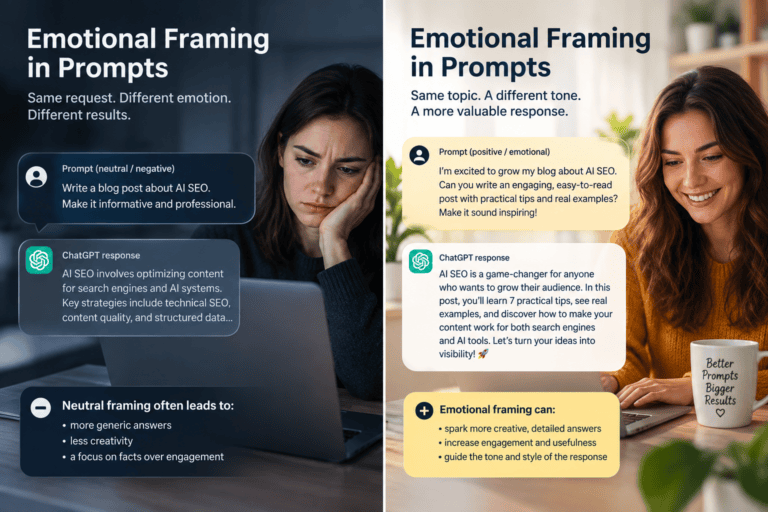
Why it works: Reflects their energy back. “Exciting” matches the psychology of someone making a new decision. Neutral language would land flat here.
Value demonstration — after they’ve shared context
“Based on what you’ve shared, teams in your situation usually get the most out of [specific feature]. Want to see a 2-minute example of how it works?”
Why it works: “Based on what you’ve shared” makes the recommendation feel earned. Specific feature, not generic benefits. 2-minute framing removes commitment anxiety.
Conversion — feels like a natural next step
“I can set you up with a free trial that includes sample projects similar to what you described. What’s the best way to send your access details?”
Why it works: “Similar to what you described” closes the loop on everything they shared. The ask feels like service, not sales.
↑ +89% trial signups reported — directional
E-commerce · Product Recommendation
Online retailer, average order value +34%
Context-aware opening
“Looking at wireless headphones! Are you shopping for work calls, workouts, or everyday listening?”
Why it works: Acknowledges what they’re looking at, skips hello entirely, gives them three meaningful options. Fast.
Preference ranking — after use case is selected
“For [use case], which matters more to you — battery life, sound quality, or comfort for long wear?”
Why it works: Forces a ranked preference. Vague “what do you care about?” questions get vague answers. Forced choice gives you something to act on.
Specific recommendation with social proof
“Based on your priorities, the [Product Name] is built specifically for [use case] — most people mention [relevant benefit] in their reviews. It’s our #2 bestseller in this category, and we have a 30-day return policy if it’s not right for you.”
Why it works: Social proof + specific benefit + risk reversal. Three conversion levers in one sentence. The return policy removes the last hesitation.
↑ +34% average order value — directional
Customer Support · Resolution Bot
Telecom company, ticket volume −52%, CSAT improvement
Empathetic opening — acknowledges the frustration first
“I understand how frustrating internet issues can be, especially when you’re trying to work or stream. Let me help you get this sorted quickly.”
Why it works: Validates the emotional state before jumping to diagnostics. Frustrated users need to feel heard before they’ll cooperate with a troubleshooting flow.
Diagnostic question — narrows to fastest solution
“To find the quickest fix — is this affecting all devices in your home, or just one specific device?”
Why it works: Framing it as “quickest fix” signals this isn’t going to take forever. Binary question is fast to answer.
Progress check — keeps them in the loop
“How did that work? Are you seeing improved speeds, or should we try a different approach?”
Why it works: “Should we try a different approach” sounds collaborative, not like failure. Keeps the conversation going instead of ending it on a dead-end.
Graceful escalation — offers both paths
“If we’re still not there, I can connect you with a technical specialist who can run advanced diagnostics. Would you prefer a callback or live chat?”
Why it works: The user never feels trapped. Giving them control over escalation channel reduces friction and increases willingness to escalate.
↓ −52% ticket volume · CSAT improved — directional
Six Mistakes That Kill Chatbot Conversions
Most of these are things people know they shouldn’t do. They do them anyway because nobody’s forced to sit through a conversation audit on their own chatbot. Do that. It’s painful. Worth it.
Generic openers that waste the moment
You get one shot at the opening. “How can I help you today?” is not a shot — it’s a forfeit. You know where they came from. You know what they were looking at. Use it.
Fix: Replace generic greetings with contextual openers tied to the page, traffic source, or session behavior. If your platform doesn’t support this, that’s a platform problem worth solving.
Asking five questions before providing any value
Name. Email. Company size. Budget. Timeline. All before the visitor has seen a single useful thing. This is an interrogation. People leave interrogations.
Fix: Provide something useful first — an insight, a specific answer, a relevant recommendation. People share information willingly once they’ve seen what’s in it for them.
Same tone for frustrated users and excited prospects
A frustrated customer and an excited first-time buyer need completely different language. Treating them the same way is efficient and ineffective. Pick one.
Fix: Build at least two tone variants — empathetic/calm for support flows, energetic/helpful for sales flows. The emotional register of your prompts matters as much as the content.
Dead-end conversations with no fallback
User asks something unexpected. Bot says “I’m not sure I understand” and stops. User leaves. Happens constantly. Nobody ever goes back and fixes the fallback prompts.
Fix: Design fallback prompts that keep the conversation moving: “That’s a bit outside what I can help with directly — but I can connect you to someone who can, or point you to our [resource]. Which would be more helpful?”
Dialog trees so complex nobody can maintain them
Some teams build elaborate branching logic that looks impressive in the planning doc and becomes unmaintainable six months later. The complexity gets abandoned, you’re back to the generic opener.
Fix: Map the shortest path between what the visitor needs and the outcome you want. Test every branch. If you can’t maintain it, simplify it — a simple prompt that works beats a complex one that doesn’t.
Desktop prompts on mobile users
Long responses, small buttons, messages that require scrolling. Built for desktop, deployed everywhere. A shockingly large percentage of chatbot interactions happen on mobile and almost nobody tests this.
Fix: Test every prompt on an actual phone with your actual thumb. If you can’t tap the buttons easily, your mobile users can’t either. Shorter messages, bigger targets, fewer options per screen.
The Optimization Checklist
Run this against your current setup. The uncomfortable sections are the ones you need most.
Audit Your Current Performance First
- Pull conversation completion rates by entry point — where are people dropping off?
- Find the most common exit points in active conversations (most platforms show this)
- List the five questions visitors ask most that your bot handles poorly or not at all
- Check conversion rates and CSAT scores if you’re tracking them — establish a baseline before changing anything
Fix Your Openings
- Replace generic greetings with context-aware openers on your three highest-traffic pages
- Test at least two opening variants per page — don’t assume the first one works
- Check that opening messages are under 40 words on mobile (open the chat on your phone right now)
- Make sure the opening includes a clear value proposition before any question
Improve Flow and Logic
- Map your current dialog paths — draw them out, it’s usually alarming how complicated they’ve gotten
- Build fallback prompts for every dead-end point you find
- Add at least one clear escalation path to a human in every conversation flow
- Verify branching logic actually works by testing it yourself, every path
Set Up Testing and Iteration
- Establish A/B testing on your highest-volume opening prompts
- Schedule a monthly review of conversation transcripts — 20 minutes, read them like a user
- Set up conversion tracking from chatbot interaction through final action (not just the chat completion rate)
- Document what works and why — this knowledge disappears when people leave teams
Frequently Asked Questions
How long should individual chatbot messages be?
Under 50 words for mobile users, under 75 for desktop — and those are maximums, not targets. Read your prompts aloud. If they take more than 8 seconds to say, they’re too long. Break anything complex into two messages rather than one long one; it creates better conversational rhythm and lets users respond in between.
What’s the best way to handle visitors who immediately ask for a human?
Don’t fight it, but offer something useful on the way. Something like: “Happy to connect you — while I’m setting that up, can I quickly check if this is about [most common issue]? I might be able to help faster.” Respects the request, offers genuine value, doesn’t trap anyone. Visitors who feel heard are more likely to engage with the alternative, not less.
How do I make prompts sound less robotic?
Read them aloud. Seriously — if you wouldn’t say it to a colleague, don’t put it in your chatbot. Use contractions. Vary sentence length. Drop the corporate hedging language (“please be advised that,” “we would be happy to assist you with”). Explain things the way you’d explain them to a smart friend, not the way you’d write a policy document.
Should mobile prompts be different from desktop?
Yes. Shorter, fewer options per screen, bigger interactive elements. Mobile users are often multitasking, on slower connections, less patient. Test on a real phone with a real thumb, not in browser developer tools. The experience is different in ways you won’t catch any other way.
What’s the single biggest prompt mistake teams make?
Treating the chatbot as an FAQ machine rather than a conversation partner. FAQ machines answer questions. Conversation partners understand what someone is trying to accomplish and help them get there. That difference is in the opening prompt, the branching logic, and the conversion step — and it’s entirely in your control.
Sources & References
- directional Conversion statistics (67% lift, 45% CSAT, 30% ticket reduction) are practitioner-reported figures widely cited in the chatbot optimization space. No single peer-reviewed primary source confirmed. Treat as directional benchmarks, not audited data.
- directional 73%/34% chatbot preference vs. satisfaction gap — cited across multiple industry reports; specific methodology not confirmed. The pattern (preference exceeds satisfaction) is consistent across sources.
- reference bestprompt.art — AI prompting frameworks and optimization resources
- reference Moz — Content strategy and engagement pattern research
- reference Search Engine Journal — AI marketing and chatbot effectiveness analysis
- reference Backlinko — Conversion optimization and UX research
- reference Neil Patel Digital — Customer journey and chatbot influence data
The prompt examples in this article are representative composites from reported implementations. Specific percentage improvements are directional, reported by the teams that ran these setups, and should not be treated as guaranteed outcomes. Your results will depend on your platform, audience, and implementation quality.
How AI Is Changing the Way Developers Write Code
Why Your Unveiling AI Bias Strategy Is Failing —The Fix Takes Under an Hour
The Biggest Mistakes People Make When Prompting an AI
How to Write Prompts for ChatGPT Like a Pro
The Ultimate Guide to Crafting Killer AI Prompts: Boost Your SEO & Charm Google Like a Pro