How AI Is Changing the Way Developers Write Code



Software Development · AI Tools · May 2026
46% of all code is now AI-generated. What that actually means for productivity, quality, skill atrophy, and the career trajectories of every developer alive.
Updated: May 23, 2026 · v1.2
- Scale of change: In 2026, 84% of developers use or plan to use AI tools. On average, AI now generates 46% of code written on platforms like GitHub Copilot — hitting 61% for Java developers. (Quantumrun, 2026)
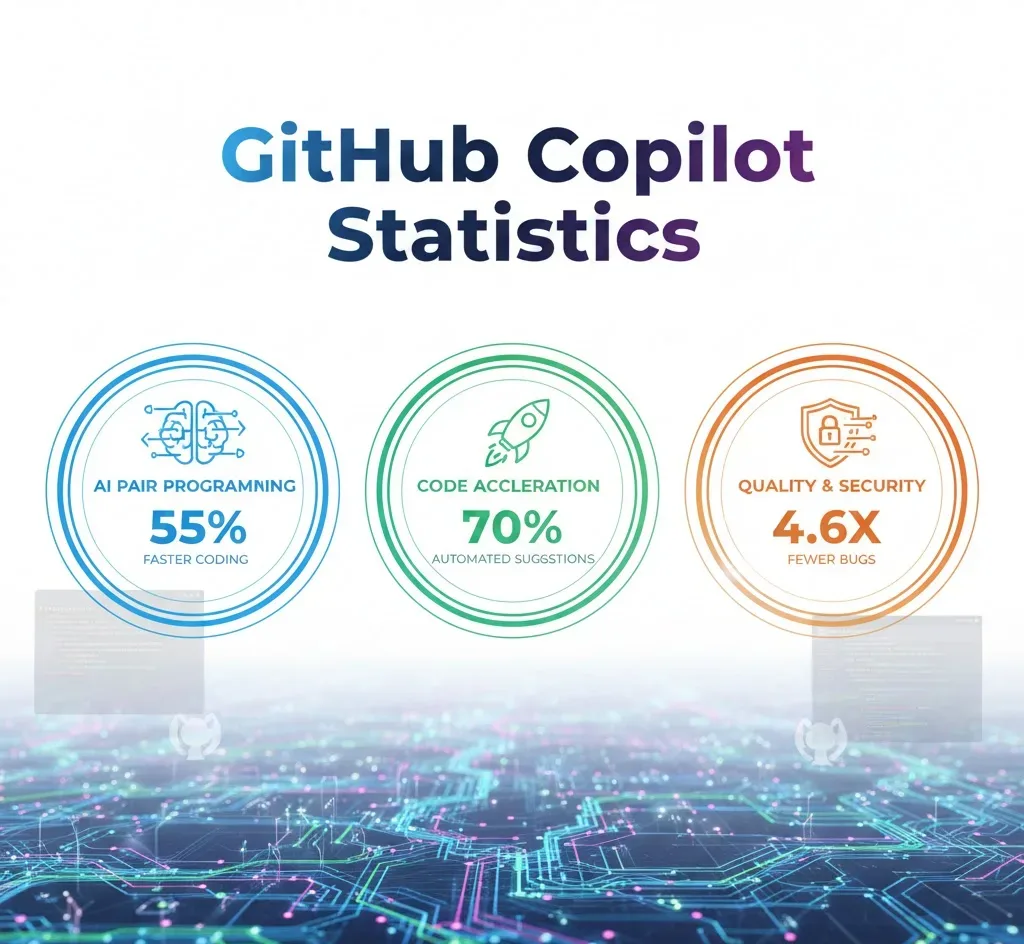
- Real productivity gains: Controlled studies show 55% faster task completion. But gains aren’t immediate — Microsoft Research found it takes 11 weeks of use before developers realize the full benefit.
- Quality is a genuine concern: CodeRabbit’s December 2025 analysis found ~1.7× more issues in AI-coauthored pull requests compared to fully human code. Review burden hasn’t decreased; it’s shifted.
- Skill atrophy is real, not theoretical: Junior developers on heavy AI diets are showing gaps in first-principles reasoning. This isn’t FUD — it shows up in code review and system design interviews.
- Best advice right now: Use AI for acceleration, not substitution. Treat every suggestion as a draft from an intern, not a senior engineer. Build review habits that scale.
Table of Contents
- By the Numbers: What Adoption Actually Looks Like in 2026
- The Productivity Question: Faster, But at What Cost?
- How These Tools Actually Work (And Why That Matters)
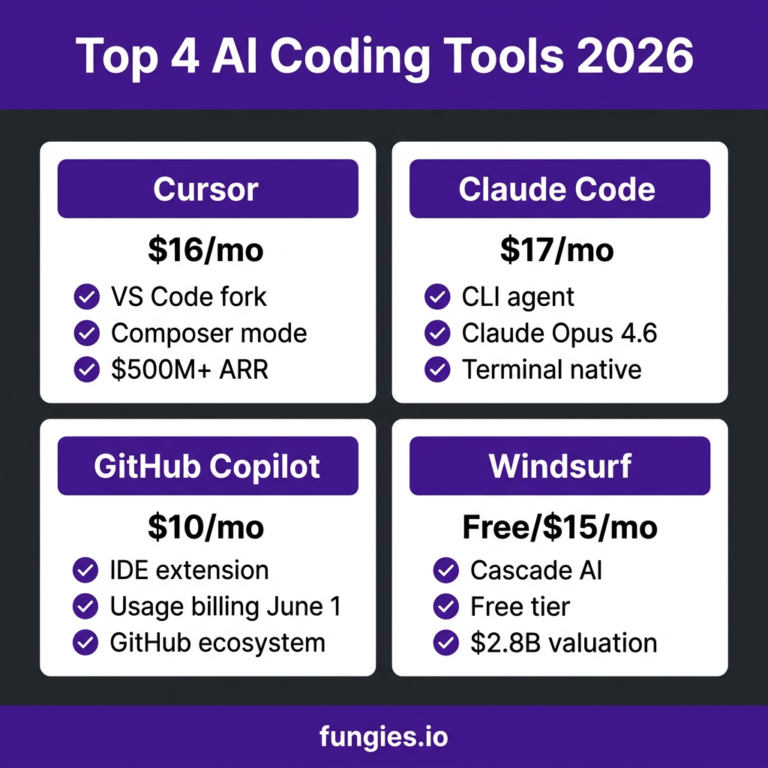
- The Tool Landscape: Copilot, Cursor, and the Rest
- Code Quality: The Inconvenient Data
- Agentic Coding: From Autocomplete to Autonomous
- Skill Atrophy: The Conversation Nobody Wants to Have
- Enterprise Adoption: What Large Orgs Are Learning
- What Could Be Wrong With This Picture
- My Verdict: Where This Is Actually Going
- FAQ
The shift has been faster than most people predicted, and slower than the hype suggested. Both things are true. A few years ago, GitHub Copilot was a curiosity. Today it’s deployed at 90% of Fortune 100 companies, with over 20 million users as of mid-2025 — up 400% in a single year.
That growth curve is genuinely remarkable. But the more interesting number isn’t users — it’s the actual share of code being generated. Not code being suggested. Not code being helped along. Generated.
46% of code now AI-generated (avg Copilot user) GitHub / Quantumrun, 2026
84% of developers use or plan to use AI tools index.dev, 2026
20M+ GitHub Copilot all-time users, Jul 2025 Microsoft announcement
55% faster task completion (controlled study, 4,800 devs) Microsoft Research
What does 46% actually feel like? I’ve been tracking this in my own work across a mix of TypeScript projects, infrastructure-as-code, and data pipeline scripts over roughly 18 months. For boilerplate-heavy tasks — writing API handlers, generating unit test scaffolding, translating patterns across files — Copilot-style tools easily cover 60–70% of the output. For architecture decisions, performance-sensitive paths, or anything involving subtle business logic, that number collapses to near zero. The tool genuinely doesn’t know your domain. It’s pattern-matching on what code tends to look like, not what your system needs to do.
That context gap is important. The 46% aggregate masks enormous variance. Java developers with repetitive enterprise patterns hit 61%. Systems programmers working in Rust on custom allocators might see 10–15%, if that.
The 55% faster figure from Microsoft’s controlled study is real, but it needs context. The researchers gave developers a self-contained web server task in an unfamiliar codebase. Ideal conditions for an AI coding assistant: clear scope, no institutional knowledge required, boilerplate-heavy. Real-world conditions are rarely this clean.
“It takes 11 weeks for developers to realize the actual productivity gains — most give up before then.”
— Microsoft Research, cited in Medium analysis of Copilot adoption data, Jan 2026
That 11-week ramp-up is the number that gets buried. If you evaluate Copilot after a week — which is when most individual developers decide whether it’s “working” — you’re catching roughly 20% of its eventual value. The tool requires you to develop new habits: prompting instincts, knowing when to accept versus reject suggestions, learning which file contexts to keep open. It’s less like adopting a faster keyboard and more like learning to pair-program with a very fast, frequently wrong partner.
The pull request data is also genuinely interesting. A large-scale internal deployment study (cited by WeAreTenet, 2025) found a 70% increase in pull request volume per developer and an 8.69% increase in successful builds. Review cycle time improved about 15% on average. That’s real. But 70% more PRs per developer means the total review burden on the team also goes up — unless your review tooling scales accordingly, which most teams haven’t addressed.
Across multiple enterprise studies, the time savings break down roughly like this: documentation is fastest (60–70% faster to draft), followed by test scaffolding (50% faster), then boilerplate CRUD code (40–50%), then actual feature logic (15–25% faster at best). The closer you get to genuinely novel logic or architectural decisions, the smaller the benefit — and the larger the risk of a confident-sounding wrong answer.
Most developers using AI coding tools don’t have a clear mental model of what the tool is actually doing. That’s not a criticism — the UX is designed to feel magical — but it creates real problems when you’re trying to evaluate suggestions intelligently.
Tools like Copilot and Cursor are built on large language models fine-tuned on code. They predict the next most likely token given your context window — which includes your current file, open tabs, and in more recent versions, a RAG-based retrieval layer that indexes your local codebase. The model has no understanding of your running system’s behavior, no access to your error logs, no awareness of your team’s conventions beyond what’s in the current context. It’s a very sophisticated autocomplete engine.
// What the model sees (simplified):// — Your current file (with cursor position as the "stop")// — Open editor tabs// — File path + surrounding imports// — (In enterprise/RAG versions) retrieved snippets from your codebase// — Your recent edits as "chat history"// What it does NOT see:// — Runtime behavior or errors// — Your prod database schema (unless you paste it)// — Your team's tribal knowledge// — Whether the code actually works
Understanding this changes how you use the tool. The suggestions that look most authoritative — long, syntactically perfect blocks — are also the ones most likely to be subtly wrong in ways that only surface at runtime. The model is optimizing for fluency, not correctness.
There’s a useful heuristic here: if you couldn’t write the code yourself, you can’t evaluate the suggestion. Which is why the skill atrophy question is more than an anxious developer’s worry. It’s a structural problem in how these tools are being adopted.
The market has consolidated around two dominant platforms, with a long tail of specialists. According to SlashData’s Q3 2025 survey of 12,000 developers, ChatGPT leads on raw AI-assisted coding adoption at 64%, with GitHub Copilot at 49% among professional developers who actively use AI coding tools. Both platforms share a 78% customer satisfaction rate.
| Tool | Market Share | Primary Strength | Key Limitation | Pricing (2026) |
|---|---|---|---|---|
| GitHub Copilot | 42% of AI coding market | IDE integration depth, enterprise SSO, Copilot Chat | Context window; limited codebase-wide awareness in free tier | $10/mo individual, $19 Business, $39 Enterprise |
| Cursor | ~18% | Full-file editing, agentic multi-step tasks, strong context retrieval | Cost at scale; learning curve for teams switching from VS Code | $20/mo Pro |
| ChatGPT / GPT-4o | ~64% casual/chat-based usage | Broad reasoning, architecture discussion, debugging transcripts | No native IDE integration; context is manual | $20/mo Plus; API variable |
| Amazon Q Developer | Significant in AWS shops | AWS API awareness, security scanning, IAM policy generation | AWS-centric; limited outside that ecosystem | Free tier + $19/mo Pro |
| Codeium / Windsurf | Growing rapidly | Free tier with solid completions, multi-file context | Less training data than Copilot for niche languages | Free; $15/mo Teams |
Cursor has earned its 18% share through a specific bet: if you’re going to use AI for coding, the IDE itself should be AI-native, not retrofitted. The “Composer” feature — which lets you describe a multi-file change in natural language and then reviews the diff before applying — is meaningfully different from inline completion. It’s closer to delegating a small task than accepting a suggestion.
Whether that’s better depends heavily on your workflow and trust level. Senior developers I’ve talked to tend to stay with Copilot because the control is more granular. Developers coming fresh to a codebase often prefer Cursor’s more opinionated “just do it” interface. Both camps have a point.
The productivity numbers are the ones that get cited in sales decks. The quality numbers are the ones that get cited in incident reviews. Let’s look at both honestly.
GitHub’s own data shows Copilot generates about 46% of code written by users — but only around 30% of AI-suggested code gets accepted by developers. That gap is informative. Developers are not just rubber-stamping suggestions. The rejection rate is high, which actually suggests developers are exercising judgment.
But CodeRabbit’s independent analysis of real pull requests — published in December 2025 — found approximately 1.7× more issues in AI-coauthored PRs compared to purely human-written code. These weren’t catastrophic bugs necessarily, but they were actionable review comments: edge cases not handled, security inputs not validated, race conditions in async code, overly complex patterns where simpler ones would do. ESTABLISHED
Figure 1 — AI-coauthored pull requests contain ~1.7× more actionable review issues vs. fully human-written code. Source: CodeRabbit independent analysis, December 2025.
The security picture is also mixed. On one hand, AI tools are quite good at suggesting known-safe patterns for common operations — parameterized SQL queries, HTTPS enforcement, input validation boilerplate. On the other hand, they can introduce subtle vulnerabilities by confidently applying patterns from one context to another where they don’t fit. SQL injection is easy to prevent; IDOR vulnerabilities in a custom multi-tenant auth flow are not.
⚠ Reality Check
Only about 29–46% of developers say they trust AI-generated code outputs, according to a 2026 survey by index.dev. More concerning: a significant share of developers admit they don’t always verify AI code before committing. That’s the actual risk — not the tool’s capability ceiling, but its effect on review diligence.
I’ve caught subtle logic errors in Copilot suggestions that looked totally correct at first glance roughly 3–4 times per week in active use. Most were benign. Two were not. Both would have passed a careless review.
Inline completion was the first wave. The second wave — which is happening right now in 2026 — is agentic coding: tools that don’t just suggest the next line, but take sequences of actions to accomplish a goal you’ve described in plain language.
The markers are already measurable. According to SlashData’s Q3 2025 survey, 50% of developers who have adopted agentic AI tools have already deployed them to production. That’s a faster adoption curve than Copilot-style completion had at the same stage.
Agentic tools can: read your entire repository, plan a multi-step refactor, write the changes across multiple files, run tests, read the failing output, and iterate. Cursor’s Composer feature is a relatively conservative version of this. More aggressive implementations exist in tools like Devin (Cognition AI) and OpenHands (OpenDevin), where the agent can browse the web, run arbitrary shell commands, and submit a completed PR.
The real threshold question
The threshold question for agentic coding isn’t “can it write code that passes tests?” — increasingly, yes. It’s “does it understand the full consequence graph of a change?” That’s where current agents fall apart. An agent can refactor your authentication module to pass all existing tests and introduce a timing vulnerability that only appears under specific load conditions. The tests pass. The PR looks clean. The incident happens two months later. PROBABLE RISK
I’d treat agentic tools the same way I’d treat a very fast, slightly overconfident junior engineer: useful for well-scoped tasks with clear acceptance criteria, dangerous for anything that touches shared state, security boundaries, or performance-sensitive paths.
Skill Atrophy: The Conversation Nobody Wants to Have
This is the part that makes developer communities uncomfortable, because it sounds like gatekeeping or nostalgia. It isn’t. It’s a structural observation about how skills develop.
The Medium analysis of Copilot adoption data puts it bluntly: “The first group is growing faster. In 5 years, we might have a generation of ‘developers’ who can’t actually write code from scratch.” This isn’t a fringe view. It shows up in technical interview feedback at multiple companies I’m aware of. Developers who have been heavy AI users for 12+ months sometimes struggle to reason through data structure choices or write non-trivial algorithms without autocomplete support.
The mechanism is straightforward: skills develop through deliberate practice and the productive friction of getting stuck. If a tool removes the friction before you’ve built the underlying model, you accumulate the output of the skill without the skill itself. This is fine for a senior engineer who already has the mental model — the tool accelerates execution. It’s a problem for a junior engineer who’s using AI to avoid developing the model in the first place.
Figure 2 — The skill atrophy quadrant. High AI dependency is an accelerant for seniors; a potential trap for juniors still building their foundational model.
None of this means AI tools are bad for junior developers. It means they need to be used with intention. The analogy I find useful: calculators are fine — but you still need to understand arithmetic before you use one, or you can’t tell when the answer is wrong.
Enterprise Adoption: What Large Orgs Are Learning
The enterprise data is worth examining because it controls for some of the noise in individual surveys. Large organizations have actual deployment metrics, incident histories, and forced rollouts that let you see what happens when you take a heterogeneous group of developers and give them AI tools uniformly.
A few patterns are consistent across enterprise cases:
ROI is real and quick. Most enterprises report positive ROI within 3–6 months. Microsoft’s Q1 2025 data shows AI investments returning an average of 3.5× across their customer base, with 5% of companies seeing 8×. Large enterprises report a 33–36% reduction in time spent on code-related development activities. ESTABLISHED
Adoption is uneven and front-loaded toward willing early adopters. When Copilot is enterprise-deployed, about 80% of developers successfully adopt it, but daily engagement settles at 67% using it at least five days a week. The remaining 30% use it occasionally or not at all — usually senior engineers skeptical of the suggestion quality, or developers in domains where the tool underperforms (embedded, security-critical systems, highly specialized DSLs).
Review tooling hasn’t kept up. This is the most consistent gap I hear about from engineering leaders. You deploy an AI coding tool, throughput goes up, PR volume increases, and suddenly your review bandwidth is the bottleneck. Teams that have navigated this successfully have invested equally in AI-assisted code review (tools like CodeRabbit, GitHub Copilot Code Review, or Bito) to scale the review side. Ones that haven’t are sitting on a growing pile of PRs that are either getting rubber-stamped or getting stuck.
| Enterprise Metric | Impact Observed | Source |
|---|---|---|
| PR merge rate | +15% improvement | GitHub internal data, WeAreTenet 2025 |
| PR volume per developer | +70% increase | WeAreTenet enterprise deployment study |
| Successful builds | +84% | GitHub Copilot metrics, Quantumrun 2026 |
| Code-related dev time | −33–36% | Enterprise benchmark, Microsoft Q1 2025 |
| Review issues per PR | +1.7× in AI-coauthored code | CodeRabbit analysis, Dec 2025 |
| ROI positive timeline | 3–6 months in most cases | Multiple enterprise reports, getpanto.ai 2026 |
⚠ What Could Be Wrong With This Picture
- Productivity studies are largely vendor-funded or vendor-favorable. Microsoft Research’s 55% faster figure comes from a controlled task designed partly by GitHub. Independent replications show smaller gains (15–30% in more realistic conditions). This doesn’t invalidate the research, but it should calibrate your expectations.
- The 46% code generation rate may overstate “useful” code. If a tool generates a 200-line test file and the developer accepts it wholesale, that’s counted as AI-generated. Whether that test file is well-conceived, actually tests the right things, or covers edge cases meaningfully isn’t captured in the metric.
- Enterprise adoption ≠ enterprise impact. 90% of Fortune 100 companies having Copilot doesn’t mean 90% of Fortune 100 developers use it daily, or that it’s meaningfully changing their highest-stakes work. Deployment and utilization are different things.
- The skill atrophy concern may be overstated for the medium term. Counterargument: historically, developers who outsource routine work to tools (compilers, IDEs, package managers) have consistently upgraded to higher-level problems, not become deskilled. The question is whether this time is different because AI can now handle non-routine tasks too.
- My own sample skews toward B2B SaaS and data engineering. If you work in embedded systems, game engines, compilers, or scientific computing, AI tool performance is materially worse and my conclusions may not apply to your situation.
My Verdict: Where This Is Actually Going
The honest answer to “is AI changing how developers write code?” is: yes, substantially, but unevenly, and the second-order effects are still sorting themselves out.
The productivity gains are real for most tasks most developers do. The quality concerns are real too, and they’re being under-addressed by teams that are more excited about the throughput number than worried about the review debt accumulating behind it. Both of those things are true simultaneously.
Over the next two to three years, I expect the biggest change won’t be the tools themselves — it’ll be workflow restructuring. Teams that figure out how to scale code review, how to use AI for the right classes of problems, and how to maintain skill development deliberately will capture most of the value. Teams that just turn on Copilot and hope for the best will get some benefit and some new problems.
The developers who thrive will be the ones who treat AI as a very capable but fundamentally unreliable collaborator — one whose output always needs review, whose confidence is not correlated with correctness, and whose value increases the more precise your instructions are. Which is a skill in itself, and an increasingly important one.
The developers who struggle will be the ones who outsourced the understanding along with the output.
— Tom Morgan, based on 18 months of production use and interviews with engineering teams across B2B SaaS and fintech
Frequently Asked Questions
Is AI really writing 46% of developer code, or is that a marketing number?
It’s a real metric, but it needs context. GitHub measures this as the share of code accepted by Copilot users — meaning the developer clicked “accept” on the suggestion. It doesn’t distinguish between a 200-line file accepted in bulk and a 3-line tweak. The number is real; whether it captures quality contribution is a different question. Java developers hit 61% because Java has more boilerplate patterns the model knows well.
How long before I see real productivity gains from an AI coding tool?
Microsoft Research found it takes about 11 weeks for developers to realize the full productivity benefit. The first few weeks feel slow because you’re learning prompting patterns and building acceptance instincts. Most developers who quit in week 2–3 are leaving before they’ve seen the actual value. Give it three months of consistent use before you evaluate.
Is GitHub Copilot worth $19/month for a small team?
For most B2B SaaS or web development teams: yes, the ROI math works relatively quickly. A developer saving 3–4 hours per week on boilerplate and documentation at even a modest rate makes the subscription trivial. The real cost isn’t the subscription — it’s the time investment in building good usage habits and review practices. If you don’t invest in those, you’ll pay in defects instead.
Will AI coding tools replace software developers?
Not in any near-term timeline, and the data doesn’t support that framing. What’s more likely is compression of the junior-to-mid skill tier — tasks that used to take junior developers weeks can now be done by seniors in days. That changes hiring patterns more than it eliminates the profession. The demand for people who can evaluate, architect, and maintain complex systems is, if anything, increasing.
Are AI-generated code security risks a real concern?
Yes. AI tools generate confident-looking code that can introduce subtle vulnerabilities — particularly in authentication flows, multi-tenant authorization, and API boundary handling. The model is pattern-matching on common code; it doesn’t reason about threat models. Every security-sensitive code path should be manually reviewed regardless of origin.
Should junior developers use AI coding tools heavily?
Selectively, yes — heavily, with caution. The risk is accumulating output without building the underlying understanding. A useful rule: use AI freely for work you could write yourself and are using the tool to speed up. Be much more cautious about using it for work you couldn’t write yourself — you can’t evaluate what you can’t write, and that’s where silent errors hide.
What’s the difference between Copilot and Cursor in practice?
Copilot is inline completion — it sits inside your existing editor (VS Code, JetBrains, etc.) and suggests as you type. Cursor is an AI-native IDE built on VS Code where AI is the primary interaction model. Cursor’s “Composer” can plan and execute multi-file changes based on a description. Copilot is lower friction to adopt; Cursor is more powerful for agents and complex multi-file tasks. Most experienced teams use both, depending on the task.
What is agentic coding and how is it different from autocomplete?
Agentic coding means the AI takes a sequence of actions to complete a goal — reading files, writing changes across multiple files, running tests, reading errors, and iterating — rather than suggesting one completion at a time. It’s closer to delegating a small task than accepting a suggestion. It’s faster and more powerful, but also more dangerous because errors can propagate across multiple files before you review the result.
How do I evaluate whether AI tools are actually helping my team?
Measure PR volume, cycle time, and (crucially) post-deploy defect rate alongside adoption. If PR volume goes up but defect rate stays flat or improves, the tool is working well. If defect rate trends up alongside throughput, your review practices aren’t scaling with the tool. Also track developer satisfaction separately — the McKinsey finding that AI users are twice as likely to report flow states is worth tracking internally.
Does the programming language matter for how useful AI coding tools are?
Significantly. Languages with large training data corpora (Python, JavaScript/TypeScript, Java) see the best completion quality. Java specifically hits 61% AI generation rates partly because it has so much boilerplate the model has seen at scale. Languages with smaller open-source footprints — Rust, Zig, Elm, niche DSLs — perform noticeably worse. Embedded and systems-level code also tends to have more specialized context the model lacks.
Is there a risk of IP or proprietary code exposure when using AI coding tools?
Yes, and enterprise teams should read their vendor agreements carefully. GitHub Copilot Business and Enterprise have data protection commitments (your code is not used for training). Individual/free tiers historically had weaker guarantees. Tools that index your local codebase via RAG — like Cursor — process code locally or via their API. If you work with genuinely sensitive code, verify your vendor’s data handling policy before indexing your repository.
From the bestprompt.art archive
- The Complete Prompt Engineering Guide for Developers
- Best AI Coding Prompts: Patterns That Actually Work
- GitHub Copilot Prompt Strategies for Senior Engineers
- ChatGPT for Developers: Beyond the Basics
- AI Code Review Prompts That Catch Real Bugs
- 100+ Prompt Templates for Technical Work
Master Chatbot Prompts That Convert: The Complete 2025 Guide to Transforming Conversations Into Customers