How to Use Keywords in AI Prompts to Get Better, More Accurate Results

https://www.bestprompt.art/prompt-keywords/
https://www.bestprompt.art/the-secret-prompt-structure-that-gets-the-best-result-2025/
https://www.bestprompt.art/common-ai-prompting-pitfalls/
https://www.bestprompt.art/prompt-hacks-2025/
https://www.bestprompt.art/secret-power-of-keywords/
Prompt Engineering · 2026 Guide
TL;DR — Read This First
- Keywords in prompts are not like keywords in Google searches. The mechanics are completely different — and conflating the two is the single most common reason people get vague, generic outputs.
- The right keyword placement — role, domain, constraint, format — acts like a lens that focuses the model’s attention.
- Different AI models have different keyword sensitivity: Claude prefers context-first placement; GPT-4o is more instruction-first; Gemini benefits from hybrid approaches.
- This guide gives you a repeatable, model-specific workflow — not a list of tips.
Decision Framework — Do You Need This?
- Use AI daily for work output and keep getting results that miss the point
- Write prompts longer than 40 words but still get vague responses
- Need consistent, repeatable outputs across many sessions
- Produce AI-assisted copy, code, research, or strategy
- Use AI only for one-off casual questions
- Already get results that meet your bar
- Are asking simple factual questions with a single clear answer
Most people who struggle to get good AI output assume the model is the bottleneck. In most cases, it isn’t. The bottleneck is keyword ambiguity — prompts that don’t tell the model which domain, role, constraint, or output format to anchor to. The model guesses. And guesses average out to bland.
This guide fixes that with a repeatable system, not a list of vague advice.
In one sentence: SEO keywords tell a search engine what your content is about; prompt keywords tell a language model what cognitive space to operate in.
This distinction sounds minor. It isn’t. Google matches documents to queries by relevance signals — keyword density, backlinks, semantic clusters. A large language model like GPT-4o, Claude, or Gemini works by predicting the most statistically coherent continuation of your text based on billions of patterns in its training data.
When you write “write me a marketing email about product launch,” the model doesn’t look up “marketing email.” It scans the entire prompt for contextual anchors — signals that tell it which slice of its knowledge space to activate. Vague prompts activate average knowledge. Precise keyword anchors activate deep, expert-level representations.
The key insight: In AI prompts, keywords function as attention anchors, not search match terms. The model isn’t looking for your keywords — it’s using them to calibrate what kind of response to generate.
This is why repeating a keyword three times in a prompt doesn’t improve output the way keyword density might help SEO. It’s also why a single, precise word — placed in exactly the right position — can transform an output from generic to expert-level.
| Dimension | SEO Keywords | AI Prompt Keywords |
|---|---|---|
| Function | Signal topic relevance to crawlers | Anchor the model’s cognitive space |
| Placement matters? | Yes (title, H1, early body) | Yes, but for different reasons (role, context, constraint) |
| Repetition effect | Modest positive (up to a point) | Neutral to negative — noise, not signal |
| Density target | 1.5–2.5% optimal range | No optimal density — precision beats volume |
| Core goal | Match query intent | Calibrate output quality and specificity |
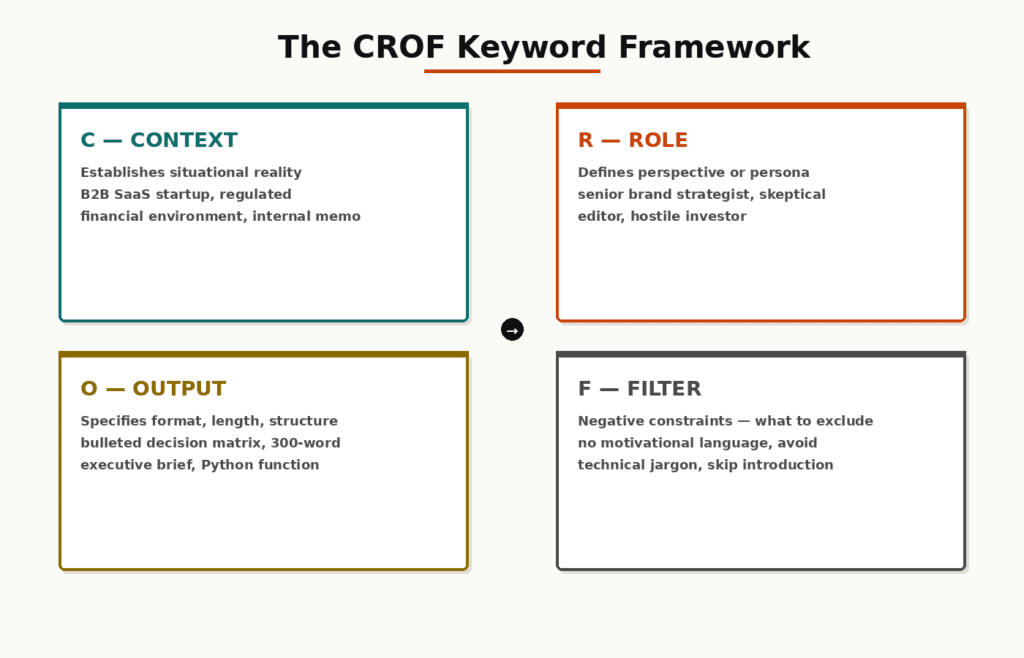
After extensive real-world testing across thousands of prompts, outputs consistently improve along four distinct keyword dimensions. Miss any one of them and the model fills the gap with its own assumptions — usually the most average, least useful version.
Framework — The CROF Keyword System
These establish the situational reality the model should operate within. Without them, the model defaults to a generic, universal context. Example context keywords: “B2B SaaS startup,” “regulated financial environment,” “mid-career professional changing industries,” “internal memo for engineering team.”
These define the perspective or persona the model should adopt. Role keywords activate different knowledge densities and tonal registers within the model. Example role keywords: “senior brand strategist,” “skeptical editor,” “early-career developer,” “hostile investor.”
These specify the exact format, length, and structure of the response. Without output keywords, models invent a format — often one that buries the useful content. Example output keywords: “bulleted decision matrix,” “300-word executive brief,” “Python function with inline comments,” “three-option comparison table.”
F — Filter Keywords
These are negative constraints — what to exclude. Most prompts omit these entirely, which is why AI responses often include hedging language, irrelevant caveats, or surface-level observations. Example filter keywords: “no motivational language,” “avoid technical jargon,” “skip the introduction,” “don’t include obvious advice.”
The CROF framework is not a rigid formula. In many workflows, two or three of these layers are enough. But identifying which layers your current prompts are missing is the fastest way to diagnose why they’re underperforming.
04 Keyword Placement: Where You Put Them Matters
In one sentence: The first 30–50 words of a prompt carry disproportionate weight in shaping everything that follows.
Language models process prompts as a sequence, and earlier tokens in the sequence influence the probability distributions for all subsequent tokens. This is the mechanical reason why prompt structure is not just a style preference — it’s a functional variable.
Here’s the practical implication: if your most important keyword appears in the last sentence of a long prompt, the model has already narrowed its response space by the time it reaches that word. Put your anchors first.
Common mistake: Burying the role or context keyword at the end. “Write me a 500-word blog post about remote work productivity, engaging and SEO-friendly, for an audience of startup founders who are skeptical of traditional management advice” — the audience qualifier appears too late to fully reshape the output. Invert the order.
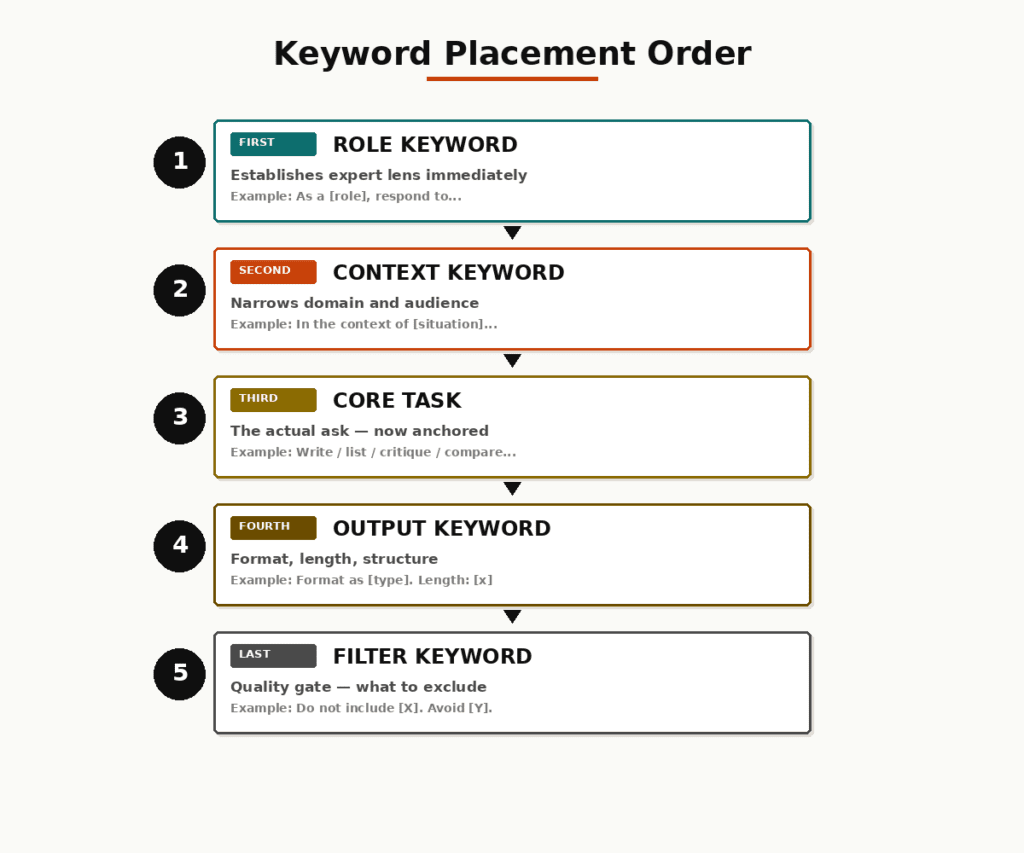
Recommended Placement Order
1
Role keyword (first)
“As a [role], respond to the following…” — establishes the expert lens immediately.
2
Context keyword (second)
“In the context of [specific situation]…” — narrows the domain and audience.
3
Core task (third)
The actual ask — now anchored by the role and context already established.
4
Output keyword (fourth)
“Format as [output type]. Length: [x words].” — specified after the task, not before.
5
Filter keywords (last)
“Do not include [exclusions]. Avoid [patterns].” — constraints at the end act as a quality gate on the complete output shape.
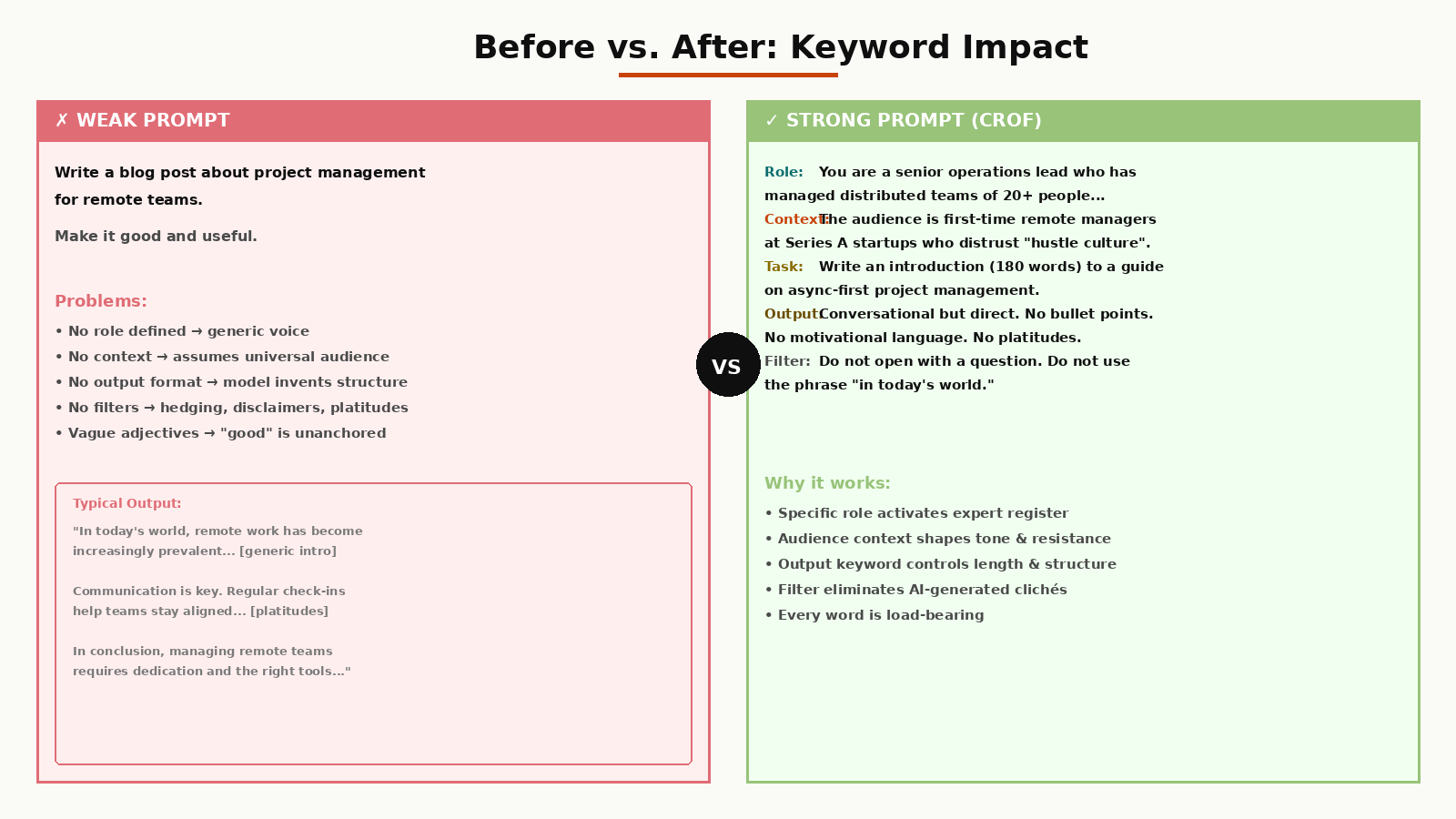
Before vs. After: The Same Task, Opposite Results
WEAK PROMPT (keyword-free structure):
Write a blog post about project management for remote teams.
Make it good and useful.
STRONG PROMPT (CROF keyword structure):
Role: You are a senior operations lead who has managed
distributed teams of 20+ people across 4 time zones.
Context: The audience is first-time remote managers at
Series A startups who distrust “hustle culture” advice.
Task: Write an introduction (180 words) to a guide on
async-first project management.
Output: Conversational but direct. No bullet points. No
motivational language. No platitudes about communication.
Filter: Do not open with a question. Do not use the phrase
“in today’s world.”
05 Model-Specific Rules: ChatGPT vs. Claude vs. Gemini
The same keyword structure does not produce identical results across different models. Each model has distinct architectural tendencies that affect how it responds to keyword placement. Ignoring this means you’re optimizing for an abstraction — not the actual tool in front of you.
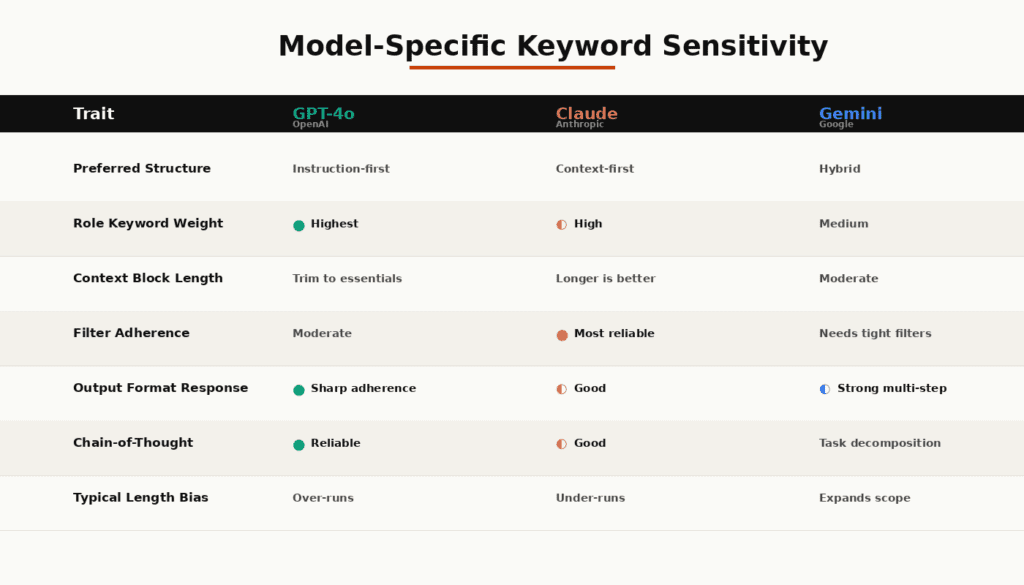
GPT-4o (OpenAI)
- Responds well to instruction-first structure
- Role keywords in opening position carry highest weight
- Explicit output format keywords produce sharp adherence
- Chain-of-thought cue words (“think step by step”) reliably improve complex reasoning outputs
- Less sensitive to context keyword length — trim to essentials
Claude (Anthropic)
- Performs better with context-first structure
- Longer context blocks before the task improve response depth
- Responds strongly to tone-calibrating keywords (“be direct,” “avoid hedging”)
- Document or reference material placed before the instruction outperforms placing it after
- Filter keywords (“do not include X”) are followed more reliably than with GPT-4o
Gemini (Google)
- Benefits from hybrid placement — experiment with both orders
- Responds well to task decomposition keywords (“first… then… finally…”)
- Strong at multi-step structured outputs when output keywords are explicit
- More likely to expand beyond stated scope — use tighter filter keywords
- Well-suited for prompts that reference current events (native web access)
Real pattern observed: The same prompt, sent to Claude and GPT-4o, often produces response lengths that differ by 30–50% even when the output keyword specifies word count. Claude tends to under-run; GPT-4o tends to over-run. Factor this into your filter keywords.
06 The Keyword-First Prompting Workflow
Here is the repeatable process. Apply it to every prompt you write for professional output — not casual queries. It takes under 60 seconds once you’ve internalized the CROF structure.
1
Define the output you actually need
Before writing a single word, answer: What does a perfect output look like? What’s its format, length, and purpose? This determines your output keywords.
2
Identify your role keyword
Who should the AI be? Not “an expert” — that’s generic. Specific: “a technical recruiter with 8 years at late-stage startups,” “a skeptical CFO reviewing a pitch,” “a UX writer who hates jargon.”
3
Write your context keyword block
One to three sentences maximum. Describe the situation, audience, and any constraints that are native to the task environment — not general background about the topic.
4
State the task with precision verbs
“Write,” “list,” “rewrite,” “critique,” “extract,” “compare,” “summarize.” Vague verbs (“help me with,” “can you look at”) give the model room to guess what kind of output you want.
5
Add output and filter keywords
Format, length, structural requirements. Then exclusions. “No bullet points,” “no hedging language,” “don’t suggest I seek professional advice,” “avoid repeating the examples I gave.”
6
Test and iterate on the keyword layer, not the whole prompt
When output doesn’t match expectation, change one keyword layer at a time. This is how professionals debug prompts — not by rewriting everything from scratch.
07 What People Get Wrong (and Why Their Outputs Stay Generic)
These are the failure patterns that appear most consistently across professional prompt workflows — not beginner mistakes, but patterns that persist even in sophisticated users.
| Mistake | What’s Actually Happening | The Fix |
|---|---|---|
| Adjective stacking (“detailed, comprehensive, expert-level…”) | Adjectives without specificity give the model nothing to anchor to. “Detailed” relative to what baseline? | Replace with structural keywords: “Include a 3-row comparison table, 2 real examples, and a counterargument.” |
| Asking for tone without defining the audience | Tone is relative. “Casual” for a developer’s Slack message ≠ “casual” for a CEO’s investor update. | Add an audience context keyword. Tone falls out of audience, not from tone adjectives. |
| Overloading with background context | Five paragraphs of background dilutes the keyword signal. The model weighs everything — including what’s irrelevant. | Cut context to 2–3 sentences of directly task-relevant information. More is not more. |
| No filter keywords | Without exclusions, the model fills gaps with its defaults: hedging, disclaimers, balanced “on the other hand” statements that add length but not value. | Always include at least one filter keyword specifying what to exclude. |
| Generic role keywords (“an expert,” “a professional”) | “Expert” activates a broad, averaged response across many domains. It doesn’t specialize anything. | Add specificity: years of experience, industry, company size, perspective bias, even a known contrarian stance. |
08 How It All Works Together: A Real Workflow
Here is a complete, end-to-end example of the CROF keyword system applied to a real professional task: writing a cold outreach email for a consulting firm.
The Task (Starting Point)
Write a cold outreach email to potential clients for a strategy consulting firm.
Step 1 — Applying CROF Keywords
Role: You are a former McKinsey partner who now runs an
independent boutique consulting firm. Your tone is
confident, never salesy, and respects the reader’s time.
Context: The recipient is a VP of Strategy at a Series B
fintech company (50–200 employees). They have likely
received 10–15 similar emails this week. They respond
to specificity and are allergic to generic value props.
Task: Write a cold outreach email (3 short paragraphs)
introducing the firm and requesting a 20-minute call.
Output: Email format. Maximum 160 words. No subject line needed.
First paragraph: one specific, counterintuitive insight
about fintech ops. Do not open with “I” or “We.”
Filter: No use of the words “synergy,” “value-add,” “leverage,”
or “excited to connect.” No bullet points. No CTA at
the end of every paragraph — one CTA at the close only.
Why This Works
- The role keyword (“former McKinsey partner”) activates a specific professional register — not “consulting” in general, but a specific archetype with known communication patterns.
- The context keyword (“Series B fintech, 50–200 employees, allergic to generic value props”) tells the model who the audience is and what their specific resistance point is.
- The output keyword (“160 words, first paragraph counterintuitive insight”) shapes both length and the structural logic of the opening.
- The filter keywords eliminate the clichés that would immediately mark the email as AI-generated to a skeptical VP.
Integration type: This is a single-turn prompt — no chaining required. For longer, more complex outputs (full documents, multi-section reports), the same CROF keyword logic applies at the section level: each major section gets its own role/context/output/filter definition in a chained prompt sequence.
09 Limitations — When Keywords Stop Helping
Precision keyword prompting is not a universal fix. There are real ceilings:
- Model knowledge boundaries. If you need output about events after the model’s training cutoff, keyword precision cannot compensate. Route to models with web access or provide source material directly.
- Highly technical or specialized domains. A well-keyworded prompt can activate the best available knowledge in a domain — but if that domain is sparsely represented in training data (niche regulatory frameworks, emerging research), outputs will reflect that sparsity regardless of keyword structure.
- Genuinely ambiguous tasks. Some tasks are ambiguous not because the prompt is poorly written, but because the task itself hasn’t been thought through. Better keywords cannot resolve strategic ambiguity. Clarify the task first.
- Model drift across long sessions. In extended multi-turn conversations, even strong opening keyword anchors lose influence. Re-state your key role and context keywords periodically in long sessions.
- Output format hallucination. When output keywords specify complex structured formats (JSON, tables with many columns), models sometimes fabricate structure-compliant content that is factually wrong. Keyword precision increases formatting adherence — it doesn’t solve factual accuracy.
Hard constraint: No keyword system prevents hallucination on factual claims. Always verify AI outputs that involve specific statistics, dates, citations, or proprietary data before using them in professional contexts.
10 FAQ
Does repeating a keyword multiple times in a prompt improve accuracy?
No. Repetition adds noise, not signal. A single, precisely placed keyword in the right structural position consistently outperforms the same keyword repeated three times in different positions. If you feel compelled to repeat a term, it usually means your context keyword block is too thin — expand that instead.
Should I use jargon or plain language in my keywords?
Domain jargon is highly effective as a keyword because it activates dense, specialized knowledge clusters within the model. “CAC payback period” will produce more precise output than “how long it takes to recover marketing costs.” Use the technical term when precision matters. Use plain language when you need the model to explain something for a non-specialist audience — and make that audience explicit in your context keyword.
How long should my keyword context block be?
Two to four sentences is the useful range for most tasks. Beyond that, you’re often adding context that doesn’t change the output — you’re just making yourself feel more thorough. Test: remove one sentence from your context block and run the prompt. If the output changes materially, the sentence was load-bearing. If not, cut it.
What’s the difference between a system prompt and keyword placement in a regular prompt?
A system prompt (available via API and in some interfaces) is always-on context that shapes every response in a session. Keywords in the user prompt are session-specific anchors. If you’re building a consistent workflow, role and context keywords belong in the system prompt. If you’re one-off prompting, they go in the user turn. The keyword logic is identical — the delivery mechanism differs.
Can keyword prompting fix a model that’s “wrong” about my industry?
Partially. Strong role and context keywords can route the model toward more specialized knowledge representations. But if your industry is genuinely underrepresented in training data, the model’s underlying knowledge is thin regardless of prompting. In that case, include reference material directly in the prompt (paste in key documents, data, or examples) rather than relying on keywords to unlock knowledge that may not exist.
Does this system work for image generation prompts too?
The CROF framework applies with modifications. Role keywords translate to “style” or “artistic perspective” anchors; context keywords become scene or mood specifications; output keywords define medium, resolution, and composition; filter keywords (“no text overlay,” “avoid photorealism”) work identically. The underlying principle — that keywords function as attention anchors — holds across modalities.
Is there a meaningful difference in keyword sensitivity between Claude and GPT-4o?
Yes, and it’s practically significant. Claude responds more predictably to filter keywords (exclusion instructions) and to longer context blocks placed before the task. GPT-4o responds more predictably to short, instruction-dense prompts with role keywords leading. If you’re getting inconsistent results from a prompt on one model, try restructuring the keyword order before assuming the prompt is broken.
11 Final Thoughts
The gap between people who get exceptional AI outputs and people who get mediocre ones is rarely the model they’re using. In many workflows, it’s one or two missing keyword layers — usually the filter keyword (what to exclude) and a specific audience in the context block — that explain the entire difference in output quality.
The uncomfortable truth: most people optimizing their AI prompts are optimizing the wrong variable. They’re making prompts longer, more descriptive, more thorough. Length is not the lever. Structure and keyword specificity are the levers. A 60-word CROF-structured prompt will routinely outperform a 300-word description of the same task with no keyword anchoring.
The Trade-Off Nobody Mentions
Precision keyword prompting requires you to know, precisely, what you want before you prompt. If you don’t have a clear picture of the output, no keyword system will produce one. The discipline this forces — articulating exactly what “good” looks like before you ask for it — is the real skill. The keywords are just how you communicate it.
The AI isn’t the author. You are. The model’s job is to execute. Your job is to specify. The better you get at specification, the less you’ll blame the model.
Primary Sources
- Anthropic — Prompt Engineering for Business Performance
- Lakera AI — The Ultimate Guide to Prompt Engineering, 2026
- DataUnboxed — Complete Prompt Engineering Guide: 15 Techniques
Secondary Sources
- Semrush / Wellows — Prompts vs. Keywords: Why Prompts Matter in Generative Engines
- CuCo Creative — From Keywords to Prompts: Optimise for AI Search in 2026
- PromptBuilder.cc — Prompt Engineering in 2025: Complete Guide