The Secret Power of Keywords in AI Prompt Engineering (And How to Use It)

Prompt Engineering
The difference between a mediocre LLM response and a genuinely useful one usually isn’t the model — it’s three or four words you chose (or didn’t choose) inside your prompt. Here’s the full system.
⏱ 7–8 min read · ~2,900 words
Keyword engineering pays off in some situations and adds friction in others. Before diving into the system, spend thirty seconds here.
When keyword engineering is worth your time
Proceed — this applies to you
- You run the same type of prompts repeatedly
- Output quality is inconsistent between sessions
- You’re building prompts for others to use
- Your outputs go into products, content, or decisions
- You use GPT-4o, Claude, Gemini, or similar frontier models
- You want shorter prompts that do more work
Skip — this may not help
- You ask one-off casual questions
- Your prompts are already returning great results
- You’re using heavily fine-tuned narrow models
- Your domain is so specialized that generic keywords don’t map
Still reading? Good. Let’s get into it.
Most prompt engineering advice is about structure — use system roles, add chain-of-thought instructions, give examples. Solid advice. But almost none of it addresses the most granular and most powerful level of control you have: the specific words you choose inside the prompt.
Every word you write activates a region of the model’s learned probability landscape. A language model doesn’t “read” your sentence the way you do — it converts your tokens into high-dimensional vectors, measures semantic proximity to training patterns, and generates output from those weighted associations. In plain terms: the words you use are not just descriptions. They are activation codes.
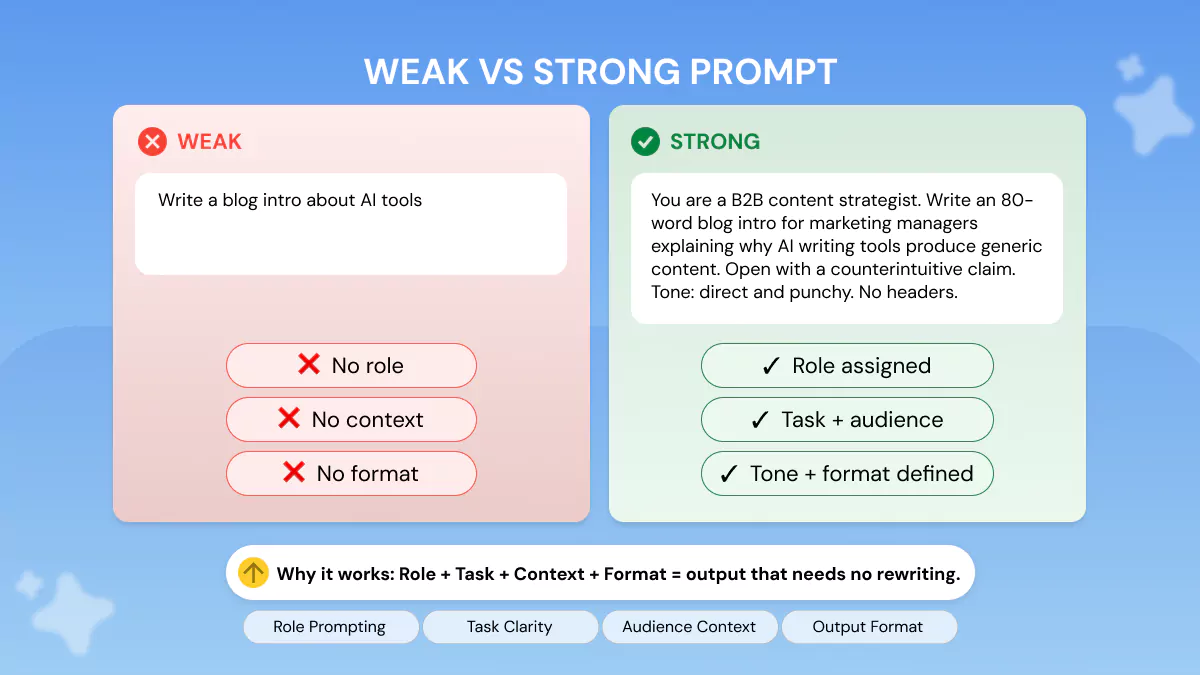
This is why two prompts with identical intent but different vocabulary can produce wildly different outputs. Compare:
❌ Weak — generic vocabulary
Write something about climate change for a business audience.
✓ Strong — loaded vocabulary
Draft a concise, evidence-based briefing on climate risk materiality for a CFO. Prioritise regulatory exposure and TCFD-aligned metrics. Tone: neutral, authoritative.
The second prompt is longer, yes. But more importantly, every word is doing deliberate work. “Materiality,” “TCFD,” “regulatory exposure,” “CFO” — each of these collapses a huge space of possible outputs into a narrow, precise target zone. That’s keyword engineering in practice.
The principle in one sentence: Keywords are semantic constraints — each one eliminates thousands of wrong outputs before the model generates a single token.
You don’t need a PhD in machine learning to benefit from understanding what happens under the hood. The relevant mechanics are simpler than most articles suggest.
LLMs process text as tokens — chunks roughly equivalent to three-quarters of a word on average. Every token gets converted to a vector: a list of numbers that encodes its meaning in the context of the surrounding tokens. The model’s attention mechanism then computes how much each token should “pay attention” to every other token in the prompt.
Here’s the crucial implication: tokens with high semantic weight attract more attention and exert disproportionate influence on the output. A token like “constraint” or “deadline” or “adversarial” triggers learned associations from thousands of training examples. Low-information tokens like “thing,” “some,” or “good” have diffuse associations and weak pull.
When you include a domain-specific term — “fiduciary,” “latency,” “proximal cause,” “contraindicated” — you aren’t just describing a topic. You are activating a cluster of related knowledge, tone patterns, and formatting conventions from the model’s training. The model shifts into a mode that mirrors how experts in that domain write and reason.
Practical consequence: Adding a single domain keyword can shift the model from generic-assistant mode into domain-expert mode without you needing to write an elaborate system prompt.
Certain words have learned behavioral associations beyond their semantic meaning. “Step-by-step” reliably activates structured output. “Critique” triggers evaluative reasoning. “Devil’s advocate” enables the model to argue against its own prior output. “Constraints:” followed by a list compresses scope dramatically. These aren’t hacks or jailbreaks — they’re patterns the model learned from millions of examples of how humans write and organize thought.
Not all keywords function the same way. After testing hundreds of prompt variations across GPT-4o, Claude Sonnet, and Gemini 1.5 Pro, five distinct functional categories emerge. Master these and you have vocabulary-level control over LLM output.
| Category | What it does | Examples | Effect strength |
|---|---|---|---|
| Domain anchors | Activates expert-mode reasoning and vocabulary for a specific field | fiduciary, latency, differential diagnosis, amortization, thermal runaway | High |
| Behavioral triggers | Tells the model how to reason or structure its output | step-by-step, critique, compare, enumerate, synthesise, prioritise | High |
| Persona signals | Shifts tone, register, and assumed audience | CFO, first-year medical student, senior engineer, skeptical investor, non-technical founder | High |
| Constraint markers | Compresses the output space by ruling out unwanted directions | avoid, exclude, only, no more than, without, focus solely on | Medium-High |
| Tone calibrators | Sets register, formality, and emotional framing | neutral, authoritative, empathetic, blunt, conversational, hedge-free | Medium |
In many workflows, the highest leverage is in combining a domain anchor with a behavioral trigger and a persona signal — three categories, often achievable in six to ten words. Everything else is refinement.
The category most people skip: constraint markers
Behavioral triggers get all the attention in prompt engineering guides. Constraint markers are underused and arguably more powerful in production contexts. A prompt that specifies what not to include is often more effective than one that tries to enumerate everything it wants.
Counterintuitive truth: Telling the model what to exclude is often more efficient than telling it what to include. Constraints eliminate output paths; inclusions just suggest them.
Prompt example — constraint markers at work
# Weak — relies on inclusion
Explain blockchain for a business executive. Include practical use cases, ROI considerations, and regulatory angles. Keep it simple.
# Strong — constraint-first
Explain blockchain ROI for a CFO evaluating an investment.
Exclude technical architecture, consensus mechanisms, and crypto speculation.
Focus only on documented enterprise implementations, cost structures, and regulatory exposure in financial services.
Tone: concise, evidence-grounded, no hype.
The second prompt doesn’t just point toward a target — it removes the large surrounding noise field. The model’s output space narrows dramatically.
Decision table: which keyword type, when
| Your goal | Lead with | Add | Avoid |
|---|---|---|---|
| Structured analysis | Behavioral trigger: “Analyse” / “Break down” | Domain anchor + constraint marker | Vague goal words (“discuss”, “talk about”) |
| Expert-level content | Domain anchor | Persona signal (who reads it) | Hedging tone calibrators (“simple”, “easy”) |
| Short, dense output | Constraint markers: “No more than X”, “Only” | Tone calibrator: “Concise” | Open-ended behavioral triggers |
| Creative generation | Tone calibrators + persona signal | Style anchors from specific authors/eras | Heavy constraint markers (kill creative space) |
| Critical evaluation | Behavioral triggers: “Critique” / “Challenge” | Constraint: what perspective to take | Positive-only tone calibrators |
| Step-by-step guide | Behavioral trigger: “Step-by-step” | Persona signal (audience skill level) | Domain overload in a single prompt |
The SCOPE framework for keyword selection
Named Framework — SCOPE
Signal · Constrain · Orient · Persona · Exclude
Before writing your next prompt, run through these five questions in order. The answers become your keyword selection.
- Signal: What behavioral mode should the model enter? (analyse, generate, critique, summarise, draft, compare)
- Constrain: What is the output format and length? (one paragraph, bulleted list, three options, table)
- Orient: What domain anchor establishes expert context? (specific field terminology)
- Persona: Who is the audience? How expert are they? What do they need?
- Exclude: What should the model explicitly not do, include, or assume?
Rule of thumb: A prompt that covers S, C, and E is already in the top 20% of prompts. Covering all five puts you in the top 5%.
The SCOPE framework applies the same way whether you’re using it for a single query or designing a system prompt for a production application. The difference is that in production, you embed the framework into the system layer so individual user queries can be minimal.
SCOPE in practice — two before/after examples
Example 1: Market research
Before SCOPE
Tell me about the EV market in Europe and what companies are doing well.
After SCOPE
Summarise [Signal] the European BEV passenger car market [Orient], focusing only on market share shifts Q1–Q4 2025 [Constrain + Exclude]. Format: three key findings, each under 40 words [Constrain]. Audience: a VC analyst familiar with automotive [Persona]. Exclude brand narrative and press release language [Exclude].
Example 2: Code review
Before SCOPE
Review my Python code and tell me what's wrong with it.
After SCOPE
Critique [Signal] this Python function for production-readiness [Orient]. Prioritise: error handling, edge cases, and O(n) complexity issues [Constrain]. Audience: mid-level engineer [Persona]. Exclude style comments and PEP 8 nit-picks [Exclude]. Output: numbered issues, severity rating (high/med/low) per item [Constrain].
How this actually works together
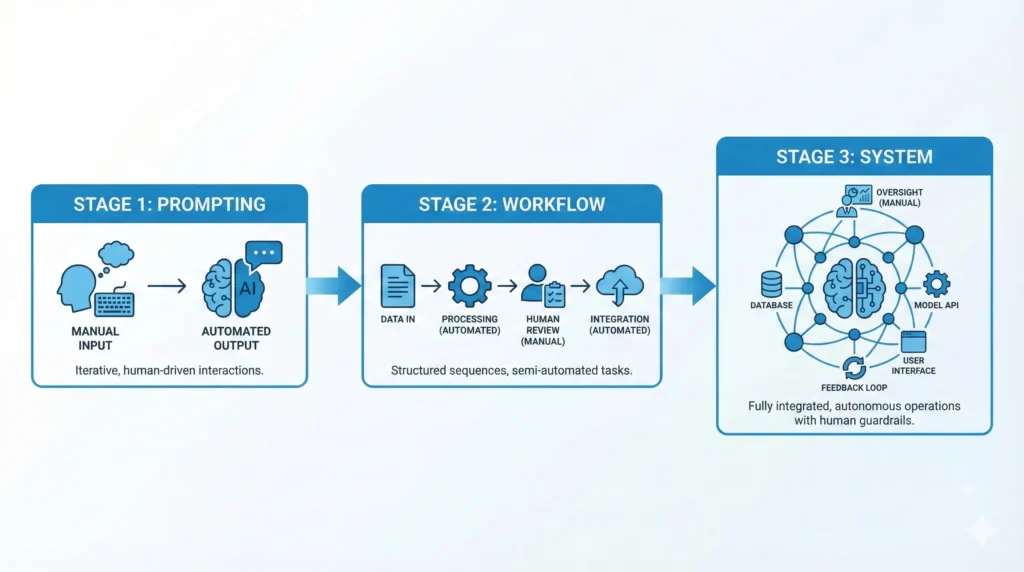
Keyword engineering isn’t just about individual prompts. The real power comes when you build a layered keyword system that operates across the full workflow: system prompt → user prompt → follow-up refinement. Here’s how those three layers interact.
-
System layer (persistent keywords)
Embed domain anchors and persona signals here. These persist across the conversation and establish the baseline mode. Example: “You are a regulatory compliance expert advising FTSE 100 companies. Assume your counterpart has board-level financial literacy.” This is where SCOPE’s O and P live permanently. -
User prompt layer (task-specific keywords)
Apply behavioral triggers and constraint markers here for each individual request. You’re not re-establishing identity — you’re specifying the task. Example: “Draft a one-page briefing. Include: FCA exposure, timeline, three recommended actions. Exclude: technical legal citations.” -
Refinement layer (targeted precision keywords)
Use surgical constraint and tone language in follow-ups rather than rewriting the whole prompt. Example: “Rewrite the second recommendation — it’s too hedged. Make it directive. 30 words maximum.” Three keywords (“rewrite,” “directive,” “maximum”) do precision work without prompt bloat.
Integration type and friction points
| Workflow type | Integration | Where keywords do most work | Main friction point |
|---|---|---|---|
| Single query (personal use) | Manual | Full prompt | Forgetting constraint markers |
| Template-based (teams) | Semi-automated | Template system prompt | Keyword drift when users edit templates |
| Production API | Native | System prompt + structured user input | Conflicting signals between system and user layers |
| Agent pipelines | Semi-automated | Each step’s behavioral trigger | Ambiguous handoff prompts between steps |
Friction point to watch: In multi-step agent pipelines, the most common failure mode is handoff prompts that use vague behavioral language (“process the output from step 2”). Each agent step needs its own behavioral trigger and constraint markers — treat each as a fresh SCOPE prompt.
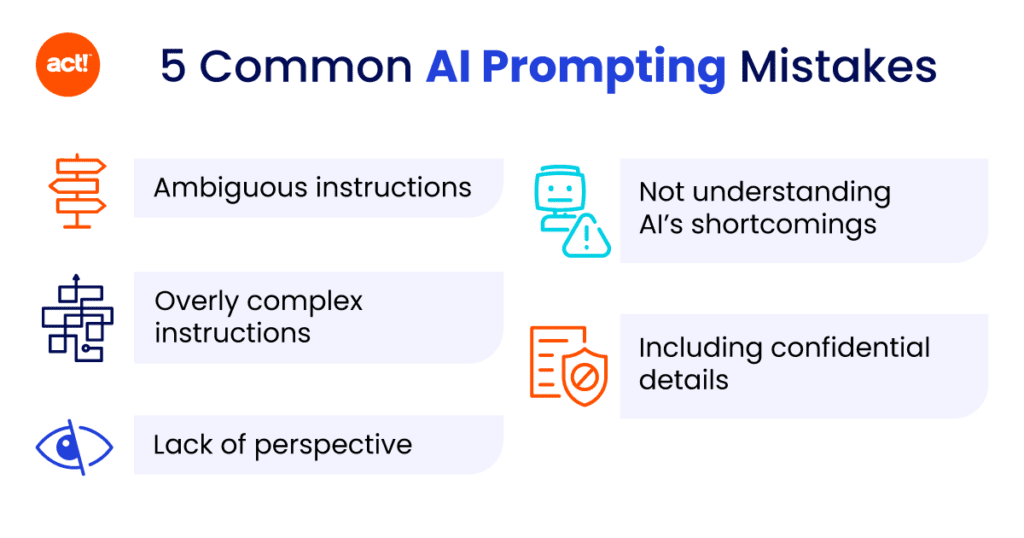
What most people get wrong
Mistake 1: Treating “please” and “thank you” as harmless
Politeness tokens are not neutral. In many workflows they add sycophantic pressure — the model mirrors the deferential tone and becomes less likely to challenge, critique, or deliver blunt findings. If your task requires critical evaluation, politeness markers work against you. Reserve them for conversational contexts.
Mistake 2: Stacking domain anchors from different fields
Including keywords from two unrelated domains in a single prompt creates interference. A prompt asking for “a behavioural economics analysis of supply chain risk for a DevOps team” contains three domain clusters pulling in different directions. The model often produces a shallow pass across all three rather than depth in any. Pick one primary domain anchor per prompt.
Mistake 3: Using vague behavioral verbs
“Discuss,” “talk about,” “explain a bit,” and “tell me about” are the weakest possible behavioral triggers. They activate the model’s default tutorial mode — comprehensive, surface-level, hedged. In many workflows where users want analysis rather than explanation, these verbs produce the wrong mode entirely.
| Weak verb | What it activates | Replace with | What that activates |
|---|---|---|---|
| Discuss | Generic overview, balanced non-committal | Analyse / Argue | Structured reasoning with position |
| Explain | Tutorial mode, simplified | Define + apply | Precision + example |
| Tell me about | Wikipedia-style breadth | Summarise the key risk factors in | Scoped, evaluative depth |
| Write something about | Maximally ambiguous | Draft / Outline / Structure | Clear format expectation |
Mistake 4: Relying on format keywords alone
“Bullet points,” “table,” and “numbered list” are format instructions — they shape structure but don’t change the reasoning mode. In many workflows, users add these and assume the underlying analysis improves. It doesn’t. A bulleted bad analysis is still a bad analysis. Format keywords must accompany, not replace, behavioral and domain keywords.
The 80% solution stack
You don’t need to memorise everything in this guide to get dramatically better outputs. This minimal keyword stack handles the majority of professional prompting situations.
Minimum viable keyword system — covers ~80% of use cases
1
One behavioral trigger verb
Analyse / Draft / Critique / Compare / Summarise / Structure — placed at the start of the prompt. Purpose: activates reasoning mode.
2
One domain anchor
One field-specific term that places the output in expert territory. Purpose: activates domain knowledge cluster.
3
One persona signal
The audience’s role and expertise level. “For a non-technical CEO” and “For a senior DevOps engineer” produce radically different outputs even from identical underlying content. Purpose: calibrates vocabulary, depth, and framing.
4
One hard constraint
“No more than X words”, “Exclude Y”, “Focus only on Z”. Purpose: eliminates output noise and enforces scope.
That’s four keywords (or short phrases). In practice, a prompt using all four consistently outperforms elaborate prompts that lack one or more of these elements. Complexity without precision is just noise.
Limitations — what keyword engineering can’t do
This system is powerful within its scope. It has real limits worth naming honestly.
| Limitation | Why it happens | Workaround |
|---|---|---|
| Model-specific variation | Each model has different training patterns; a keyword that strongly activates GPT-4o may have weaker effect on Claude or Gemini | Test keyword sets across your target model; don’t assume portability |
| Factual grounding | Better keywords improve reasoning mode, not factual accuracy — a model can reason expertly about wrong facts | Combine with RAG, grounding documents, or source-verification steps |
| Context window dilution | In very long prompts, early keywords lose influence as the model attends to more recent tokens | Repeat core constraint markers at the end of long prompts |
| Compound domain conflicts | Multi-domain prompts create interference; no keyword system fully resolves this | Chain single-domain prompts rather than stacking multiple domains in one |
| Creative tasks | Heavy constraint and domain keywords suppress creative latitude; the framework is less useful for open-ended generation | Use tone calibrators and style anchors instead; loosen constraint markers |
Honest constraint: Keyword engineering is a vocabulary-level control system, not a quality-of-thinking guarantee. It shapes the model’s reasoning path. If the model lacks knowledge in a domain, better keywords can’t manufacture it — they’ll just produce a more confidently-written wrong answer. Verification remains your responsibility.
FAQ
Does keyword order inside the prompt matter?
Yes, but not in the way most people assume. Tokens near the beginning and end of the prompt receive somewhat stronger attention weights due to positional effects (recency and primacy bias in transformer attention). Place your behavioral trigger and persona signal early. Put your hardest constraints at the end where they’ll be freshest in context when output generation begins.
How many keywords is too many?
There’s no hard number, but signal dilution is real. When you load a prompt with 8–10 domain anchors and 6 behavioral triggers, the model has no clear primary instruction. In many workflows, keeping to one of each core type (trigger, domain, persona, constraint) produces cleaner results than an exhaustive list. Add more only when testing confirms improvement.
Do keywords work differently for reasoning models like o1 or o3?
Reasoning models have extended internal chain-of-thought that operates before generating output. Behavioral trigger keywords (“step-by-step,” “reason through”) are largely redundant because these models already do this. Domain anchors and constraint markers remain highly effective. Persona signals may need adjustment — reasoning models can handle more technical audience framing.
Should I use jargon even if I don’t fully understand it?
No — and this is the most important cautionary note in this entire guide. Using domain terminology you don’t understand means you can’t evaluate whether the model’s output is correct. A misused jargon term can activate the wrong domain cluster entirely. Use domain anchors only when you can verify the output that results from them.
Can I use the SCOPE framework in ChatGPT’s custom instructions or Claude’s system prompts?
Yes, and this is one of the highest-leverage applications. Embedding S (signal), O (orient), and P (persona) in the system prompt means you only need C (constrain) and E (exclude) in each individual user prompt. This dramatically reduces per-query effort while maintaining consistent output quality.
What’s the difference between a keyword and a prompt template?
A prompt template is a structure (with placeholders). Keywords are the semantic units that fill it. Templates are about consistency of format; keywords are about precision of signal. You need both — a well-structured template with weak keywords still produces weak output. Keyword engineering operates at a more granular level than template design.
Does this work for image generation prompts too?
Partially. Domain anchors and style/tone calibrators translate well to image generation — “editorial photography,” “Brutalist architecture,” “low-key lighting” all function similarly to domain anchors in text models. Behavioral triggers don’t map directly. Constraint markers have different mechanics in image models. The vocabulary layer is relevant; the reasoning-mode layer is not.
Uncomfortable final truth
The hard part isn’t learning the system — it’s applying it consistently
The framework in this guide is not complex. Most people can internalize SCOPE in a single sitting and apply the keyword categories immediately. The actual barrier is developing the habit of keyword discipline under time pressure — when you’re trying to get an answer quickly and you reach for “tell me about” instead of “analyse.”
There’s a more uncomfortable version of this. Many workflows where people report that “AI doesn’t give good answers” are actually workflows where the person is giving the model no signal, no constraint, and no context — then judging the model for the inevitable generic output. The gap between what AI can do and what most people get from it isn’t primarily a model capability gap. It’s a vocabulary gap.
Closing that gap is now your advantage. The person in any organisation who understands keyword-level prompt engineering produces AI-assisted output that is qualitatively different from what their colleagues produce — with the same model, the same subscription, the same tools. That delta is entirely determined by how precisely they communicate.
Primary & secondary sources
- 1. K2View — “Prompt Engineering Techniques: Top 6 for 2026” — k2view.com (April 2026)
- 2. Analytics Vidhya — “Master Prompt Engineering 2026” — analyticsvidhya.com (January 2026)
- 3. DEV.to — “7 Prompt Engineering Techniques That Actually Work in 2026” — dev.to (April 2026)
- 4. The AI Corner — “Your 2026 Guide to Prompt Engineering: How to Get 10x More from AI” — the-ai-corner.com (March 2026)
- 5. IBM Think — “The 2026 Guide to Prompt Engineering” — ibm.com/think
- 6. Lakera — “The Ultimate Guide to Prompt Engineering in 2026” — lakera.ai
Last updated: June 2026 · bestprompt.art
https://www.bestprompt.art/prompt-keywords/
https://www.bestprompt.art/chatgpt-prompts-for-productivity/
https://www.bestprompt.art/prompt-hacks-2025/
https://www.bestprompt.art/20-best-ai-prompts-for-hr-leaders/
https://www.bestprompt.art/how-to-use-keywords-in-ai-prompts/