Prompt Engineering for SQL: A Data Analyst’s Playbook


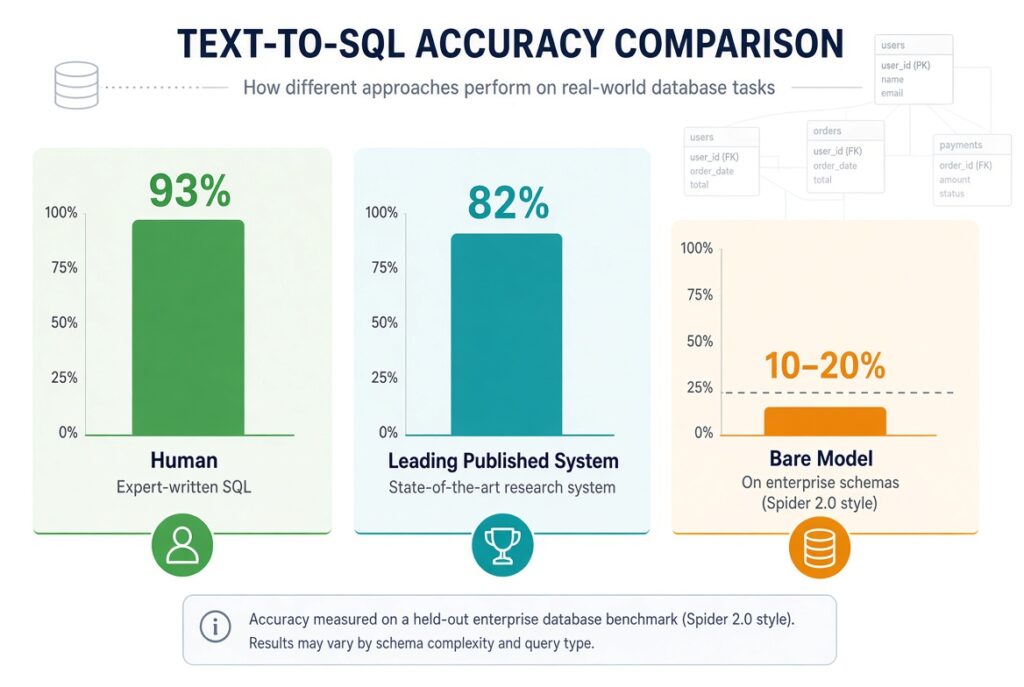
Prompt engineering improves text-to-SQL accuracy mainly by supplying schema context, vetted examples, and execution feedback — not by phrasing the question more cleverly. Even with those techniques in place, the strongest published systems still miss roughly one enterprise query in five, so generated SQL needs review, not blind trust.
TL;DR
- The accuracy gap is a schema problem before it’s a language problem: on the BIRD benchmark, human accuracy sits near 93%, the leading published system reaches roughly 82%, and on Spider 2.0’s enterprise schemas (800+ columns) a bare model’s success rate can fall to 10–20%.
- Four levers move that number in practice: schema linking, few-shot examples pulled from real approved queries, an execution-feedback retry loop, and a business-glossary layer that resolves ambiguous terms before generation starts.
- Commercial “ask your data” products get most of their accuracy from a maintained semantic layer, not a smarter model underneath — the same discipline applies if you’re prompting a general-purpose LLM directly.
- A correct query and a correct narrative are two different failure surfaces. An LLM can misdescribe an accurate result with the same confidence it uses to write a wrong join, so the writeup needs the same grounding rules as the SQL.
- This works best on modeled, documented schemas. On ad hoc joins against undocumented tables, no amount of prompt tuning substitutes for a person who knows what the columns mean.
An analyst pastes a question into a chat window, gets back a SQL query, runs it, and the dashboard updates. The number looks reasonable. It’s also wrong — not because the SQL failed to execute, but because it joined on the wrong key and quietly double-counted a third of the rows. Nothing in the interface flagged it. The query ran, returned a result, and looked exactly like every correct query before it.
That failure mode is the real subject of prompt engineering for SQL. It isn’t about getting an LLM to understand English better — general-purpose models already parse business questions fine. It’s about getting the model to see enough of the database, and enough of the organization’s own definitions, that the SQL it writes matches what a query is actually supposed to return.
Why the accuracy number is worse than it looks
The benchmark most cited for this task is BIRD (BIg Bench for LaRge-scale Database Grounded Text-to-SQL), built from 12,751 question-SQL pairs across 95 real institutional databases — financial records, toxicology reports, government datasets — rather than the small, clean schemas older benchmarks used. Two details from that dataset matter more than any leaderboard rank.
First, without a curated hint explaining what an ambiguous column means, GPT-4’s execution accuracy on BIRD drops from 54.89% to 34.88% — a 20-point swing driven entirely by whether the model was told what a business term meant, not by anything about how the question was phrased. Second, human performance on the same benchmark is roughly 93%, and even the strongest reported systems in 2026 — Huawei’s DataGallery at 82.39% execution accuracy, Google’s Gemini-SQL2 at a claimed 80.04% — still leave a double-digit gap to a human analyst. Google has not published a technical report or model card for Gemini-SQL2, so that 80.04% figure should be read as a vendor claim rather than an independently verified result; it’s included here because it’s the number Google put on the record, not because it has been reproduced by anyone else.
Schema size makes the picture worse, not better, once you leave the benchmark. Spider 2.0 tested models against enterprise databases averaging 812 columns, some exceeding 3,000, spanning dialects like Snowflake, BigQuery, and T-SQL. Models that scored 90% on the original, small-schema Spider benchmark fell to 10–20% success on Spider 2.0. The lesson isn’t that the model got worse. It’s that most of what a data analyst actually does — deciding which of forty similarly-named tables holds the current version of a metric, which join key is genuinely unique, which column finance redefined last quarter — is invisible to a model that only sees the question.
One more caveat worth sitting with: even BIRD’s own gold-standard answers aren’t perfectly clean. An audit found that roughly 49% of the financial-domain data points contain some annotation error — ambiguous questions, spelling mistakes, or gold SQL that’s itself incorrect. If the reference answers used to grade these systems are that noisy, treat every headline accuracy percentage, including the ones in this article, as directionally useful rather than exact.
The pipeline a well-engineered prompt actually runs through
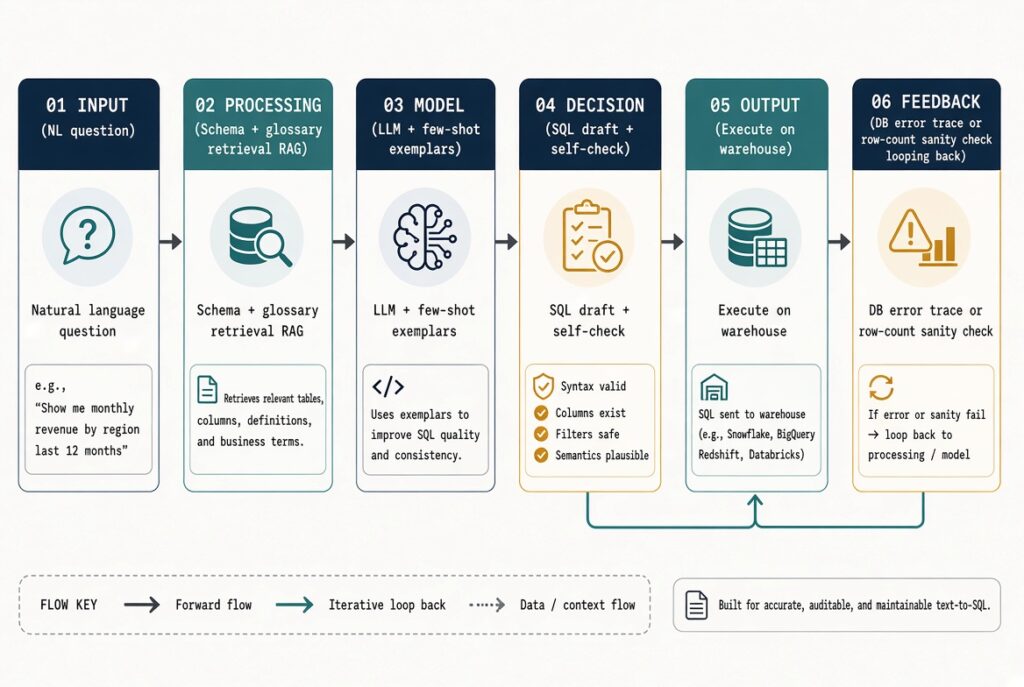
Before the specific techniques, it helps to see where in the process each one intervenes. A natural-language question doesn’t go straight from the analyst to a finished number — it passes through several stages, and prompt engineering is the discipline of controlling what the model sees at each one.
Fig. 1 — where schema linking, few-shot exemplars, and execution feedback each intervene in the pipeline
Most teams that complain an LLM “can’t write SQL” have only built stage 3 — they paste a question straight into a model with no schema, no examples, and no way to check its own output. The techniques below correspond to stages 2, 3, 4, and 6.
Four techniques that measurably close the gap
1. Schema linking: show the model only the tables that matter
Dumping an entire 800-column schema into a prompt doesn’t help — it dilutes the model’s attention across mostly irrelevant columns, which is a large part of why Spider 2.0 accuracy collapses on wide enterprise schemas. Schema linking retrieves and passes only the tables, columns, and foreign keys plausibly relevant to the question, typically via embedding similarity between the question and column or table descriptions, plus the join paths that connect them. The trade-off: linking is only as good as the schema’s documentation. Undocumented tables named tbl_4a with columns named flag_2 give the retrieval step nothing to match against, which is exactly the ad hoc case where this technique quietly fails.
2. Few-shot exemplars pulled from real, approved queries
Generic few-shot examples from a tutorial teach syntax, not the organization’s conventions. The more useful version pulls two or three previously reviewed queries against the same tables — how the team actually defines “active customer,” which join order avoids a known fan-out, how a recurring metric is calculated — and includes them in the prompt as worked examples. This is the mechanism the semantic-layer vendors sell as a packaged feature: one comparison of nine NL2SQL products concludes plainly that “accuracy comes more from the semantic model than the model generating the text” — a vendor can claim 90%+ accuracy, and that number is usually conditional on clean joins and metric definitions already being in place, not on the underlying model being unusually capable.
3. An execution-feedback retry loop
Instead of accepting the first SQL a model writes, run it, and if it errors or returns an empty or implausible result, feed the actual database error message back to the model and ask it to correct the query. This closes the loop drawn as stage 6 above. It catches syntax errors and invalid column references reliably; it does not catch a query that runs cleanly and returns a plausible but wrong number, because the database has no way to know the join was semantically incorrect. That distinction is the single most important thing to communicate to anyone who assumes “it ran without an error” means “it’s correct.”
4. A business-glossary layer, separate from the schema
The 20-point accuracy swing from providing a single hint sentence on BIRD is the clearest evidence available that ambiguous business terms — not SQL syntax — are the largest lever. A glossary layer maps terms like “churned,” “active,” or “revenue” to their exact SQL definition (which table, which filter, which date logic) and retrieves the relevant definitions into the prompt before generation, the same way a semantic layer works in Cortex Analyst or Genie. Without it, the model has to guess at a definition your finance team spent two quarters arguing about — and it will guess confidently.
| Technique | Fixes | Added cost | Does not fix |
|---|---|---|---|
| Schema linking | Attention diluted across irrelevant columns on wide schemas | Requires maintained table/column descriptions | Undocumented or ambiguously named tables |
| Few-shot exemplars | Syntax that doesn’t match team conventions | Curation and periodic refresh of example queries | Questions unlike any prior approved query |
| Execution feedback | Invalid SQL, syntax errors, broken references | Extra round-trip latency and warehouse cost per retry | Queries that run but return the wrong number |
| Business glossary | Ambiguous term interpretation (“active,” “revenue”) | Ongoing ownership — someone has to keep definitions current | Terms nobody has formally defined yet |
Table 1 — what each technique fixes, and what it doesn’t
None of these four is optional if the goal is production reliability. Skipping the glossary layer while keeping schema linking gets you syntactically correct SQL against the wrong definition of revenue — arguably worse than an obvious failure, because it looks trustworthy.
A query that runs without error has cleared the lowest bar there is. It says nothing about whether the join was right.
Where commercial tools land on this trade-off
Most analysts won’t build this pipeline from scratch — they’ll evaluate a vendor product that claims to do it already. The products differ mainly in how tightly the semantic layer is coupled to the warehouse, not in some hidden model advantage.
| Product | Best fit | Semantic layer | Known limitation |
|---|---|---|---|
| Snowflake Cortex Analyst | Snowflake-only teams with a mature semantic model | Semantic Views, high setup effort | Accuracy depends heavily on how complete the semantic model is |
| Databricks Genie | Databricks/Unity Catalog teams | Genie Spaces, curated per domain | Databricks-only; weaker on ad hoc, unmodeled schemas |
| ThoughtSpot Sage | Search-first BI across more than one warehouse | ThoughtSpot’s own model, needs upfront modeling | Lower accuracy on data that hasn’t been modeled yet |
| Generic LLM, direct prompting | Teams building a custom internal assistant | None by default — you build it | No live schema context unless you add retrieval yourself |
Table 2 — NL2SQL product landscape, condensed from third-party comparisons; treat as directional, not vendor-verified
Databricks reports customers created over 1.5 million Genie Spaces in 2026 since the product’s general availability in June 2025 — a first-party adoption figure, not an independent accuracy measurement, and worth reading as evidence of demand rather than proof of reliability. The pattern across every product in this table is the same: the accuracy an analyst experiences tracks how much time someone spent curating the semantic layer, not which vendor’s logo is on the interface.
The second failure surface: turning a correct number into an honest sentence
Getting the SQL right solves half the problem. The other half — asking a model to summarize the result set into a written finding, an “insight narrative” for a report or a Slack update — introduces a different way to be wrong. A model can look at a correctly computed 12% quarter-over-quarter increase and describe it as “accelerating growth” when the prior three quarters show a decline and this is the first uptick, or attribute a change to a cause the query never tested for. The number is right. The interpretation is invented.
The discipline that prevents this is the same one that prevents bad SQL: restrict what the model is allowed to draw on. A narrative-generation prompt should receive only the returned rows, explicit instructions to describe trend direction and magnitude without asserting causation unless a comparison column proves it, and a requirement to flag when a result contradicts the stated business context rather than smoothing over it. Asking the model to “explain why” from a single query result invites exactly the kind of confident, ungrounded claim that a reviewer won’t catch — because it reads as reasonable.
Who this doesn’t work for yet
This entire approach assumes a schema someone has already modeled, named sensibly, and documented well enough for retrieval to find the right tables. Three situations sit outside that assumption, and prompt engineering doesn’t rescue them:
- Ad hoc joins against undocumented tables. If nobody has written down what a column means, there’s no glossary entry to retrieve and no few-shot example to draw from. This is precisely the gap between Spider 1.0’s clean schemas and Spider 2.0’s real ones.
- Domains with contested or shifting definitions. Finance, and any metric that’s been redefined mid-year, are the highest-risk categories — not because the SQL is harder to write, but because the “correct” answer depends on which version of the definition the business actually wants, and that context often lives in someone’s memory, not the schema.
- One-off analytical questions nobody has asked before. Few-shot exemplars and cached business logic help most on recurring questions. A genuinely novel analytical question still needs a human who understands the data to check the model’s join logic line by line before anyone reports the number externally.
A working prompt structure
Combining the four techniques into something usable looks less like a clever one-line prompt and more like a small, boring pipeline:
SYSTEM:
You write SQL for [warehouse dialect]. Use only the tables and columns
listed below. If a term in the question isn’t defined in the glossary,
ask for clarification instead of guessing.
SCHEMA (retrieved, relevant tables only):
[table/column descriptions + join keys]
GLOSSARY (retrieved, relevant terms only):
active_customer: has placed >=1 order in trailing 90 days, status != ‘test’
revenue: net of refunds, recognized_date not order_date
EXAMPLES (from approved query history):
[2-3 prior questions + reviewed SQL against these same tables]
QUESTION: {analyst’s question}
Return SQL only. After execution, if the query errors or returns zero
rows, retry once using the error message; otherwise stop and return
the result for human review before it’s reported externally.
Nothing here is exotic. What makes it work is that each block corresponds to a specific, previously measured failure mode — the schema block addresses the wide-schema attention problem, the glossary block addresses the 20-point BIRD swing, the examples block addresses convention mismatches, and the final instruction addresses the fact that execution success is not the same thing as correctness.
What to check before trusting a number
Given that even the best published systems fail roughly one time in five on real schemas, a lightweight review step matters more than any additional prompt tuning. Before a generated query’s result goes into a report: confirm the join didn’t fan out row counts (compare a raw row count against an expected order of magnitude), confirm the date logic matches the glossary definition rather than a default the model assumed, and confirm the query would have returned zero rows or an error if its underlying assumption were false — a query that silently returns a plausible number even when its premise is wrong is the specific failure mode worth testing for deliberately.
The model that writes a query with total confidence and the model that writes it correctly are, distressingly often, the same output — which is exactly why the review step belongs in the workflow, not in the prompt.
About this article. Every accuracy figure here is attributed to its original benchmark or vendor announcement, vendor claims are labeled as such rather than presented as independent verification, and no experiments were run for this piece — the analysis synthesizes and cross-checks published benchmark data (BIRD, Spider 2.0) and third-party product comparisons rather than original testing. Benchmark scores and vendor claims in this space shift with each model release; recheck the cited figures before citing them elsewhere, particularly the unreleased-model claim from Google.
Sources referenced
- BIRD benchmark analysis — execution accuracy, hint dependency, annotation error rate: beancount.io research log
- Spider 2.0 enterprise schema results (ICLR 2025 oral): ascii.co.uk summary of the original paper
- Huawei DataGallery-Text2SQL BIRD leaderboard result (82.39% EX, 9 Sept 2026): technologymagazine.com
- Google Gemini-SQL2 BIRD claim (80.04%, unverified by technical report, 12 June 2026): aiweekly.co
- Databricks Genie GA date and 2026 adoption figure: kanerika.com
- NL2SQL product comparison and semantic-layer dependency: querio.ai