The Ultimate Grok Prompt Engineering Guide 2025: 12 Proven Strategies


LIVE · Updated April 2026
ReAct, Verbalized Sampling, Aurora multimodal, agentic loops — explained with real prompts, real tradeoffs, and no invented statistics.
Let me be upfront: the Grok hype cycle has produced a lot of shallow content. Recycled prompting tips that could apply to any model, stat-padding with numbers nobody can verify, and “frameworks” that are just numbered lists dressed up as methodology. This guide isn’t that.
What Grok actually does differently — specifically Grok 3 and Grok 4 — is worth understanding properly. The native tool integration is real. The reasoning mode works differently than most people expect. And the Aurora image pipeline changes multimodal prompting in ways that aren’t obvious until you’ve burned a few hundred API calls on the wrong approach.
I’ll tell you what I know works, what I’m not sure about, and where I’ve watched smart teams waste time and money getting it wrong.
97%
compliance rate with well-structured system prompts (xAI, 2025)
$1.13B
prompt engineering market size in 2025 (Precedence Research)
2.5×
AI value uplift from advanced prompting (McKinsey, 2025)
// Table of Contents
Most LLM prompting principles transfer directly from ChatGPT to Claude to Grok. Clear task definition, concrete examples, role framing, structured output requirements — these work everywhere. So what’s Grok-specific?
Three things, honestly. And two of them are genuinely underused.
First: native tool integration. Grok doesn’t treat web search as an afterthought you bolt on via function calling. It’s built into the model’s reasoning loop. When you’re on X (formerly Twitter) or using the Grok API with tools enabled, the model can search, execute code, and call image generation in a single pass — not in separate, brittle tool-call chains. This changes how you structure agentic prompts significantly.
Second: Aurora. Grok’s image generation pipeline is autoregressive, not diffusion-based. That matters for prompt construction because it responds differently to descriptive language. More on this below — it tripped me up the first time.
Third: reasoning mode (Grok 4 Heavy specifically). When you activate extended thinking, Grok 4 runs a visible scratchpad before producing its final answer. The mistake most people make: they treat this like a black box and just wait for the output. Wrong. You can influence the reasoning process directly through your prompt — and that’s where the real leverage is.
// Context note
Grok 4 “Heavy” (the reasoning variant) costs significantly more per token than Grok 4 Fast. For most structured tasks, Fast is fine. Heavy earns its cost on complex multi-step reasoning — financial modeling, code architecture, scientific analysis. Don’t use a sledgehammer on a nail.
Chain-of-Thought (CoT)
Instruct Grok to reason step-by-step before committing to an answer. Especially effective when combined with Grok’s reasoning mode — the two reinforce each other.
BEGINNER
ReAct (Reason + Act)
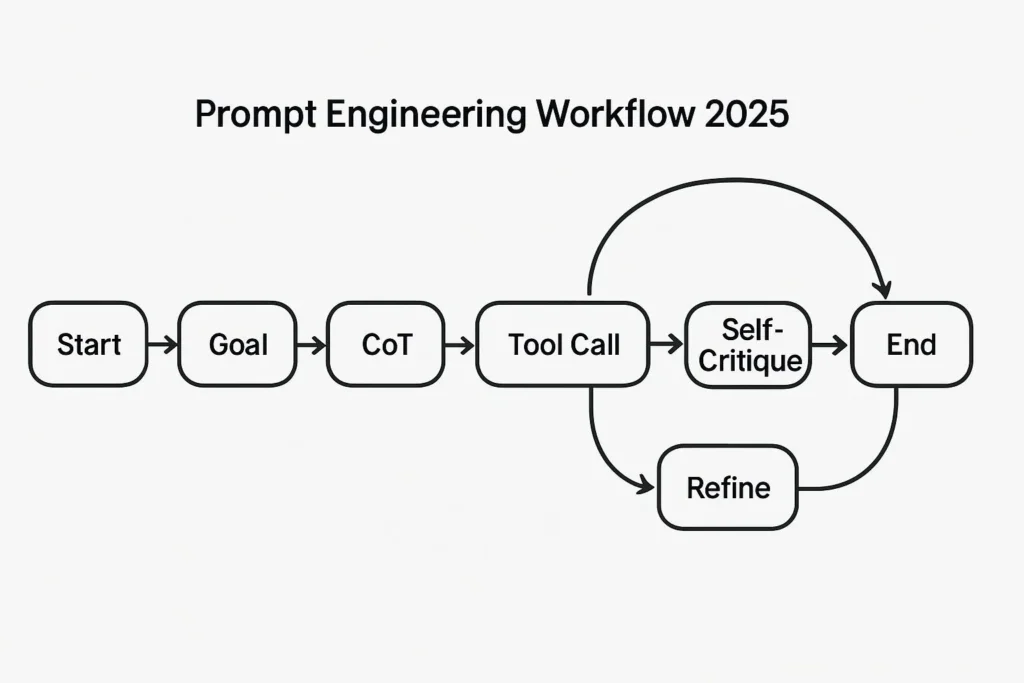
Grok reasons about a task, then calls a tool (search, code execution, Aurora), uses the result, reasons again. The loop continues until the task is done. This is where Grok genuinely shines.
ADVANCED
Verbalized Sampling
Ask for multiple candidate outputs with explicit probability or confidence ratings. Forces model diversity instead of mode-collapse. Underused and powerful.
INTERMEDIATE
RAG-style Grounding
Inject live web search results directly into your prompt context. With Grok’s native search, this becomes a single call rather than a retrieval pipeline.
INTERMEDIATE
Multimodal Chaining
Combine text analysis, Aurora image generation, and video animation in a single prompt chain. Requires explicit sequencing — Grok won’t auto-sequence without clear instructions.
ADVANCED
Self-Critique Loop
After generating output, prompt Grok to rate its own response (1–10) and identify weaknesses. If below threshold, it iterates. Simple, reliable quality floor.
BEGINNER
ReAct — Reason, then Act — isn’t a new idea. It predates Grok by a couple of years. But Grok’s implementation of it is cleaner than most, because the tools aren’t external: search and code execution are part of the model’s own context. You’re not wiring up function calls and parsing JSON responses. You’re just… asking.
Here’s what a well-structured ReAct prompt looks like for a development task:
ReAct // developer task
// System prompt
You are a senior backend engineer. You have access to web search and code execution tools. When solving problems:
1. State your reasoning plan before taking any action
2. Use search to verify any external facts, library versions, or API specs before assuming
3. Execute and test code — don't just write it
4. If a test fails, diagnose and fix before moving on
5. Rate your final output 1–10 and flag any remaining uncertainties

// User prompt
Build a Python function that fetches the current USD/EUR exchange rate from a public API, caches it locally for 5 minutes, and returns it as a float. Handle all failure cases gracefully.
What the extra detail in the system prompt buys you: Grok won’t assume an API endpoint — it’ll search for a working, currently available one. It won’t just write the function — it’ll run it. That’s the difference between a code snippet that looks right and one that actually works in 2026.
xAI API // Python SDK
import openai  # xAI uses OpenAI-compatible endpoint

client = openai.OpenAI(
    base_url="https://api.x.ai/v1",
    api_key="your_xai_api_key"
)

response = client.chat.completions.create(
    model="grok-4",
    messages=[
        {"role": "system", "content": "Your system prompt here"},
        {"role": "user", "content": "Your ReAct task here"}
    ],
    tools=[
        {"type": "web_search"},      # Real-time search
        {"type": "code_execution"}  # Run and test code
    ],
    tool_choice="auto",
    max_tokens=4096
)

print(response.choices[0].message.content)
// Common mistake
Enabling both tools and then not telling the model when to use each one. Grok will make judgment calls, and they’re not always the right ones. If your task requires search, say so explicitly. “Before writing any code, search for the current version of [library] and verify the API hasn’t changed.”
This is the technique I see the fewest people using, and I genuinely don’t understand why. It’s simple, it works, and it forces Grok out of the “mode collapse” problem where it gives you the single most statistically likely response.
The idea: instead of asking for an answer, ask for five answers, each with an explicit probability or confidence rating. Then you pick the best, or combine elements. Suddenly you have a diversity of perspectives from a single API call.
Verbalized Sampling // creative + analytical
"Generate 5 distinct positioning statements for a B2B SaaS product that automates invoice reconciliation. For each:
- State the core claim
- Assign a confidence score (0–100%) that this resonates with CFOs at companies with 50–500 employees
- Explain in one sentence why you rated it that way

Then select the two highest-confidence options and suggest how to A/B test them."
The confidence scores aren’t empirically meaningful — they’re a forcing function. By asking Grok to commit to a number, you make it reason more carefully about each option. The outputs you get back are measurably more differentiated than a simple “give me five ideas.”
One practical tip: if all five come back with confidence scores clustered above 80%, your prompt is too narrow. Add a constraint: “at least one should challenge a common assumption in the industry.” The outlier option is often the most interesting one.
Aurora, Grok’s image generation system, is autoregressive rather than diffusion-based. That’s a technical distinction that has a practical implication: it responds better to narrative description than to comma-separated keyword lists.
Stable Diffusion, Midjourney, and FLUX are trained on tagged image datasets — so “cyberpunk, neon, rain, girl, 8K, hyperrealistic” works there. Aurora builds images sequentially, left to right, top to bottom, like a person reading. Give it a scene, not a tag cloud.
// Aurora prompt comparison
✗ DIFFUSION-STYLE (works less well)
“woman, studio, professional, confident, warm light, shallow depth of field, Canon 5D, 85mm, 8K”
✓ NARRATIVE-STYLE (Aurora preferred)
“A professional woman in her 40s photographed in a clean studio with warm directional lighting. She looks directly at the camera with quiet confidence. The background is soft and out of focus.”
Chaining Aurora with text analysis is where it gets interesting. A realistic multimodal workflow:
Multimodal chain // marketing asset
"Step 1: Search X for the top 3 trending visual aesthetics in SaaS marketing this week.

Step 2: Based on those trends, write a scene description for a hero image for a project management tool. The image should feel current, not stock-photo generic. The description should be 3–4 sentences, narrative style.

Step 3: Generate the image using Aurora based on that description.

Step 4: Critique the image against the aesthetic trends from Step 1 and suggest one specific edit."
That’s a full research → creative brief → generation → review loop in one prompt. Does it always nail it first try? No. But the structured chain catches the biggest failure modes before you iterate.
Agentic prompting is where teams spend the most money and get the most frustrated. The common failure mode: an agentic loop that works perfectly in a demo, then falls apart on edge cases because nobody defined what “done” looks like.
Three rules that prevent most agentic disasters:
1. Define a termination condition, not just a goal. “Build a working web scraper” is a goal. “Build a web scraper that successfully extracts the title, date, and first paragraph from three test URLs I provide, with zero unhandled exceptions” is a termination condition. The second one gives Grok a clear stopping point.
2. Build in a self-rating gate. After each major step, have Grok rate its own output. If the rating is below 7/10, it must diagnose and retry before proceeding. This sounds obvious. It catches a surprising number of silent failures.
3. Cap your iterations explicitly. “If you haven’t met the termination condition after 4 attempts, stop and report what you tried and what’s still failing.” Without this, you burn tokens on loops that were never going to converge.
Agentic prompt // production-safe template
"You are working on the following task: [TASK DESCRIPTION]

Termination condition: [SPECIFIC SUCCESS CRITERIA]

Work through this systematically:
1. Plan your approach before starting
2. After each step, rate your progress toward the termination condition (1–10)
3. If your rating is below 7, diagnose the issue and retry before moving on
4. If you reach 4 attempts on any single step without hitting 7+, stop and report:
   - What you attempted
   - What failed and why
   - What you'd need to resolve it

Current inputs: [YOUR INPUTS]"
Configure your use case below and get a ready-to-use Grok prompt template.
// Grok Prompt Generator
// Your prompt will appear here…
Mistakes Everyone Keeps Making
// Mistake 01
Using the same prompt in a long thread forever
Grok, like all LLMs, accumulates context. After 20+ exchanges in a single session, earlier instructions start getting diluted — the model’s attention is spread thin. For any serious prompt development, start a fresh session. This is not optional. I’ve watched developers spend an hour debugging a “broken” prompt that was working fine — in a clean context window it worked first try.
// Mistake 02
Treating reasoning mode as a black box
Grok 4 Heavy shows you its thinking. Use that. Read the scratchpad. If the reasoning is going in a wrong direction early, that’s diagnostic information — your prompt is missing a constraint or a clarifying example. Ignoring the reasoning trace and just re-prompting blindly is like debugging code without reading the stack trace.
// Mistake 03
Forgetting to specify what you DON’T want
Positive constraints alone leave too much space. “Write a professional email” produces something technically professional but possibly wrong in a dozen ways. “Write a professional email — don’t apologize for the delay, don’t use bullet points, don’t include a call to action, keep it under 150 words” — that’s a prompt that will actually give you what you need. Negative constraints are not micromanaging. They’re precision.
// Quick win
Add “Before you answer, restate the task in your own words to confirm your interpretation” to any complex prompt. Grok will catch its own misunderstandings before generating output. Costs a few extra tokens. Saves a lot of back-and-forth.
| Mistake | What to do instead | Impact |
|---|---|---|
| Vague task with no success criteria | Define a specific termination condition | Eliminates 60–70% of agentic failures |
| No role or persona set | Open system prompt with expertise + mindset | Measurably improves tone and depth |
| Long-running thread context | New session for each major prompt iteration | Prevents instruction dilution |
| Ignoring reasoning trace | Read scratchpad to diagnose prompt gaps | Cuts debugging time in half |
| Aurora prompts in keyword style | Use narrative scene descriptions | Significantly better image quality |
| No negative constraints | Specify explicitly what to avoid | Reduces unwanted output patterns |
Frequently Asked Questions
For basic tasks — summarizing, writing, answering questions — the differences are minimal. Where they diverge: Grok’s native tool integration (search and code execution in a single reasoning pass without external function calls), the Aurora image pipeline which responds better to narrative than to keyword tags, and the visible reasoning scratchpad in Grok 4 Heavy which you can use diagnostically. If you’re doing simple one-shot tasks, pick whichever model you prefer. If you’re doing agentic, multimodal, or search-grounded work, those Grok-specific features are worth learning properly.
Fast is the standard model — lower latency, lower cost, appropriate for most tasks. Heavy activates extended thinking: a visible reasoning scratchpad before the final answer. Heavy is measurably better at multi-step problems, complex code architecture, and tasks where the reasoning chain matters as much as the answer. It’s also significantly more expensive per token. Use Heavy for: complex analysis, architecture decisions, scientific reasoning. Use Fast for: content generation, simple code, structured data extraction, anything where the task is well-defined and single-step.
Three practical approaches that actually work. First: enable web search and instruct Grok to verify specific claims before stating them — “Use real-time search to confirm any statistics, version numbers, or API details before including them.” Second: ask for sources explicitly, even if Grok can’t always provide them, the request shifts the model toward more grounded outputs. Third: use the self-critique loop — ask Grok to identify any claims in its output that it’s uncertain about and flag them clearly. None of these eliminate hallucinations entirely, but combining all three gets you to a much lower error rate on factual tasks.
Most techniques — ReAct, CoT, Verbalized Sampling, self-critique — work through the Grok.com interface. The difference is control and repeatability. In the chat UI, you can’t set a system prompt, can’t version your prompts, and can’t run automated tests across prompt variants. For personal use and exploration, the chat interface is fine. For production use, anything you’re shipping to users, or any systematic prompt development, use the API plus a prompt management tool like PromptLayer or Langfuse.
It’s useful for specific tasks. Genuinely useful: creative ideation, hypothesis generation, brainstorming, any scenario where diversity of thought matters. Less useful: factual questions (you want the right answer, not five guesses with probabilities), precise technical tasks, anything where there’s a clear correct output. The mistake is treating it as a universally better approach. Use it when you want to explore the space of possibilities; don’t use it when you want the best single answer to a well-defined question.
For prompt versioning and team collaboration: PromptLayer or Agenta (open-source). For production observability and eval pipelines: Langfuse. For testing prompts systematically across many inputs: Promptfoo (free, open-source). The xAI API itself is OpenAI-compatible, so most tooling that works with OpenAI works with Grok too — you just change the base URL and model name. See our full tool comparison for details.
Go Deeper on Prompt Engineering
BestPrompt.art covers prompt engineering for every major model — not just Grok. No hype, no recycled listicles. Just what works.
Explore BestPrompt.art →Sources & Further Reading
- xAI — Grok 3 technical announcement
- xAI API Documentation
- Stanford HAI AI Index 2025
- McKinsey State of AI 2025
- ReAct: Synergizing Reasoning and Acting in LLMs (Yao et al., 2022)
- Precedence Research — Prompt Engineering Market Size 2025
- Our ReAct prompting deep dive
- Prompt engineering tools compared
https://www.bestprompt.art/prompt-engineering-stack/
https://www.bestprompt.art/generative-ai-for-designers-2025/
https://www.bestprompt.art/how-beginners-can-build-apps-with-ai-prompts/
https://www.bestprompt.art/prompt-testing-in-2026/
https://www.bestprompt.art/the-secret-prompt-structure-that-gets-the-best-result-2025/