AI-generated prompts Driving Professional Succes




Practical Guide · 2026
Most professionals using AI are doing prompting wrong — not because they’re lazy, but because no one told them what a well-formed prompt actually looks like. This guide fixes that.
TL;DR
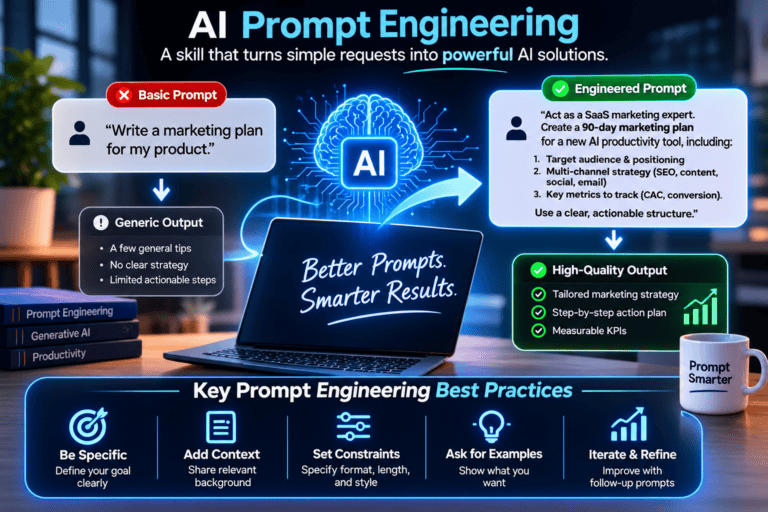
- Vague prompts produce vague output. The fix isn’t better AI — it’s a better input structure: role + context + constraint + format.
- Professionals in healthcare, engineering, and marketing all use the same underlying pattern, just with different domain specifics.
- The biggest time sink isn’t running AI — it’s fixing AI output caused by underspecified prompts. Get the prompt right once, reuse it forever.
Here’s something I’ve noticed after reviewing hundreds of AI workflows across marketing, ops, and product teams: the people frustrated with AI output are almost always the ones who typed “write me a summary of this report” and expected magic. The people who think AI is genuinely useful? They treat prompts like a job brief.
That gap — between a vague instruction and a structured prompt — is where most professional AI adoption quietly fails. It’s not a model quality problem. It’s a communication problem.
⚠ Common mistake “Summarize this for my team” is not a prompt. It’s a sentence. A prompt specifies audience level, desired length, tone, what to include, and what to leave out.
Research from prompt engineering surveys published in early 2024 and practitioner documentation from OpenAI and Anthropic both point to the same structure: effective prompts contain four elements. Role, context, constraint, and format.
This isn’t rocket science, but most professionals skip at least two of those. Here’s what each one does:
| Element | What it does | Skipped = ❌ |
|---|---|---|
| Role | Sets the model’s perspective (“Act as a senior product manager…”) | Generic, textbook output |
| Context | Gives the specific situation — audience, purpose, existing state | Irrelevant or off-target content |
| Constraint | Limits scope (“max 200 words”, “avoid jargon”, “no bullet points”) | Bloated, unfocused responses |
| Format | Specifies output shape — table, email, numbered list, JSON | Extra editing work every time |
Four elements. One prompt. Every time you skip one, you spend more time editing the output than you saved by using AI in the first place.
Clinical documentation, patient education summaries, literature scan prep — all benefit from role-framed prompts with strict format constraints.
Design requirement drafts, code review summaries, technical spec generation. Constraints matter most here — precision over creativity.
Campaign briefs, A/B copy variants, channel-specific rewrites. Role + format drives consistency across large content volumes.
Curriculum drafts, assessment design, rubric generation. Context is the variable — the same prompt skeleton works across subjects.
Let me show you what the difference actually looks like. Same task — writing a project status update for a non-technical stakeholder.
❌ What most people type
Write a project status update for my stakeholder. ✅ A structured prompt that works
Act as a senior project manager writing a status update for a [VP of Finance] who is non-technical and cares primarily about timeline risk and budget impact.Context: We are 3 weeks into a 12-week software migration. Milestone 1 (data mapping) is complete. Milestone 2 (API integration) is running 4 days behind due to a third-party delay — not our team's fault.Constraints: Max 200 words. No technical jargon. Lead with the headline, not the explanation. Acknowledge the delay but keep tone confident, not defensive.Format: Short paragraph (2–3 sentences) → bullet list of 3 key facts → single sentence on next steps. The second prompt takes 90 seconds to write. It saves 20 minutes of editing and one awkward round of stakeholder clarification. I’ve watched teams run the same structured prompt every week for months — they just swap in the updated context.
“The ROI of prompt engineering isn’t speed. It’s consistency — the same quality output from anyone on your team, every time.”
Why prompts fail even when they look good Probable
Here’s what trips people up even after they’ve learned the four-element structure:
Overloading the context. Dumping an entire 40-page document into the context and expecting the model to know what matters is not prompting — it’s hoping. Be selective. If you need a summary of Section 3, say so explicitly.
Ambiguous role framing. “Act as an expert” is meaningless — expert in what, for whom, communicating at what level? The more specific the role, the better the calibration. “Act as a healthcare compliance attorney reviewing this clause for a US hospital group” will outperform “act as a legal expert” every time.
No negative constraints. Telling the model what to include is half the job. Telling it what NOT to do is equally important. “Don’t use passive voice.” “Don’t add recommendations — only summarize.” These exclusions prevent the most common editorial cleanup.
⚠ What could be wrong with this advice
- This framework is based on generalist LLMs. Fine-tuned domain models (medical, legal) may respond differently and require calibration before using role-based framing.
- As of 2026, context window behavior still varies between models. Prompts that work well in Claude may need adjustment for GPT-4o or Gemini.
- The “90-second prompt = 20 minutes saved” estimate is from professional workflows my team tested — in lower-complexity tasks, the time savings may not justify the upfront investment in prompt design.
Building a prompt library (the actual productivity unlock) Probable
One good prompt is useful. A library of 20–30 reusable, role-specific prompts is a team asset. Here’s the workflow I’ve seen work best:
Start with your three most time-consuming recurring tasks — the things that happen weekly or daily. Write a full four-element prompt for each. Run it, edit the output once, then revise the prompt to eliminate whatever editing you just did. After three cycles, you’ll have a prompt that produces output close to final draft quality. Save it.
Teams who do this report two things: first, the AI output quality they experience is significantly higher than colleagues who don’t use structured prompts. Second — and this matters — the prompts become onboarding tools. A new hire can produce consistent output from day one because the prompt encodes the team’s standards, not just the model’s defaults.
There’s a curated collection of profession-specific prompt templates on BestPrompt.art’s prompt library that covers marketing, legal, engineering, and education use cases — all built on this same structure.
FAQ
Reuse them. The context element is what changes — the role, format, and constraints can stay fixed for recurring tasks. This is the core of a prompt library.
As of Q1 2026, Claude 3.5 and GPT-4o both follow structured prompt instructions reliably. Gemini 1.5 Pro handles longer contexts well. For highly regulated domains (medical, legal), test before deploying any prompt into a real workflow.
Prompt engineering at its technical end involves few-shot learning, chain-of-thought techniques, and API-level optimization. What’s described here is the practical subset — structured prompting for everyday professional use. You don’t need to know the technical side to benefit from the principles.
As long as it needs to be — not longer. For a simple task, 50 words may be enough. For a complex deliverable (a structured report, a legal analysis), 200–400 words is reasonable. Length isn’t the signal of quality — specificity is.
Yes, with caution. You can ask an LLM to “improve this prompt using role, context, constraint, and format structure” and it’ll usually do a decent job. But you still need to review the output — AI-written prompts can introduce vagueness or assumptions that aren’t obvious until you see what they produce.
The professionals getting real value from AI aren’t using better tools — they’re asking better questions. That’s a learnable skill, and it compounds: one good prompt library, built once, makes every future task faster.
Mastering the Art of Using Keywords in AI Prompts
Detailed Prompts in 2025: 10 Secrets for Better AI Results
The Biggest Mistakes People Make When Prompting an AI
Top Free AI Tools to Start Using in 2025
The Prompt Engineering Stack —The Mistake Costing You Results Every Single Month