Open-Source vs. Proprietary AI Prompt Tools: What They Really Cost You

Open-Source vs. Proprietary AI Prompt Tools: What They Actually Cost You
If you’re comparing tools like Langfuse, PromptLayer, LangSmith, Agenta, and Maxim AI, the marketing pages all say roughly the same thing: “manage prompts, run evals, ship faster.” The real differences show up later — in who’s on call at 2 a.m. when your self-hosted instance falls over, and in how your bill scales once a hobby project turns into three teams sharing one workspace.
In this guide:
The current landscape, honestly
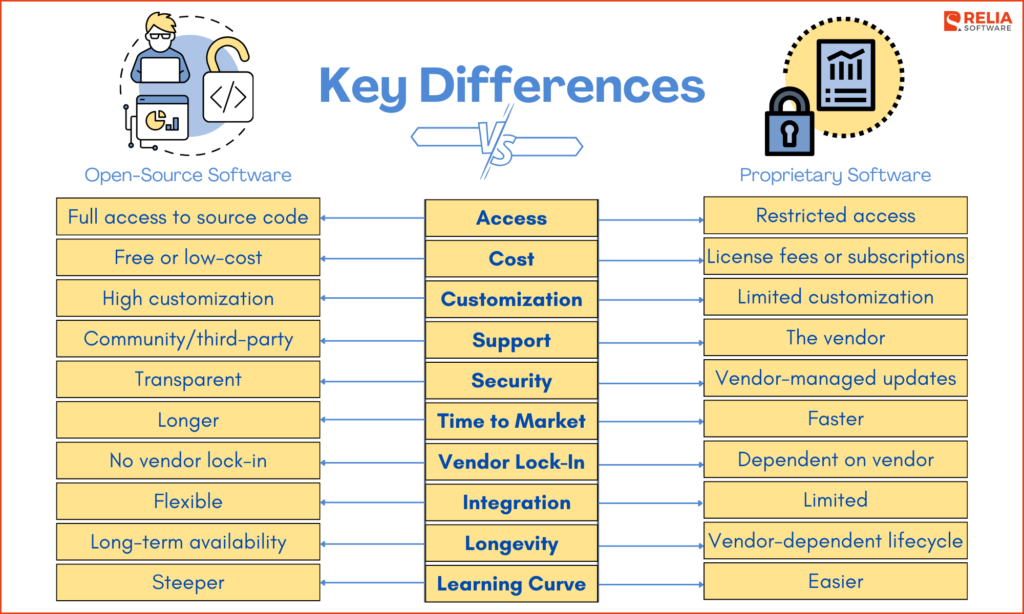
Prompt management has quietly split into two camps. On one side: open-source, self-hostable engineering platforms — Langfuse, Opik (built by Comet), Helicone, Arize Phoenix, and Lunary — that give you tracing, prompt versioning, and evaluation infrastructure you can run inside your own VPC. On the other: fully managed, closed-source platforms — PromptLayer, LangSmith, Braintrust, and newer entrants like Maxim AI — that trade infrastructure ownership for a polished UI and someone else’s on-call rotation.
This piece focuses on the handful of tools most relevant to a prompt-engineering workflow specifically (Langfuse, LangSmith, PromptLayer, PromptTools, Maxim AI), but it’s worth knowing the category is bigger than that. Arize Phoenix is a genuinely open-source option (Elastic License 2.0, pip install arize-phoenix) with a strong focus on LLM/agent debugging and evaluation. Braintrust is a well-funded proprietary competitor that, notably, also offers a self-hosting option for compliance-sensitive teams — a middle ground worth knowing exists. And Weights & Biases’ Weave tooling extends a platform that was itself acquired, by CoreWeave in March 2025 — the same “open/independent tool gets bought by infrastructure company” pattern you’ll see below with Langfuse. If your shortlist doesn’t include at least one of these, it’s worth a look before you commit.
A genuinely notable data point for anyone weighing “is open source stable enough to bet on”: ClickHouse’s own press release confirms the acquisition of Langfuse, announced alongside its $400M Series D in January 2026 — independently confirmed by TechCrunch’s coverage of the same news and by Langfuse’s own Y Combinator company page, which states plainly: “Langfuse was acquired by Clickhouse in January of 2026.” That’s worth sitting with for a second — the leading open-source option in this category is now owned by a database company, not an independent startup. It doesn’t make Langfuse worse, but it changes the calculus on vendor risk that “open source = no lock-in” arguments usually skip over. You still get the MIT-licensed core if the relationship sours, which is the actual protection open source buys you — not immunity from acquisitions. For context on scale: ClickHouse’s own release states Langfuse ended 2025 with over 20,000 GitHub stars and more than 26 million SDK installs per month, so this isn’t a niche project getting absorbed — it’s the category leader.
On the framework side, adoption data backs up the idea that open source isn’t a fringe choice anymore. One developer roundup on DEV Community cites a Linux Foundation AI and Data figure of more than 100,000 developers contributing to 68 hosted AI projects from over 3,000 organizations — I wasn’t able to locate the original Linux Foundation report behind that specific figure, so treat it as a secondhand claim from an unvetted blog post, not a confirmed statistic. The ROI figure fares better: IBM’s own newsroom confirms the underlying study — more than 2,400 IT decision-makers surveyed by Morning Consult, with 51% of companies using open-source AI tools reporting positive ROI versus 41% of those not using it. Note the study is about 2024 AI strategy specifically, published December 2024, not a 2026 figure — the gap may have narrowed or widened since.
Feature and pricing comparison
One structural fix worth making up front: a Python library, a self-hostable platform, and a managed SaaS product aren’t really comparable on a single “self-host: yes/no” axis — “self-hosting” a library is a meaningless question, and lumping it in with a Kubernetes deployment decision overstates how similar the choice actually is. So this is split in two.
Libraries and toolkits (you assemble the workflow yourself)
| Tool | License | What it is | Where it falls short |
|---|---|---|---|
| PromptTools | Open source | Free, open-source tooling for prompt testing and experimentation, with support for multiple LLMs and vector databases — you import it into your own code | No hosted UI, no team collaboration surface — it’s a toolkit, not a product |
Full platforms (hosted UI, team collaboration, trace storage)
| Tool | License model | Self-host option | Core strength | Where it falls short |
|---|---|---|---|---|
| Langfuse | MIT core + commercial add-ons (Enterprise Edition) | Yes — single Docker container to start locally; production needs more (see note below) | Tracing, integrations, datasets, and prompt management are fully available under the MIT license when self-hosting | Model-based evaluation inside the UI is currently a Langfuse Cloud beta feature; self-hosters run evals via SDK instead of the point-and-click UI |
| Opik (Comet) | Open source | Yes, Docker | Evaluation and monitoring focus, backed by an established MLOps company | Smaller community/ecosystem than Langfuse |
| Arize Phoenix | Elastic License 2.0 (open source, with usage restrictions on competing hosted offerings) | Yes, Docker/Kubernetes | Strong on agent/RAG debugging and embedding-level analysis, not just text traces | Elastic License isn’t as permissive as MIT for competing SaaS use cases |
| Helicone | Open source | Yes, Docker | Lightweight observability layer, fast to bolt onto an existing stack | Narrower feature set than full LLMOps suites |
| LangSmith (LangChain) | Proprietary, cloud-first | Enterprise self-host available on paid tiers | The strongest choice if you’re already building on LangChain or LangGraph | Cost and cloud dependency for teams outside the LangChain ecosystem |
| PromptLayer | Proprietary | No (SaaS only) | Purpose-built prompt engineering UI, visual-first workflow | No self-hosting means your prompt history lives on someone else’s servers |
| Braintrust | Proprietary | Yes — self-hosting offered for compliance-sensitive teams, unusual for a proprietary tool | Combines eval, prompt management, and trace visualization in one product | Newer, smaller ecosystem than LangSmith; self-host tier pricing is a sales conversation, not self-serve |
| Maxim AI | Proprietary | No (SaaS only) | Combines prompt management with simulation, evaluation, and observability in one platform aimed at cross-functional teams | Newer entrant — smaller track record than LangSmith or Langfuse |
Feature claims above are drawn from each project’s own documentation and public comparison write-ups linked throughout this article; verify current plan details on each vendor’s pricing page before budgeting, since SaaS pricing tiers change often.
On that “single Docker container” claim: it’s accurate, but incomplete, and a reviewer rightly called that out. Langfuse’s own docs describe the single-container path as the way to try it locally. A production deployment is a different shape — Langfuse’s own reference deployment (visible in its published Hugging Face Space configuration) runs separate Postgres, ClickHouse, and MinIO (S3-compatible object storage) services alongside the app container, and Langfuse’s own templated deployment guides cover Kubernetes, AWS Fargate, and GCP Cloud Run for exactly this reason. If you’re picturing “one container on a $5 VPS” for a production trace volume, picture instead “a small multi-service stack you’re responsible for patching and backing up.”
Real Langfuse Cloud pricing, from a primary source: Langfuse’s own AWS Marketplace listing for Langfuse Cloud shows usage-based pricing of $0.000008 per processed event on top of a contract, with a sample 12-month Enterprise contract listed at $60,000/year (i.e., $5,000/month) in that specific listing. That’s one real data point, not the whole pricing ladder — Langfuse’s self-serve web pricing likely has lower entry tiers than an AWS Marketplace Enterprise contract reflects, and third-party directories citing a $29–$2,499/month range may be describing those lower tiers. Confirm the tier that matches your team size directly at langfuse.com/pricing — I’m giving you a verified anchor point plus an honest gap, not a complete price sheet.
A worked cost scenario, with real anchor numbers
Here’s what a first-pass budget comparison looks like, for a team of 4 engineers at moderate usage. To keep verification status unambiguous, verified vendor figures and my own estimates are in two separate tables — don’t average them together as if they carry equal weight.
Verified figures (from vendor documentation or vendor listings)
| Line item | Figure | Source |
|---|---|---|
| LangSmith — free tier ceiling | $0, up to 5,000 traces/month before a credit card is required | LangChain’s own docs |
| LangSmith — Plus/team tier | Starts at $39/user/month for small-team collaboration features (4 seats ≈ $156/mo before usage-based charges) | As reported by TechCrunch, citing LangChain’s own public pricing page — not independently confirmed against smith.langchain.com directly, so treat as one step removed from the primary source |
| Langfuse Cloud — hobby tier | $0 (no credit card required) | Langfuse’s own GitHub README |
| Langfuse Cloud — usage-based component | $0.000008/event (≈$8 per million events) on top of a contract | Langfuse’s own AWS Marketplace listing |
⚠ Estimates (my own math, not vendor-confirmed — verify before budgeting)
| Line item | Estimated range | Methodology |
|---|---|---|
| Langfuse Cloud — mid-market self-serve tiers | Third-party directories report roughly $29–$2,499/mo depending on tier | Not confirmed against Langfuse’s own self-serve pricing page. The verified AWS Marketplace Enterprise contract above (≈$5,000/mo equivalent) suggests entry-level self-serve tiers likely sit toward the lower end of that range — confirm directly before budgeting. |
| Self-hosted Langfuse — infrastructure | Roughly $40–120/mo | Based on typical published VPS pricing (e.g. DigitalOcean, Hetzner) for a small box running Postgres + ClickHouse + Redis + MinIO at this trace volume — a plausible range from current public cloud pricing, not a bill I’ve paid. |
| Self-hosted Langfuse — engineer time | ≈8–15 hrs initial setup/hardening, then 2–5 hrs/month ongoing | A rule-of-thumb range, not measured data; depends heavily on existing Docker/K8s fluency on your team. |
| Migrating off LangSmith to a self-hosted tool | Roughly 2–4 engineering days for a medium codebase | Rough estimate based on typical scope of re-instrumenting tracing calls; teams using a framework-agnostic layer like OpenTelemetry from the start pay closer to the low end, teams with LangSmith-specific calls scattered through the codebase pay closer to the high end. |
At $150–200K/year fully loaded for a senior engineer, 2–5 hours/month of upkeep works out to roughly $150–500/month in opportunity cost — which puts self-hosted Langfuse’s all-in monthly cost (infra + time) somewhere in the same ballpark as Langfuse Cloud’s paid tier, not dramatically below it. That’s the actual point of this table: “free” and “cheap” aren’t the same claim once you count the hours — and switching later isn’t free either, so it’s worth weighing the exit cost against the entry cost before you pick.
The hidden cost of “free”
I’ve made this mistake myself: treating “open source” as synonymous with “no cost.” It isn’t — it’s a different cost shape. You trade a predictable monthly line item for a variable one (your own time), and variable costs are the ones teams consistently underestimate because they’re spread across ten other Jira tickets instead of sitting in one finance dashboard.
The honest tradeoff, stated plainly:
Open source pays you back in…
Data sovereignty (your prompts and traces never leave your infrastructure), no per-seat pricing creep, and the ability to fork if the maintainer disappears. In security- and compliance-sensitive contexts, this is exactly why locally deployed open-source models get chosen over commercial ones despite lower raw accuracy — the privacy, cost-control, and data-sovereignty tradeoffs outweigh a performance gap, a pattern that shows up in prompt-tooling decisions too, not just model selection.
Proprietary pays you back in…
Someone else owns uptime, someone else ships the eval UI you didn’t have to build, and support tickets get answered by a paid team instead of a GitHub issue queue. For a 3-person startup trying to ship, that’s often the correct trade.
The unpopular take: in my observation, teams under 10 engineers who “go open source to save money” often end up spending more in engineer-hours than they would have on a mid-tier SaaS plan — they just don’t track it that way, since hours are spread across tickets instead of sitting on one invoice. I don’t have a dataset proving this is true for “most” teams; treat it as a pattern worth checking against your own numbers, not an established statistic. If your team doesn’t already run production Docker/Kubernetes workloads confidently, self-hosting an LLMOps platform is not the place to learn.
When open source is genuinely the right call
- Regulated data. Healthcare, legal, or financial workflows where prompts/outputs contain data you legally cannot send to a third-party SaaS — the same constraint that applies to model hosting applies to your tracing/prompt-management layer, since traces often contain the same sensitive inputs and outputs. One recent clinical NLP research team evaluated locally deployable open-source models instead of proprietary APIs specifically because of healthcare data privacy rules like GDPR — that was a model-hosting decision, but it’s the same reasoning that should drive your tooling choice.
- You already run the infrastructure. If you have a platform team maintaining Postgres, Redis, and Docker deployments for other services, adding Langfuse is marginal effort, not a new discipline.
- You want zero vendor lock-in on your prompt history. Your prompts and evaluation data are a genuine competitive asset over time; owning that data outright has real long-term value.
When proprietary is the sane choice
- Small team, need to ship. Every hour spent maintaining infrastructure is an hour not spent on your actual product.
- You’re deep in the LangChain/LangGraph ecosystem. LangSmith’s tightest integration is with LangChain and LangGraph specifically — fighting that with a generic open-source tool adds friction for no real gain.
- You need cross-functional collaboration features today. Non-engineers (PMs, prompt writers) reviewing and editing prompts without touching code is a UX investment that takes real product-design time to build well — buying it is often cheaper than building it in-house on top of an open-source base.
Decision checklist
Run through these. Each open-source-leaning “yes” pulls you toward Langfuse/Phoenix/Opik; each proprietary-leaning “yes” pulls you toward LangSmith/PromptLayer/Maxim/Braintrust.
Lean open source if:
☐ You legally cannot send prompts/traces to a third party (healthcare, finance, government)
☐ Your team already runs Docker/Kubernetes workloads in production with confidence
☐ You have a platform engineer who can own upkeep as part of their existing job, not a side project
☐ Owning your prompt/eval data long-term matters more than shipping speed this quarter
Lean proprietary if:
☐ Your team is under ~10 engineers and every hour matters
☐ Nobody on the team wants to own infrastructure upkeep
☐ You’re already committed to LangChain/LangGraph (→ LangSmith) or want a polished, non-engineer-friendly UI today
☐ You’d rather pay a predictable monthly fee than an unpredictable time cost
Three or more checks in one column is a reasonably strong signal. A near-even split usually means: start on the free/hobby tier of whichever proprietary tool fits your framework, and revisit self-hosting once usage (and the bill) actually justifies the infrastructure investment.
Frequently asked questions
Is Langfuse really free?
The core is genuinely free if you self-host: tracing, integrations, datasets, and prompt management are all available under the MIT license. Some newer features, like in-UI model-based evaluation, are currently cloud-only in beta. Hosting infrastructure and your team’s time are not free — see the cost scenario above.
Can I switch from LangSmith to an open-source tool later without much pain?
It depends heavily on how tightly you’ve coupled your code to LangSmith-specific tracing calls versus using a framework-agnostic instrumentation layer (like OpenTelemetry). Building on open standards from day one makes any future migration — in either direction — much less painful. See the “migrating off LangSmith” row in the estimates table above for a rough time budget.
Does self-hosting actually protect my data better?
Yes, in the sense that data never leaves infrastructure you control, which matters most under regulatory constraints. It does not automatically mean “more secure” — a poorly maintained self-hosted instance can be less secure than a SaaS platform with a dedicated security team. Self-hosting shifts responsibility to you; it doesn’t guarantee better outcomes.
Is open-source *tooling* (Langfuse, Phoenix) catching up to proprietary *tooling* (LangSmith) in raw capability?
Worth separating this from a different, more commonly-cited stat about open-source foundation models (like Llama or Qwen) closing the gap with proprietary ones (like GPT or Claude) — that’s a real trend, but it’s about the models generating text, not the tools you use to manage and trace prompts. On the tooling layer specifically, the honest answer is: feature parity is close for core tracing and prompt versioning, but proprietary platforms still generally lead on polish, non-engineer-friendly UI, and enterprise support SLAs — which is a UX and support-org gap, not a capability ceiling.
What about Agenta, Lunary, and other smaller open-source options?
They’re real and worth evaluating, especially Agenta for no-code prompt experimentation and Lunary as a lighter-weight, cloud-hosted alternative to LangSmith if you want managed hosting without LangSmith’s price tag. This article focuses on the two or three tools with the largest, most active communities as of 2026, but “largest community” isn’t automatically “best fit for you” — try the free tiers before committing.
Do I need an LLMOps tool at all if I’m a solo developer?
Probably not yet. If you’re testing prompts in a notebook and shipping to a handful of users, a lightweight open-source library like PromptTools, or even just version-controlled prompt files in Git, covers most of what you need. Add a full platform when you have more than one person touching prompts in production, or when debugging a bad output in production actually costs you real time.
How do I estimate my own real cost before committing?
Run the free tier or self-hosted version for 30 days with real traffic, log the engineer-hours spent on setup and troubleshooting separately from any subscription fee, and compare that combined number against the cheapest proprietary tier that covers your team size. That’s a more honest number than any vendor’s pricing page.
Further reading
- Langfuse self-hosting documentation
- Langfuse GitHub discussion on self-hosted eval limitations
- IBM’s 2026 guide to prompt engineering
- DEV Community: Top 5 prompt management tools for 2026
Sources referenced in this piece are linked inline and above. Pricing details for SaaS tools change frequently — always confirm current numbers on the vendor’s own pricing page before making a purchasing decision.