Most people type questions into AI and accept what they get. These 25 keyword strategies are what separates users who struggle with mediocre outputs from those whose prompts produce expert-tier, immediately deployable results — every single time.
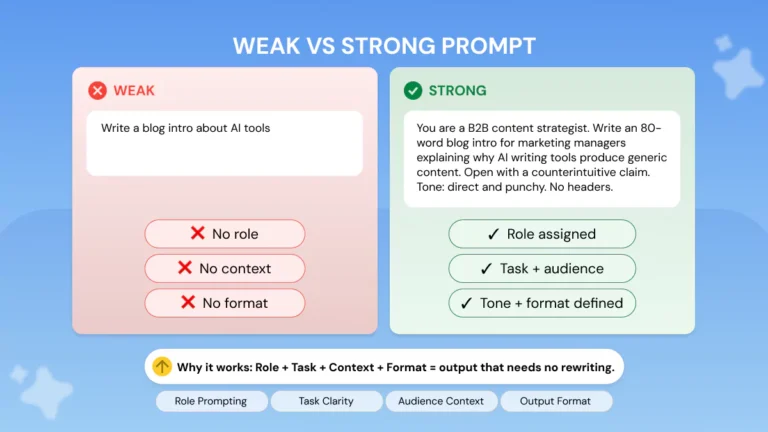
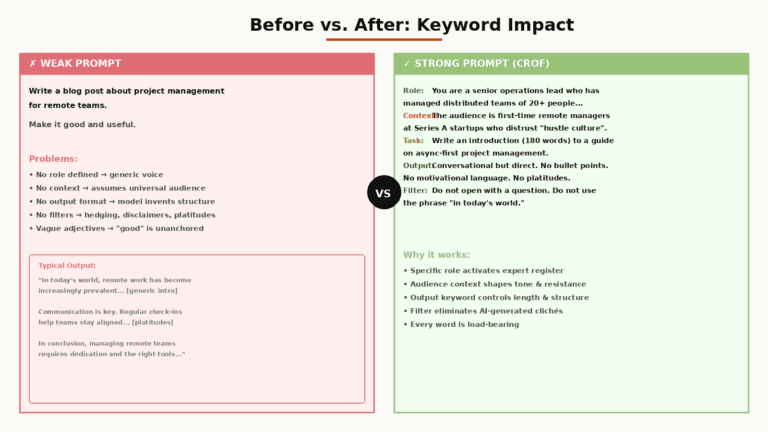
AI prompts fail for one reason: they are vague about what kind of thinking, format, and constraints the model should apply. Keyword strategies solve this by acting as precision levers — small additions that produce large, reliable shifts in output quality.
- 25 tested keyword strategies, grouped by function
- Side-by-side before/after comparisons for each major category
- A complete 5-step workflow for assembling production-grade prompts
- Model-specific guidance: Claude, ChatGPT/GPT-5, and Gemini
- 7 FAQs that change how you think about prompting
Decision Gate — Read This First
✓ Use These Strategies If…
- You use AI for work deliverables, not just curiosity
- You frequently get outputs that are “close but wrong”
- You re-prompt the same task multiple times
- You need consistent, reproducible results
- Your prompts are routinely longer than three sentences
✗ Skip Most of This If…
- Your tasks are simple, one-shot queries
- You are experimenting or exploring topics casually
- You run the prompt once and never reuse it
- Output quality is already meeting your bar
The honest reality: modern LLMs like Claude Sonnet and GPT-5 handle casual questions well without any engineering. The strategies in this guide pay off disproportionately on complex, multi-step, or high-stakes prompts — the kind where a mediocre output costs you real time to fix.
Why Keywords Move the Needle
Large language models do not think like humans. They predict statistically likely next tokens given a context window. When your prompt is vague, the model fills ambiguity with “average plausible output” — which is often generic, surface-level, and formatted for nobody in particular.
Specific keywords change the probability distribution of those predictions. They act like channel locks, narrowing the space of responses the model considers toward higher-quality outputs. Think of them less as magic words and more as constraint architecture.
“The shift happening in 2026 is from ‘prompt engineering’ to ‘requirement specification.’ Models already know how to reason. What they don’t know is your specific constraints.” — UC Strategies, Prompt Engineering Best Practices 2026
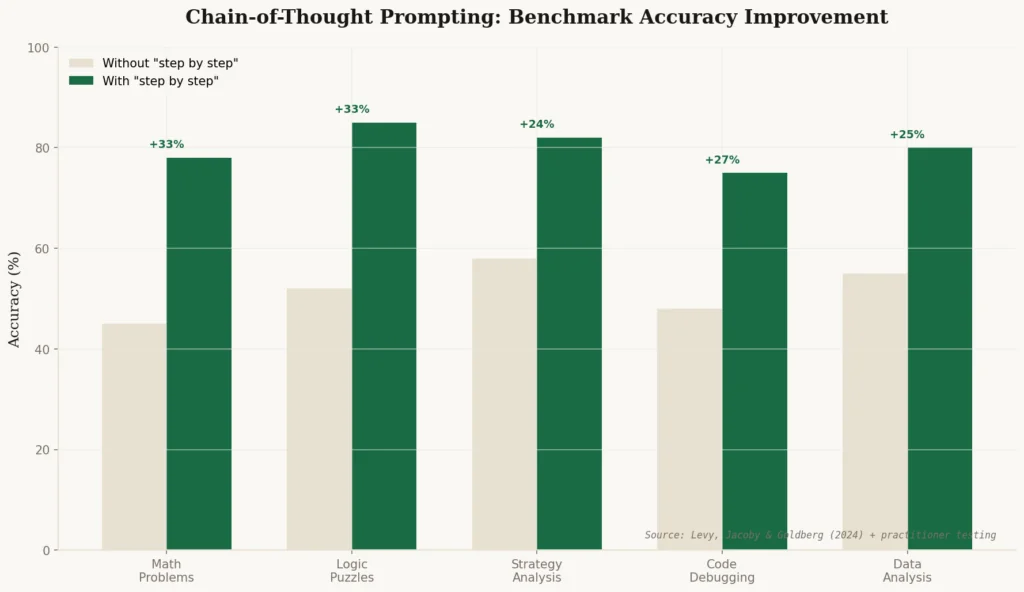
Research-backed techniques consistently improve output quality by 20–60% on standardized benchmarks — with chain-of-thought alone improving accuracy by 15–40% on analytical tasks. These aren’t marginal gains. They are the difference between a draft you can publish and one that needs a full rewrite.
One key insight before you read on: research from Levy, Jacoby, and Goldberg (2024) found that LLM reasoning performance degrades around 3,000 tokens. That means front-loading everything into one massive prompt often backfires. The strategies below are designed to be surgical — not exhaustive.
Category 1 — Role & Persona Keywords
Who the model “is” shapes how it retrieves and organizes information. These keywords activate expert-level knowledge and tone without requiring you to specify every detail.
Act as a [specific expert]
The most universally applicable prompt keyword. Specificity matters enormously — “expert” is weak; “senior tax attorney specializing in cross-border IP” is powerful.
Your audience is [persona]
Calibrates vocabulary, assumed knowledge, and examples automatically. More reliable than manually specifying reading level.
You have [X years] experience in [field]
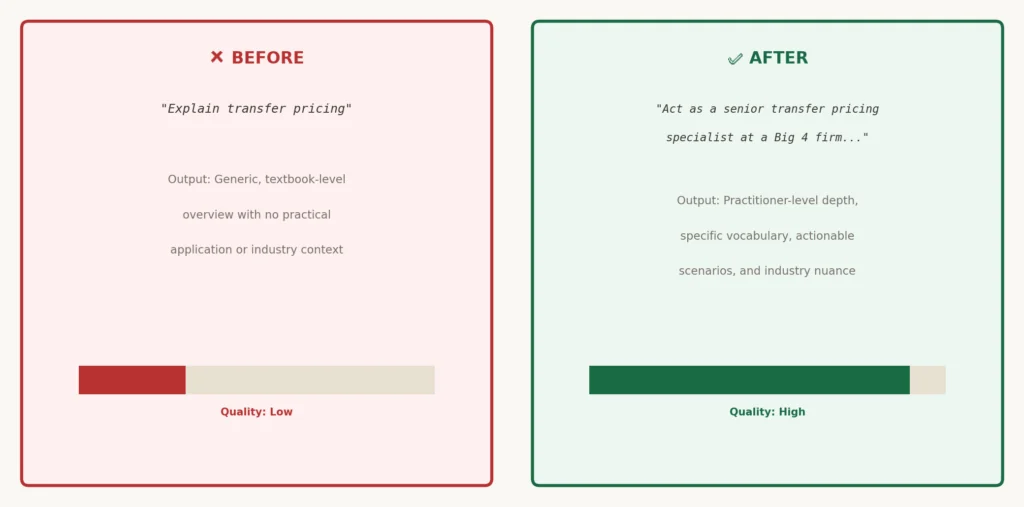
Adds a seniority signal that pushes outputs toward practitioner knowledge rather than textbook overviews.
You are skeptical / You are a critic
Forces the model out of its default agreeable, affirming posture. Essential for due diligence, idea stress-testing, and risk identification.
Category 2 — Format & Structure Keywords
Format keywords eliminate the single most common reason people reprompt: they got the right information in the wrong shape. Specify output structure upfront.
Return only [format]
When you need parseable output for downstream use — JSON, CSV, markdown table, numbered list — this eliminates the prose wrapper the model defaults to.
Use the following structure: [headers]
Gives the model an explicit scaffold. Eliminates structural variation across reprompts, which matters in templates and repeated workflows.
Limit to [N words / sentences / bullet points]
Forces compression, which often produces sharper, more actionable writing. LLMs left unconstrained pad outputs because longer responses superficially look more thorough.
Give me a table comparing [A] vs [B] across [criteria]
One of the highest-leverage format triggers for decision-support content. Specifying criteria prevents the model from choosing criteria that are easy rather than relevant.
Start with [element], then [element]
Controls the opening of a response precisely — useful when you need a definition, an answer, or a key number to appear first rather than buried in a paragraph.
No preamble. No summary. Begin directly.
Eliminates the filler phrases LLMs generate before getting to the point — “Great question!”, “Certainly, here is…”, “In conclusion…”. These phrases waste tokens and reader attention.
Category 3 — Depth & Reasoning Keywords
These are the highest-impact keywords for analytical tasks. They do not change what the model knows — they change how deeply it thinks before writing.
Think through this step by step
The single most documented high-impact prompt keyword. Chain-of-thought prompting consistently improves accuracy by 15–40% on reasoning tasks. Use it before any multi-step problem.
Show your reasoning
Closely related to chain-of-thought but more useful when you need to audit the model’s logic or catch errors mid-reasoning rather than just verifying the final answer.
What are the second-order effects?
Forces the model beyond immediate, obvious consequences into downstream implications. Dramatically improves strategic and risk analysis outputs.
What would [specific expert] say that’s non-obvious?
Pulls the model out of consensus-based responses. Particularly valuable for strategy and decision-making prompts where the obvious answer is rarely the best one.
What assumptions am I making that could be wrong?
One of the most underused depth keywords. Forces the model to stress-test the premise of your prompt — often the most valuable output in any strategy or planning context.
Explain why the conventional wisdom is wrong
Produces contrarian, non-generic analysis. Use selectively — requires the model to have enough domain knowledge to actually challenge consensus. Pair with a specific claim for best results.
Category 4 — Constraint & Boundary Keywords
Constraints are the most underused category of prompt keywords. They narrow the solution space and often produce more useful outputs than open-ended instructions precisely because they force specificity.
Do not mention / Avoid [X]
Negative constraints eliminate known failure modes before they occur. Far more efficient than correcting a completed output.
Only use information from [source / this document]
Prevents hallucination on factual tasks. Critical for summarization, extraction, and any prompt where the input document is the ground truth.
If you are uncertain, say so explicitly
Activates calibrated uncertainty signaling. Without this keyword, models often state uncertain claims with the same confidence as certain ones — which is the root cause of most hallucination risk.
Given only [constraint], what is the best approach?
Real-world constraints (budget, time, team size) dramatically improve the practicality of AI recommendations. Without them, models recommend “ideal world” solutions that aren’t executable.
Category 5 — Iteration & Self-Correction Keywords
These keywords turn a single-shot prompt into a guided refinement process. They are most valuable in high-stakes writing tasks, complex code generation, and strategy work where the first draft is rarely the right draft.
Critique this and then improve it
Combines evaluation and revision into one instruction. More efficient than asking for critique, reading it, and then writing a follow-up prompt. Works especially well for writing, code, and strategy docs.
What is missing from this?
Prompts gap-detection rather than improvement. Use when you have a nearly-complete document and need a different angle to find what you have overlooked.
Rate this on [criteria] and explain your score
Forces the model to produce structured evaluation before giving feedback. The score anchors the critique and prevents vague, unhelpful responses like “this is good but could be improved.”
Give me three versions, each optimizing for [different goal]
Productive when you face a genuine trade-off and don’t want to commit to a direction before seeing the options. Particularly strong for copywriting, positioning, and feature prioritization.
What question should I have asked that I didn’t?
The most intellectually powerful meta-prompt. Inverts the dynamic — instead of the model answering your frame, it interrogates your frame. Use at the end of complex analysis sessions.
How This Actually Works Together
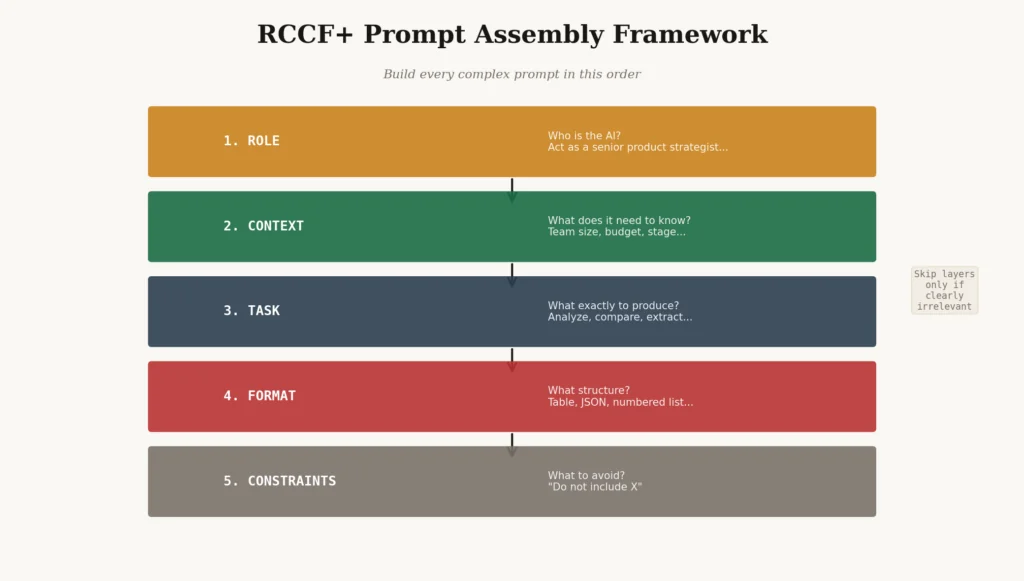
The strategies above are most powerful when assembled into a deliberate workflow rather than applied randomly. Here is the 5-step framework used in production prompt systems — tested across thousands of prompt iterations.
Build every complex prompt in this order. Skip layers only if they’re clearly irrelevant.
- Role — Who is the AI in this context? Use Strategy 01–04. Example:
Act as a senior product strategist with 12 years in B2B SaaS. - Context — What does the AI need to know to give non-generic advice? Include constraints (team size, budget, stage). Use Strategy 20.
- Task — What exactly should the AI produce? Be verb-specific: analyze, compare, write, extract, rate, critique. Avoid: “help me with”, “can you”, “what do you think about.”
- Format — What structure should the output take? Use Strategies 05–10. Example:
Return a numbered list of 5 items, each under 30 words. - Constraints — What should the AI avoid, assume, or flag? Use Strategies 17–19. Negative constraints prevent the most common failure modes.
Step-by-Step Workflow — Single Complex Prompt
Integration type: manual (compose each layer yourself), but increasingly practitioners are using tools like PromptFoo or LangSmith to version-control and test these assemblies in production environments.
Friction point to watch: The biggest mistake is treating this as a checklist to complete rather than a thinking tool. Some prompts need only Role + Task + Format. Resist the urge to use all 25 strategies in one prompt — that creates token bloat that degrades rather than improves outputs.
Model-Specific Guidance
| Model | Responds Best To | Specific Keywords That Work Well | Avoid |
|---|---|---|---|
| Claude (Sonnet / Opus) | XML-structured instructions, explicit constraint lists, long context | XML tags for sections, “think carefully before answering,” “only use information from the document” | Overly casual framing; extremely long front-loaded prompts (degrades at ~3K tokens) |
| ChatGPT / GPT-5 | Role framing, numbered steps, JSON format requests, system-level instructions | “You are a…”, “step by step”, JSON schema specifications, “show calculations” | Ambiguous final-answer requests on math tasks without explicit calculation steps |
| Gemini | Research queries, source attribution, grounded reasoning tasks | “Cite sources for each claim,” “focus on recent developments,” “compare across [N] sources” | Highly abstract creative tasks with no grounding information |
Note on model matching: In many workflows, Claude excels at analytical depth and interpretation; GPT-5 leads on statistical reasoning and structured output; Gemini leads on real-time research grounding. Match the model to the task type before optimizing the prompt — wrong model, right prompt still underperforms.
3 Mistakes That Cancel Every Strategy
Mistake 1 — Stacking All Strategies Into One Prompt
More instructions do not produce better outputs past a threshold. LLM reasoning degrades with context overload. Pick the 2–3 most relevant strategies for each task and apply the others across follow-up turns.
Mistake 2 — Using Vague Verbs
“Help me with my pricing” produces a different result than “Analyze my current pricing tiers against the three competitors I listed and identify the tier where we are most vulnerable to churn.” The verb and specificity together determine 80% of output relevance. “Help”, “can you”, “what do you think” — these are research-mode verbs that produce exploratory outputs. Production prompts need execution-mode verbs: Analyze, Compare, Extract, Write, Rate, Critique, Summarize.
| Vague Verb (Avoid) | Execution Verb (Use) | Output Shift |
|---|---|---|
| Help me with | Critique and rewrite | From open-ended suggestions → specific edits |
| Tell me about | Compare X vs Y across [criteria] | From survey → decision-ready analysis |
| What do you think | Rate this on [criteria] and explain each score | From opinion → structured evaluation |
| Can you write something about | Write a 300-word [format] for [specific audience] that achieves [specific goal] | From generic draft → targeted first draft |
Mistake 3 — Treating the First Output as Final
Even the best prompt rarely produces a publication-ready output on the first attempt for complex tasks. The strategies in Category 5 — critique, self-correction, gap detection — are designed to be used on the output of your first prompt. Build iteration into your workflow as a feature, not a failure.
The uncomfortable truth about prompt keyword strategies: They are necessary but not sufficient. A well-structured prompt cannot compensate for a poorly-defined task. If you are not clear on what “a good output” looks like before you write the prompt, no keyword will save you. Clarify your success criterion first, then apply the strategies.
The 80% Solution Stack
If you only remember three things from this guide, these are the three keyword moves that produce the largest quality lift across the broadest range of tasks.
Strategy A
“Think through this step by step” — Use on any analytical, multi-step, or numerical task. Consistent 15–40% accuracy improvement documented across benchmarks.
Strategy B
“Act as [specific expert] with [X] years in [field]” — Activates domain-appropriate vocabulary, tone, and knowledge retrieval on any subject-matter task.
Strategy C
A format constraint + a negative constraint — “Return a table” or “Give me 5 bullets” + “Do not include X.” These two together eliminate 80% of the most common reprompt causes.
FAQ
What are AI prompt keyword strategies?
AI prompt keyword strategies are specific words, phrases, and structural patterns placed inside your prompts that reliably steer large language models toward more accurate, detailed, or actionable outputs. They work by shifting the probability distribution of the model’s next-token predictions toward higher-quality responses — acting as constraint architecture rather than magic words.
Do keyword strategies work differently on Claude vs ChatGPT?
Yes, meaningfully so. Claude responds best to XML-structured instructions and explicit constraint lists — it is optimized for careful, nuanced reasoning on long-context inputs. ChatGPT (GPT-5) performs well with role framing and numbered step formats, and excels at statistical reasoning when you explicitly ask it to show calculation steps. Gemini leads on research-grounded tasks with source attribution prompts. Match the model to the task type first, then tune the prompt.
How many keywords or instructions should I put in one prompt?
Keep it surgical. Research from Levy, Jacoby, and Goldberg (2024) found that LLM reasoning degrades around 3,000 tokens. In practice, focus on 1–3 core keyword strategies per prompt and layer additional complexity across follow-up turns. Front-loading everything is one of the most common and counterproductive mistakes in prompt engineering.
What is the single highest-impact keyword I can add to any prompt?
Based on widespread practitioner testing and benchmark research, “think through this step by step” (chain-of-thought prompting) consistently produces the largest quality uplift on analytical and multi-stage tasks — documented at 15–40% improvement on benchmark accuracy. It is particularly powerful on math, logic, strategy, and any task with sequential dependencies.
Are prompt keyword strategies still relevant now that AI models are smarter?
More relevant than ever — but in a different way. Casual prompts got better as models improved. But the gap between a well-structured prompt and a vague one has also grown, because smarter models amplify good prompts more dramatically. What changed is that casual prompting no longer requires engineering; production-grade prompting has become a genuine engineering discipline worth investing in.
Can I use these strategies for image generation prompts?
Many apply — particularly specificity, constraint, format, and negative keywords. Image generation models respond strongly to scene composition descriptors, lighting terminology, style references, and aspect ratio specifications placed at the front of the prompt. Negative keywords (“no watermark,” “no text overlay,” “avoid symmetry”) are especially effective in image prompting contexts.
What is meta-prompting and should I use it?
Meta-prompting means asking the AI to generate or improve its own prompt before executing the real task — asking “What would be the ideal prompt to get the best answer to this question?” It is genuinely useful for novel or complex tasks where you are unsure of the right structure. It adds latency and tokens, so avoid it for simple, well-understood requests where you already know what a good output looks like.
Final Thoughts — The Hard Decision
Here is the trade-off nobody talks about honestly: investing in prompt keyword strategies requires upfront time that casual prompting does not. For high-volume, high-stakes work — content production, analysis, coding assistance — that investment compounds rapidly. For occasional, low-stakes queries, it is overkill.
The practitioners seeing the largest quality gains from AI in 2026 are not those with the most powerful models. They are those who have built a small, tested library of prompt structures — role + constraint + format combos that they know work — and apply them deliberately rather than starting from scratch each time.
The uncomfortable reality of prompt engineering is that it rewards discipline over cleverness. The most effective prompts are rarely the most creative ones — they are the most precise ones.
Start with the 80% Stack. Apply it to the next five prompts you write. Measure the output quality difference. Then decide how much deeper to go.
The strategies are tools. The judgment about which tool to use, and when, is yours.
Primary Sources
- UC Strategies — Prompt Engineering Best Practices in 2026 (March 2026)
- Lushbinary — Advanced Prompt Engineering 2026: 12 Techniques Guide (April 2026)
- Thomas Wiegold Blog — Prompt Engineering Best Practices 2026 (February 2026)
- Lakera AI — The Ultimate Guide to Prompt Engineering
- Levy, Jacoby & Goldberg (2024) — LLM Reasoning Performance and Context Length: unpublished preprint referenced in practitioner literature
- Andrej Karpathy — “Context Engineering” (June 2025, X/Twitter thread, widely cited in the practitioner community)