How to Generate Code With AI Prompts — Beginner to Pro


Deep Guide
Most people get mediocre code from AI because they treat it like a search engine. This guide shows you exactly what to type instead — with real frameworks, copy-paste templates, and the honest limits you should know before you ship anything.
Last updated: May 23, 2026 — All statistics verified against primary sources
⚡ Quick Read
- The core problem: Vague prompts produce tutorial-level code. Specific, structured prompts produce production-ready code. The gap between these two modes is enormous.
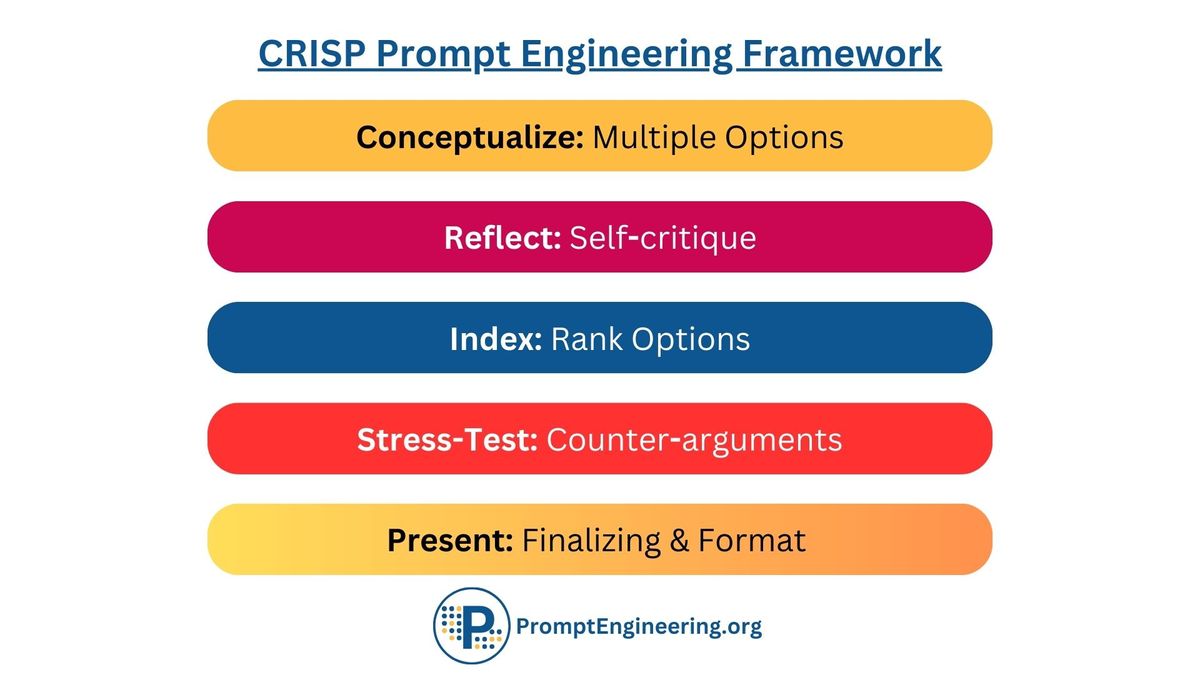
- The fix: Use a structured prompt framework. The best-tested in 2026 are CRISP (Context, Role, Instructions, Specifications, Polish) and CRTSE (Context, Role, Task, Standards, Examples). Pick one and stick to it.
- Who uses AI for code: 84% of developers now use or plan to use AI tools. Daily users save roughly 3.6 hours per week, or about 187 hours per year.
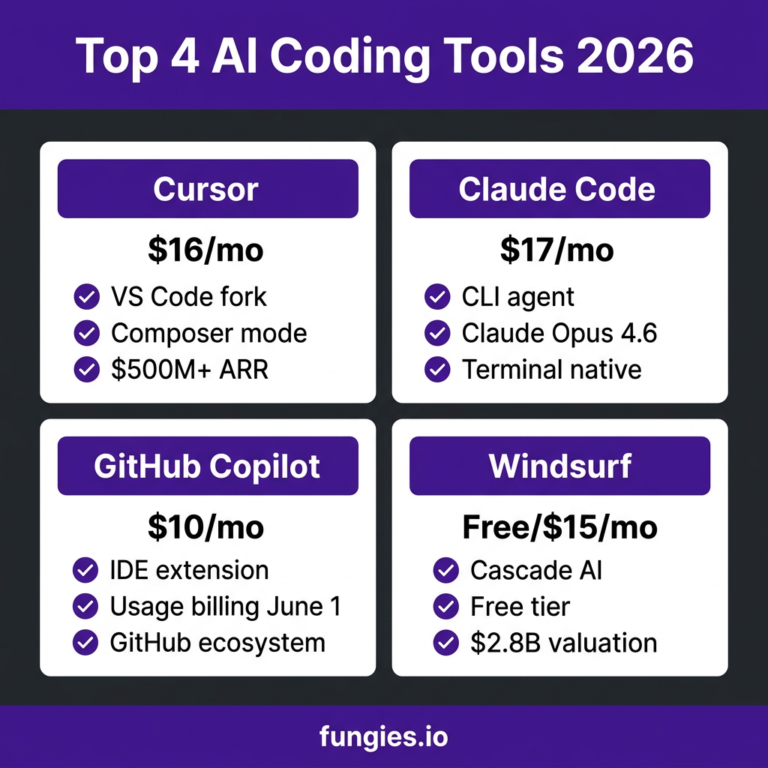
- Best models in 2026: Claude Sonnet 4.6 for complex reasoning and multi-file work; GPT-4o for general tasks and versatility; GitHub Copilot for inline IDE suggestions; Cursor for larger agentic workflows.
- The honest warning: 45% of AI-generated code contains security flaws (Veracode 2025). Never ship AI-written code without reading it first.
- The progression: Start with single-function prompts → move to component-level prompts → advance to chained multi-turn workflows → master agentic loops.
- When AI doesn’t help: When you don’t understand what you’re asking for. AI can generate; you need to evaluate. If you can’t tell good code from bad, AI will accelerate your mistakes.
⚠ This guide doesn’t hype AI as a replacement for learning. It treats it as a powerful tool that amplifies what you already know — and occasionally what you don’t.
Table of Contents
- The State of AI Code Generation in 2026
- Why Most AI Code Prompts Fail
- The Anatomy of a Code Prompt That Actually Works
- Beginner Level: Your First Real Code Prompts
- Intermediate Level: Context, Constraints, and Chaining
- Advanced Level: Multi-Turn Workflows and Agentic Coding
- 20 Copy-Paste Prompt Templates by Category
- AI Coding Tools Compared (2026)
- The Part Everyone Skips: Security and Code Quality
- When AI Code Generation Fails — and What to Do
- Frequently Asked Questions
- Final Verdict
Something shifted in the developer world sometime around 2024, and by 2026 it’s become close to irreversible. Writing code without an AI assistant now feels a bit like writing a long document without spell-check — not impossible, just oddly laborious. The numbers back this up.
84%
of developers use or plan to use AI tools
Stack Overflow Survey 2025
41%
of all code written globally is AI-generated or AI-assisted
Second Talent / Stack Overflow, 2025
3.6 hrs
saved per developer per week using AI tools
DX Research, Q4 2025 (135k+ devs)
20M+
GitHub Copilot users as of mid-2025
GitHub / Microsoft FY2025
But here’s the part that rarely makes the headlines: the same Stack Overflow 2025 Developer Survey that reports near-universal AI adoption also found that fewer than 30% of developers report consistently useful output for production code. The gap isn’t the model. It’s almost always the prompt.
The term “vibe coding” — coined by former Tesla AI lead Andrej Karpathy in early 2025 — describes the practice of building applications through plain-language conversation with an AI, sometimes without the developer closely reading what was generated. Google describes it as shifting focus from “writing code line-by-line to guiding an AI assistant to generate, refine, and debug an application through a more conversational process.” For throwaway weekend projects, it works fine. For anything you plan to maintain or deploy, it needs more discipline.
This guide is about that discipline — specifically, how to write prompts that get genuinely useful code at every stage of your learning curve.
I’ve watched a lot of developers get frustrated with AI coding tools, and the failure mode is almost always the same. They type something like “write me a login function” and then spend twenty minutes arguing with the output because it uses the wrong library, ignores their existing database schema, and handles errors in whatever way seemed most common in the model’s training data.
The root issue: an AI model has to guess on every dimension you don’t specify. Language? Guessed. Framework version? Guessed. Error handling style? Guessed. Should it use async/await or promises? Guessed. Whether you want comments or not? Guessed.
When a prompt leaves ten things ambiguous, the model picks the most statistically common combination from its training — which is usually tutorial-grade, not production-grade. Compare these two prompts:
| Bad Prompt | What the Model Guesses | Result |
|---|---|---|
Write me a login function |
Language, framework, DB, error style, security approach, return type | Generic pseudocode or vanilla JS. Probably wrong for your stack. |
You're a senior Node.js engineer. Write a login function for an Express 5 app using Prisma ORM and PostgreSQL. Use bcrypt for password comparison. Return a JWT signed with HS256. Throw a 401 AppError (from our existing error class) if credentials fail. No comments needed. |
Nothing. Everything is specified. | Code that integrates into your actual codebase. |
The second prompt takes about 45 extra seconds to write. It typically saves 20–40 minutes of correction. That trade-off is almost always worth it.
Research Note
A 2025 study published in ACM Transactions on Software Engineering and Methodology found that Structured Chain-of-Thought (SCoT) prompting outperformed standard baseline prompting by 15.27% in correctness and 36.08% reduction in code smells. Human developers also significantly preferred reading SCoT-generated code.
Several frameworks have emerged from the developer community for structuring prompts. Two have held up best in real-world testing.
Framework
CRISP
Developed by the DEV Community, 2026. Works well for self-contained functions and components.
- C — Context: Your stack, framework, existing code architecture, and any relevant constraints.
- R — Role: What kind of engineer should the model act as? (“You are a senior backend engineer who writes clean, type-safe TypeScript.”)
- I — Instructions: The specific task — in one unambiguous sentence if possible.
- S — Specifications: Technical requirements, performance expectations, edge cases to handle, things to avoid.
- P — Polish: Output format — should there be comments? Type annotations? Unit tests alongside? A README snippet?
Framework
CRTSE
From DEV.to’s Best AI Prompts for Developers in 2026. Better for complex, multi-component tasks where you need to enforce coding standards.
- C — Context: Project background, tech stack, relevant existing code.
- R — Role: The specific engineering persona and seniority level.
- T — Task: The precise deliverable.
- S — Standards: Conventions, linting rules, security requirements, testing frameworks.
- E — Examples: Paste examples of existing code in your style, or examples of the output format you expect.
Both frameworks share the same core insight: the more context you give, the less the model has to invent. Where they differ is that CRTSE explicitly adds an Examples slot, which tends to produce significantly better style-matching when you need the generated code to look like it was written by the same person as the rest of your codebase.
Pro Tip
Always end a complex code prompt with: “Do not write anything except the code and a brief explanation of non-obvious choices.” This eliminates the lengthy preamble AI models often generate that delays you from reaching the actual answer.
If you’re new to using AI for code, the instinct is usually to write what you’d type into Google — something like “how do I validate an email in Python.” That’s not wrong, but AI can do more than explain. It can generate the actual function, with the exact behavior you need, in the style that fits your project. You just have to tell it those things.
A single-function prompt should answer five questions before asking anything: What language and version? What framework if any? What input does the function receive? What should it return or do? Are there edge cases to handle?
Beginner Prompt Template — Single Function
# Language and version: Python 3.11
# Task: write a function that validates an email address
Write a Python function called validate_email that:
– Takes a single string argument
– Returns True if it’s a valid email format, False otherwise
– Uses only the standard library (no third-party packages)
– Handles None input without crashing
– Includes a brief docstring
Only return the function. No explanation needed.
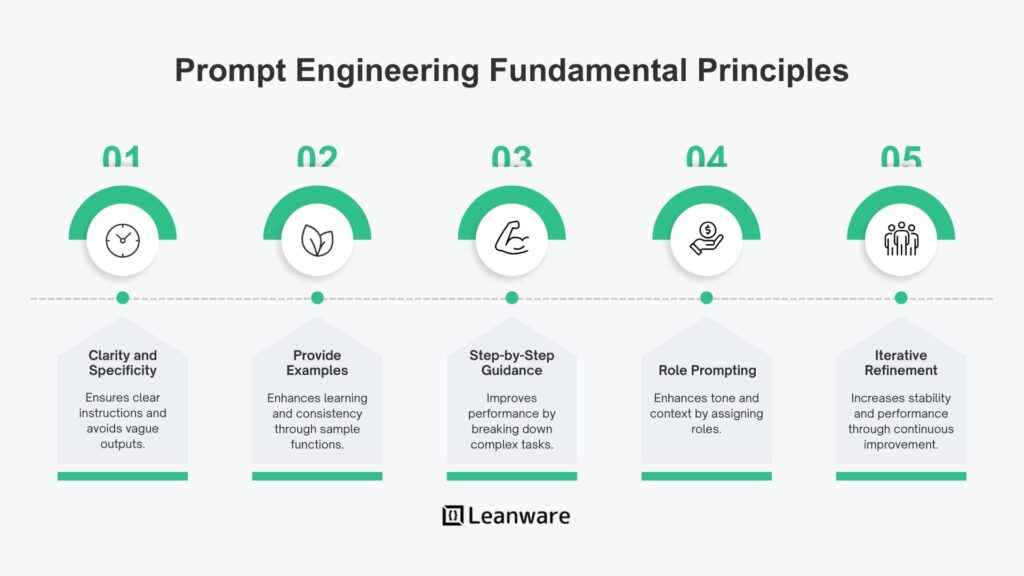
Notice what this prompt doesn’t do: it doesn’t ask the AI to “be creative” or “make it as good as possible.” Vague encouragement produces vague code. Specific constraints produce useful code.
Asking for Explanations (the Right Way)
One of the most underrated uses of AI for beginners is asking it to explain code you don’t fully understand — including code it just generated for you.
Beginner Prompt — Code Explanation
Here is a Python function I received:
[paste the function here]
Explain what each line does in plain English. Focus on anything that uses language features
a beginner might not recognize. Do not rewrite the code — just explain the existing version.
This forces the AI into teacher mode, and it’s particularly good at it. The explanations are usually accurate and targeted, which makes it genuinely faster than reading documentation for something unfamiliar.
Debugging: The Beginner Use Case That Works Best
AI is often at its most practically useful when debugging. The key is giving it the actual error, not a description of what you think is wrong.
Beginner Prompt — Debugging
I’m getting this error when I run my Python script:
TypeError: unsupported operand type(s) for +: ‘int’ and ‘str’ on line 14
Here is the relevant code:
[paste lines 10–20 here]
Explain why this error occurs and show me the corrected version of the code.
Don’t change anything else — only fix the specific bug.
Common Beginner Mistake
Never tell the AI “fix all the problems in this code” without understanding what those problems are first. It will happily rewrite things that weren’t broken, introduce new patterns you’re unfamiliar with, and leave you with code that’s harder to understand than what you started with. Ask for one specific fix at a time.
5. Intermediate Level: Context, Constraints, and Chaining Intermediate
At the intermediate level, the shift is from single functions to components, modules, and multi-file systems. This is where most developers hit a wall — they get good at prompting for isolated functions but struggle when the code needs to fit into a larger context.
Providing Codebase Context
The single most valuable thing an intermediate developer can do is paste relevant existing code alongside the request. This isn’t optional; it’s the difference between getting code that integrates and code that technically works but doesn’t fit.
Intermediate Prompt — Context-Aware Component
Stack: React 18, TypeScript 5, Tailwind CSS 3.4, React Query v5
Existing types I’m using:
[paste your TypeScript interfaces here]
Existing component style (use this as a reference for formatting and patterns):
[paste a small existing component here]
Task: Create a UserCard component that displays a user’s name, avatar, and role badge.
It should accept a User prop (type is defined above). The role badge colors should follow
the Tailwind color scheme: blue for admin, green for user, yellow for moderator.
Requirements:
– TypeScript strict mode
– No inline styles — Tailwind only
– Export as named export, not default
– No useEffect unless necessary
– If avatar URL fails to load, show initials fallback
Only output the component file. Brief comments on non-obvious decisions only.
This kind of prompt produces something you can drop into your codebase without a rewrite. The difference is the “Existing component style” section — it gives the model a concrete target to match, not an abstract standard.
Prompt Chaining: Building Complex Features in Steps
Trying to generate a complex feature in a single prompt almost never works well. The output is typically shallow on the details that matter. Instead, chain prompts across multiple turns.
| Step | What to Ask For | Why This Order |
|---|---|---|
| 1 | Ask for a structure/outline of the feature first. “What files would you create and why?” | Catch architectural mistakes before any code is written. |
| 2 | Ask for types and interfaces only, no implementation. | Types define the contract. Getting them right first avoids cascading rewrites. |
| 3 | Ask for implementation of one file at a time, referencing types from step 2. | Smaller context = more focused, accurate output. |
| 4 | Ask for unit tests for the function/component just generated. | Tests reveal assumptions in the generated code you may not have noticed. |
| 5 | Ask for a code review of your own edits to the generated code. | Catches issues introduced during your modifications. |
Negative Constraints: Tell the AI What NOT to Do
This is one of the most underused techniques. AI models default to common patterns from their training data. If those defaults aren’t what you want, you have to explicitly exclude them.
Negative Constraint Examples
DO NOT use any external libraries — standard library only
DO NOT add try/catch — error handling is handled by the parent caller
DO NOT use class syntax — functional style only
DO NOT add console.log statements
DO NOT rewrite parts of the code I haven’t asked you to change
DO NOT explain things I already know — skip basics
6. Advanced Level: Multi-Turn Workflows and Agentic Coding Pro
At the professional level, the model is no longer generating one-off functions — it’s participating in an iterative workflow alongside a real codebase. The mental model shifts from “assistant that writes code” to “junior engineer with unlimited patience and broad knowledge but no judgment.” You supply the direction and critical thinking. It supplies the execution speed.
System Prompts for Consistent Sessions
If you’re using Claude, ChatGPT, or a custom API integration, you can establish a persistent system prompt that runs before every message. This is far more efficient than re-stating context in every prompt.
System Prompt Template — Senior Dev Persona
You are a senior software engineer on the [project name] team.
Stack: [e.g., Next.js 15, TypeScript 5.4, Prisma 6, PostgreSQL, Tailwind 4]
Code standards:
– Strict TypeScript. No ‘any’ unless you explain why it’s unavoidable.
– All async operations use async/await. No raw .then() chains.
– Error handling follows our AppError class (thrown, never returned).
– Tests are written in Vitest. Use describe/it blocks, not test().
– Named exports only. No default exports except for pages.
When generating code:
1. Match the patterns in code I paste, even if you’d do it differently.
2. Don’t add features I didn’t ask for.
3. Don’t refactor things I didn’t ask you to change.
4. Flag security concerns separately, after the code.
5. If something is ambiguous, ask before writing — don’t guess.
Chain-of-Thought for Complex Logic
For algorithmic or architectural problems, ask the model to reason before writing code. This isn’t just philosophical — research published in ACM TOSEM (2025) consistently shows that structured chain-of-thought prompting produces code with measurably fewer defects.
Advanced Prompt — Chain-of-Thought Reasoning
Before writing any code, explain your approach to this problem:
Problem: I need to implement a rate limiter for our API that:
– Allows 100 requests per user per 15-minute sliding window
– Works in a distributed environment (multiple Node.js instances)
– Uses Redis for shared state
– Degrades gracefully if Redis is unavailable (falls back to permissive mode)
Think through:
1. Which rate-limiting algorithm fits best (token bucket, fixed window, sliding window log, sliding window counter)?
2. What are the trade-offs?
3. What edge cases need handling?
4. What Redis data structure makes sense?
After your analysis (3–5 sentences per point), implement the solution.
Agentic Workflows and Their Limits
Tools like Cursor, Claude Code, and Windsurf now operate as autonomous agents — they can read your entire codebase, write multiple files, run tests, and iterate. This is genuinely powerful. It’s also where the risks multiply.
Georgia Tech’s Vibe Security Radar project tracked vulnerabilities introduced by AI coding tools that made it into public CVE databases. In the second half of 2025, they found 18 cases over seven months. In just the first three months of 2026, they found 56 — with March 2026 alone exceeding all of 2025 combined. The attack surface is expanding with agent adoption.
For agentic workflows, always set explicit boundaries in your prompt:
Agentic Safety Constraints
Before making any changes to the codebase:
1. List every file you plan to modify and explain why.
2. Wait for my confirmation before proceeding.
3. Do NOT delete any files or data. If deletion seems necessary, flag it and ask.
4. Do NOT install new packages without listing them and asking first.
5. After making changes, summarize exactly what you changed and why.
6. If you encounter something unexpected, stop and ask — don’t improvise.
7. Twenty Copy-Paste Prompt Templates by Category
These are real, tested templates. Swap the italic placeholders for your specifics and use them directly. Each is written around a specific task type.
Code Generation
Template 1 — New Function
You are a [language] developer following [style guide, e.g. Google Python Style Guide].
Write a function called [name] that:
– Input: [describe parameters and types]
– Output: [describe return value]
– Edge cases to handle: [list specific cases]
– Do NOT use: [libraries or patterns to avoid]
Return only the function with a docstring. No explanation.
Template 2 — REST API Endpoint
Stack: [e.g., Express 5 + TypeScript + Prisma]
Create a [GET/POST/PUT/DELETE] endpoint at [path] that:
– [describe what it does]
– Authenticates via [e.g., JWT middleware already attached to router]
– Validates input with [e.g., Zod schema — paste schema here]
– Returns: [response shape]
Error handling: throw AppError with appropriate HTTP status codes.
No comments unless logic is genuinely non-obvious.
Template 3 — React Component
Stack: React 18, TypeScript, [CSS approach]
Create a component called [ComponentName].
Props: [describe props and types]
Behavior: [describe what it does]
States to handle: [loading / error / empty / populated]
Do NOT use: useEffect for [specific cases], default exports.
Reference component for style matching:
[paste existing component]
Debugging and Code Review
Template 4 — Debug with Error
I’m getting this error:
[paste full error message and stack trace]
Relevant code:
[paste the smallest code section that reproduces the issue]
What is causing this error? Show only the corrected lines, not a full rewrite.
Explain your fix in one sentence.
Template 5 — Code Review
Review this code for:
1. Potential bugs or incorrect logic
2. Security issues (SQL injection, XSS, auth flaws, etc.)
3. Performance problems
4. Anything that will break at scale
[paste code]
Format: a numbered list of findings. For each: severity (critical/medium/low),
what the issue is, and a one-line fix suggestion. Don’t rewrite the entire code.
Template 6 — Performance Optimization
The following function is a bottleneck in our codebase (it runs ~10,000 times/second):
[paste function]
Identify the top 2–3 performance issues. For each, explain the problem and show
the optimized version. Do not change behavior — only improve performance.
Include estimated improvement reasoning (no made-up benchmarks).
Testing
Template 7 — Unit Tests
Write unit tests for this function using [testing framework, e.g. Vitest / Jest / pytest]:
[paste function]
Cover:
– Normal use cases (at least 3)
– Edge cases: [list specific edge cases]
– Error cases: [describe what errors should be thrown/returned]
Do NOT mock anything unless absolutely necessary.
Use descriptive test names that explain what is being tested, not how.
Template 8 — Integration Test
Write an integration test for the following API route using [e.g., Supertest + Vitest]:
Route: [paste route handler]
Database setup available: [describe test DB helpers available]
Test the following scenarios:
1. Successful request
2. Missing required fields
3. Unauthorized (no token / expired token)
4. [any domain-specific scenarios]
Refactoring
Template 9 — Refactor for Readability
Refactor this code to be more readable without changing its behavior:
[paste code]
Constraints:
– Keep the same function signature
– Do NOT change the logic — only improve clarity
– Remove duplication if you see any
– Explain in 2–3 sentences what you changed and why
Output: the refactored code, then the explanation.
Template 10 — Convert to TypeScript
Convert this JavaScript code to TypeScript with strict mode:
[paste JS code]
Requirements:
– Add proper types for all parameters and return values
– Use ‘unknown’ instead of ‘any’ where you’re unsure — annotate those spots
– Don’t change the implementation logic
– If you infer something that seems wrong, add a comment flagging it
Documentation and Explanation
Template 11 — Write Documentation
Write documentation for this function/module in [JSDoc / docstring / Markdown] format:
[paste code]
Include:
– One-sentence description of what it does
– Parameter descriptions with types
– Return value description
– One usage example
– Any important caveats or known limitations
Keep it concise. No marketing language.
Template 12 — Explain Complex Code
Explain this code to someone who knows [e.g., basic Python but not async programming]:
[paste code]
Focus on:
– What the code does overall (1–2 sentences)
– Any parts that use unfamiliar patterns
– What would break if you removed any non-obvious lines
No analogies. Plain, direct explanation.
Architecture and Design
Template 13 — Design a Feature
I need to build [describe feature] for a [describe app type]
using [stack].
Before writing any code, propose:
1. Which files/modules to create
2. How data flows through the feature
3. What the main functions/classes are and their responsibilities
4. What could go wrong or scale poorly
Don’t write code yet. Just the architectural plan. I’ll ask for implementation next.
Template 14 — Database Schema Design
Design a PostgreSQL schema for [describe the domain, e.g., a multi-tenant SaaS with users, organizations, and billing].
Requirements:
– [list specific business rules]
– Include appropriate indexes for common query patterns you’d expect
– Add foreign key constraints where appropriate
– Note any trade-offs you’re making
Output: SQL CREATE TABLE statements, then a brief note on any non-obvious decisions.
Security-Focused Prompts
Template 15 — Security Audit Prompt
Audit the following code specifically for security vulnerabilities:
[paste code]
Check for:
– SQL/NoSQL injection
– XSS vulnerabilities
– Insecure direct object references
– Missing authentication/authorization checks
– Hardcoded secrets or credentials
– Insecure dependencies (note any you recognize)
– Improper error handling that leaks information
Format: for each finding, provide severity, location, and a specific fix.
Template 16 — Secure Reimplementation
Rewrite this function with security best practices:
[paste function]
Specific concerns: [e.g., input validation, parameterized queries, output encoding]
Explain each security improvement you made. Keep the same overall behavior.
Advanced / Specialized
Template 17 — SQL Query Optimization
Optimize this SQL query for PostgreSQL:
[paste query]
Context: [table sizes, existing indexes, approximate row counts]
Explain what’s slow in the current query, then show the optimized version.
If you’re adding indexes, explain the trade-off (write performance vs read performance).
Template 18 — Data Pipeline / ETL
Write a Python script that:
– Reads from: [source — CSV / API / DB + describe format]
– Transforms: [describe what needs to happen to the data]
– Writes to: [destination + format]
Requirements:
– Handle malformed rows gracefully (log and skip, don’t crash)
– Process in batches of [N] rows to manage memory
– Log progress every [N] rows
Use pandas 2.x if appropriate. Standard library otherwise.
Template 19 — Shell/Bash Script
Write a bash script that [describe task].
Requirements:
– set -euo pipefail at the top
– Works on both macOS and Linux
– Provide a usage message if arguments are missing
– Do not require root unless absolutely necessary
Comment any non-obvious commands.
Template 20 — Code Migration
Migrate this code from [old framework/version] to [new framework/version]:
[paste code]
Key breaking changes I’m aware of: [list any you know about]
Requirements:
– Preserve the same behavior
– Use the new API patterns correctly
– Flag anything you’re uncertain about — I’d rather you note uncertainty
than silently use a deprecated API
8. AI Coding Tools Compared (2026)
The landscape has matured considerably. Each tool has a genuine niche, and using the wrong one for a given task produces frustrating results.
| Tool | Best For | Weaknesses | Price (2026) | Context Window |
|---|---|---|---|---|
| Claude Sonnet 4.6 | Complex reasoning, multi-file refactors, security analysis, long-context codebases | Not IDE-native (use via API or Claude.ai); less convenient for inline completions | $3 / $15 per M tokens | 200k tokens |
| GPT-4o | General tasks, versatile, strong instruction following, good for structured output | Can be verbose; sometimes over-explains | $5 / $15 per M tokens | 128k tokens |
| GitHub Copilot | Inline completions in VS Code / JetBrains; fastest for boilerplate in existing files | ~30% acceptance rate; weaker for complex architecture; limited context | $10–$19/month | Varies by model |
| Cursor | Full codebase-aware agentic coding; best for large refactors across many files | Learning curve; can make sweeping changes if not carefully prompted | $20/month (Pro) | Full codebase |
| Gemini 2.5 Pro | Very long context tasks; good for analyzing large codebases in one shot | Sometimes less precise on specific framework idioms | $1.25 / $10 per M tokens | 1M tokens |
A practical note on acceptance rates: GitHub Copilot’s data from Q1 2025 shows about a 46% code completion rate, with around 30% of suggestions ultimately accepted by developers. That’s not a failure of the tool — it’s a healthy signal that human review is still doing real work. The moment you start accepting 90%+ of AI suggestions without reading them is the moment bugs start accumulating.
9. The Part Everyone Skips: Security and Code Quality
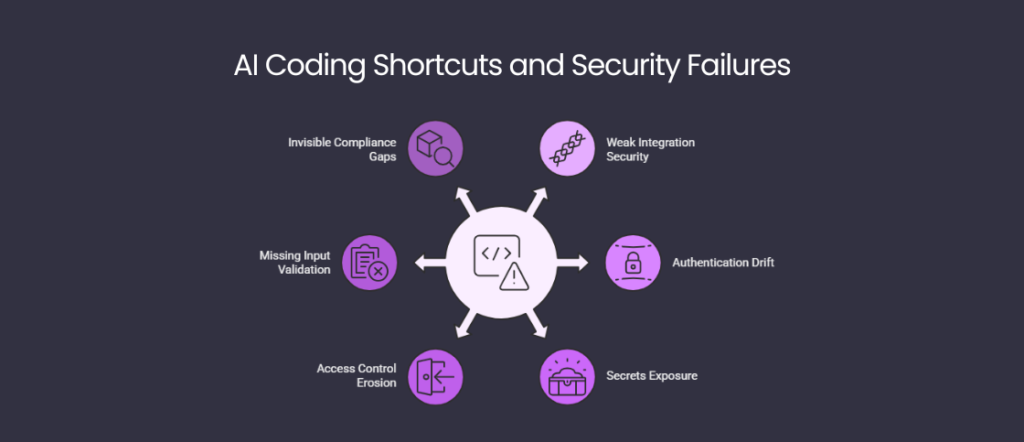
The honest picture here is concerning. The Veracode 2025 GenAI Code Security Report found that roughly 45% of AI-generated code contains security vulnerabilities. More specifically, when models are given a choice between a secure and an insecure approach, they choose the insecure path close to half the time — prioritizing code that “works” over code that’s safe.
Critical Warning
Georgia Tech’s Vibe Security Radar — which tracks CVEs directly introduced by AI coding tools — identified 56 publicly-disclosed vulnerabilities in just the first three months of 2026, compared to 18 in all of the second half of 2025. The attack surface is growing rapidly as more developers ship AI-generated code without review.
The most common vulnerability categories in AI-generated code, based on Wiz’s 2025 analysis and Veracode’s report:
- Injection flaws — SQL and command injection, especially when input validation is omitted from the prompt
- Weak authentication logic — improperly implemented JWT validation, missing expiry checks, etc.
- Hardcoded credentials — AI models trained on public repos sometimes reproduce patterns from leaked secrets
- Vulnerable dependencies — AI recommendations for packages don’t always reflect current security status
- Insecure defaults — CORS configured too permissively, rate limiting omitted, etc.
The fix is straightforward in principle, though it requires discipline: treat AI-generated code the same way you’d treat code from an unknown contractor. Don’t deploy it without reading it. Run static analysis. Ask the model to audit its own output — it will often catch things you missed.
Databricks’ AI Red Team found that adding specific security-focused prompts to code generation requests significantly reduced insecure output with minimal trade-off in code quality. The simplest version of this is to add a line to every generation prompt: "After the code, list any security concerns with this implementation."
10. When AI Code Generation Fails — and What to Do
AI code generation fails in predictable ways. Knowing the failure modes makes them much less frustrating to deal with.
| Failure Mode | Why It Happens | What to Do |
|---|---|---|
| Wrong library version or deprecated API | Training data skews toward older patterns; newer APIs are underrepresented | Specify the exact version. Paste the relevant section of the current docs into the prompt. |
| Confidently wrong on niche topics | Hallucination — the model extrapolates plausibly but incorrectly | For specialized domains, always verify against official documentation. Never trust function signatures for proprietary APIs without checking. |
| Ignored instructions | Long prompts with many constraints — model weights some over others | Break the prompt into fewer, more focused requests. Put your most important constraint first. |
| Context drift in long sessions | Models have limited effective attention; early constraints get diluted | Start a fresh session for a new task. Re-paste critical context rather than assuming it’s remembered. |
| Code works in isolation but fails in context | The model optimized for the examples given, not your actual system | Paste more of your real codebase. Show the model the interfaces it needs to integrate with. |
| Over-engineered solutions | Models default to demonstrating capability; they tend to add abstractions | Explicitly say: “This is a small internal tool. Prefer the simplest solution that works over an elegant architecture.” |
Practical Tip
If an AI model is producing consistently wrong output on a specific framework, paste a short excerpt from the framework’s current changelog or migration guide into the prompt. Models update their effective knowledge with whatever context you give them — this often resolves version-confusion completely.
The Honest Limitation
AI code generation amplifies your existing knowledge. If you don’t understand what good code looks like in a given domain, AI will generate something that looks reasonable but contains subtle architectural mistakes you won’t spot. The solution isn’t to avoid AI — it’s to build enough domain knowledge to evaluate what it produces. The tools work best for developers who are already competent; they’re a multiplier, not a substitute.
Frequently Asked Questions
What’s the best AI tool for code generation in 2026?
It depends on what you’re doing. For inline completions in your IDE, GitHub Copilot or Cursor are most convenient. For complex reasoning, multi-file refactoring, and security-sensitive work, Claude Sonnet 4.6 consistently produces higher-quality output. GPT-4o is a solid all-rounder. Most experienced developers use two or three tools depending on the task — there’s no single answer.
Do I need to know how to code to use AI code generation?
You can generate working code without deep programming knowledge, especially for simple scripts. But you genuinely need some ability to read and evaluate code before deploying anything to production. The Veracode 2025 report found 45% of AI-generated code contains security flaws — if you can’t spot these, you’ll ship them. AI is best used as a force-multiplier on existing skills, not a replacement for them.
How long does it take to get good at prompting for code?
Microsoft’s research suggests it takes roughly 11 weeks for developers to fully realize productivity gains from AI coding tools. The core skill — writing specific, context-rich prompts — can be learned in a few days. The deeper skill of knowing when to trust AI output and when to verify it more carefully comes with experience over several months.
Is AI-generated code safe to use in production?
It can be, with proper review. The problem is that AI prioritizes working code over secure code. A security-focused review of any AI-generated code — either manual, via static analysis, or by asking the model itself to audit its output — is non-negotiable for production use. Treat it the way you’d treat code from an unknown open-source library: read it before running it.
What’s the difference between prompt engineering and vibe coding?
Vibe coding (Andrej Karpathy’s term, 2025) refers to a workflow where you describe what you want in natural language and let the AI generate complete applications, sometimes without closely reviewing the output. Prompt engineering for code is a more disciplined practice: crafting structured prompts that precisely specify requirements, and then reviewing and evaluating the output critically. Both use AI; the difference is the level of developer oversight.
Can AI generate code for any programming language?
All major models handle Python, JavaScript/TypeScript, Java, Go, Rust, C#, C++, Ruby, and SQL well. Quality degrades noticeably for niche languages, very recent framework versions, and proprietary internal APIs that weren’t in the training data. For anything highly specialized, you’ll need to paste relevant documentation or examples directly into the prompt.
How do I make AI code match my existing codebase style?
Paste examples. This is the most effective technique by a significant margin. Include one or two representative files from your codebase in the prompt and instruct the model to match their style — naming conventions, error handling patterns, file structure. The CRTSE framework’s Examples slot is specifically designed for this.
Will AI replace software developers?
The evidence so far doesn’t support replacement — it supports augmentation. GitHub’s research cites a potential GDP contribution of over $1.5 trillion from AI-assisted development, which is a productivity story, not an elimination story. Google’s CEO Sundar Pichai specifically framed 25% AI-assisted code as an “engineering velocity” gain. The demand for developers who can work effectively with AI is growing; the demand for developers who ignore it is shrinking.
How much time can AI code generation actually save?
DX Research’s analysis of 135,000+ developers found an average 3.6 hours per week saved — roughly 187 hours annually. Daily users of AI tools merged about 60% more pull requests than non-users. GitHub Copilot users complete 126% more projects per week than those coding manually, according to Second Talent’s 2025 analysis. These are aggregate numbers; actual savings depend heavily on task type and how effectively you prompt.
What should I never use AI to generate?
Be extra cautious with: authentication and authorization logic (high security surface), cryptographic implementations (subtle errors have severe consequences), code handling sensitive PII or financial data, and anything where you can’t adequately verify correctness. These aren’t prohibitions — just areas where the cost of an AI mistake is high enough to warrant very careful human review, preferably by someone with domain expertise.
Does the quality of output differ significantly between models?
Yes, meaningfully so for complex tasks. For simple function generation, most major models produce comparable output. The gap widens for multi-file refactoring, security-sensitive code, complex state management, and tasks that require deep understanding of an unfamiliar framework. Published benchmarks like HumanEval and SWE-bench show measurable differences across models, though benchmark performance doesn’t always translate directly to real-world usefulness.
How do I handle AI-generated code in code reviews?
Review it the same way you’d review any code — by what it does, not by how it was generated. A useful addition to your review checklist: explicitly check for AI-specific failure modes — deprecated APIs, over-abstraction, missing error handling, and hardcoded values. Some teams are beginning to require that AI-generated code be flagged in pull requests for additional security review, which is a reasonable policy.
Is there an ethical dimension to using AI for code generation?
A few legitimate ones: attribution and licensing (AI may reproduce patterns from training data under licenses you’re not aware of), over-reliance (if AI makes basic coding decisions, junior developers may not develop fundamental skills), and the environmental cost of running large models at scale. None of these are reasons to avoid AI tools, but they’re worth being conscious of as usage scales.
Final Verdict
AI code generation has crossed from novelty into infrastructure. Eighty-four percent of developers use it. Forty-one percent of written code involves it in some way. The productivity gains for developers who use it well are real and well-documented.
But the quality gap between developers who prompt well and those who don’t is also real — and it’s widening. A vague prompt gets you tutorial-grade code that requires a rewrite. A structured prompt gets you code you can actually use. The frameworks in this guide — CRISP, CRTSE, prompt chaining, system prompts, negative constraints — aren’t tricks. They’re habits that change what you get out of these tools every single day.
The security picture deserves honest attention. Forty-five percent vulnerability rates in AI-generated code is not a rounding error. It means every AI-assisted codebase should have a review process that treats the AI as a capable but security-naive collaborator. Read what it generates. Ask it to audit its own output. Run static analysis. This isn’t excessive caution — it’s basic engineering hygiene for a new kind of tool.
The developers getting the most from AI in 2026 are the ones who treat it like a brilliant junior engineer: fast, broadly knowledgeable, willing to work on anything, and in need of clear direction and quality control. Give it those things, and it’s genuinely transformative. Don’t, and it produces impressive-looking bugs at scale.
More from BestPrompt.Art — Related Reading
- The Complete Prompt Engineering Guide: Every Technique That Actually Works — Zero-shot, few-shot, chain-of-thought, role prompting, and the research behind each.
- Best AI Prompts for Developers in 2026 — 100+ tested prompt templates organized by language, framework, and workflow stage.
- Claude vs ChatGPT for Coding: An Honest Comparison — Real benchmark results, real-world testing, and the honest answer to which one to use for what.
- AI-Generated Code Security: What the Data Actually Shows — Deep dive into Veracode’s findings, Georgia Tech’s Vibe Security Radar, and what to do about it.
- Cursor vs GitHub Copilot in 2026: Which IDE Tool Is Worth Paying For? — Side-by-side comparison on real development tasks.
- The BestPrompt.Art Template Library — 500+ categorized prompt templates, filterable by tool, language, and task type.
- Chain-of-Thought Prompting for Complex Problems — How the technique works, what the research says, and how to apply it to technical tasks.
- Vibe Coding: What It Is, What It’s Good For, and Where It Goes Wrong — An honest look at the trend Karpathy named, with concrete guardrails for responsible use.
https://www.bestprompt.art/membership-login/
https://www.bestprompt.art/ai-prompts-that-generate-python-code/
https://www.bestprompt.art/ai-prompt-writing-for-beginners/
https://www.bestprompt.art/mastering-ai-art-with-midjourney/