Most guides show you templates. This one shows you why prompts fail — and what the research actually says about the techniques everyone swears by. Spoiler: some of them don’t work the way you think.
TL;DR — what you’re getting
- The mechanical reason bad prompts fail (it’s not vagueness — it’s something more specific)
- Four components every effective prompt needs, in order
- Chain-of-thought prompting: genuinely useful, but not for the reason guides say
- The one technique most guides skip: negative space (what you tell ChatGPT not to do)
- 12 templates you can copy right now, organized by task type
ChatGPT is ranked among the top 10 most visited websites globally, reaching a million users within five days of its November 2022 launch. And somehow most people are still getting mediocre outputs. That’s worth sitting with for a second.
The common diagnosis is vagueness. “Be more specific,” every guide says. Which is true, kind of. But it misses the actual mechanism.
Here’s what’s really happening. ChatGPT is a pattern-matching system trained on an enormous amount of text. When you send a prompt, it’s not “thinking” about what you want — it’s calculating the most statistically probable completion of your input. Vague prompts get generic outputs not because the model is lazy, but because vague prompts match patterns for generic content. The model is doing exactly what it was trained to do.
Second-order mechanism
Here’s the part that makes this maddening: a bad output looks like a mediocre output. Same formatting. Same apparent confidence. No signal that the model made the wrong inference about what you wanted. Your prompt didn’t fail loudly — it failed silently, into plausible-sounding garbage.
Which is why most people blame themselves (“I should have been clearer”) instead of diagnosing what actually went wrong structurally.
Research published in 2025 in SAGE Open looking at ChatGPT interactions found that prompt quality was the primary driver of output quality, but the specific failure mode wasn’t vagueness alone — it was missing context about who would use the output and what they’d use it for. The model needs that context to set the right scope. Without it, it defaults to the broadest possible interpretation of your request.
So. That’s problem one.
Problem two is instruction conflict. You ask for “a detailed 300-word summary.” That’s internally incoherent. Detailed and 300 words are in direct tension, and the model has to pick one to prioritize. Usually it picks the one that comes last, which means you get whatever it decides “detailed” means. More on this in a bit.
The Four Components of a Prompt That Works
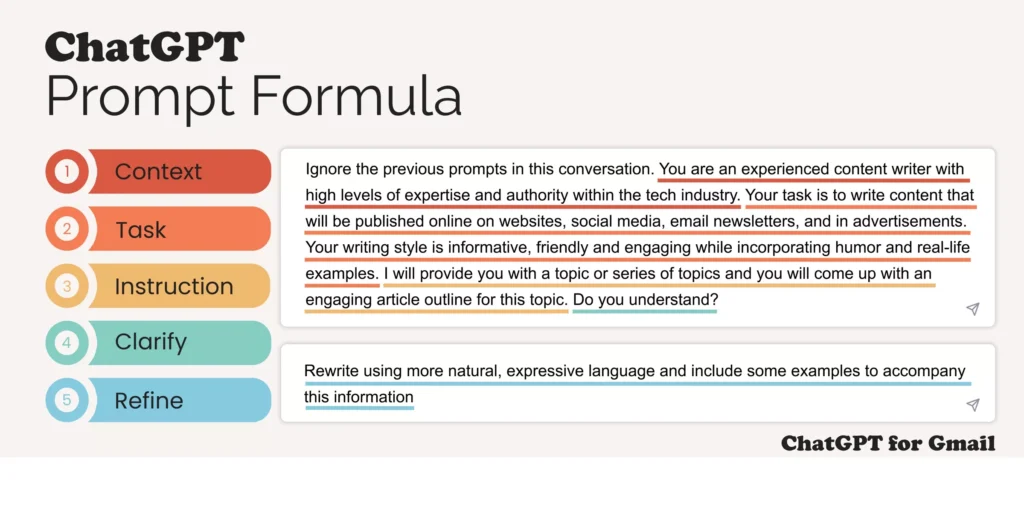
Forget the acronyms. Forget the frameworks. There are four actual things every effective prompt needs — not because someone invented a system, but because they map to the four things the model needs to make the right inferences.
“Act as a senior UX designer reviewing a mobile checkout flow.” Role assignment shapes vocabulary, depth of domain knowledge, and tone. Caveat: multiple studies found that persona settings don’t always improve results — they help most when the role carries specific domain constraints that the model can activate.
Analyze. Rewrite. Summarize. Generate. One action per prompt. “Analyze and then improve and also suggest alternatives” forces the model to sequence tasks it wasn’t designed to sequence inline. Chain those as separate follow-up prompts.
The audience and purpose of the output. Not your background — the intended reader’s background. “For a VP of Marketing who hasn’t looked at the raw data” produces a different output than “for a data analyst.”
Format (length, structure, tone). And what not to do. “Don’t include bullet points. Don’t use jargon. Don’t recommend paid tools.” Negative constraints are dramatically underused and disproportionately effective.
“The model isn’t reading your prompt the way a human would. It’s estimating the most probable response given what you wrote. Structure your prompt to make the right response the most probable one.”
Editorial synthesis — sources: OpenAI Help Center prompt engineering guide; SAGE Open (Choi et al., 2025)
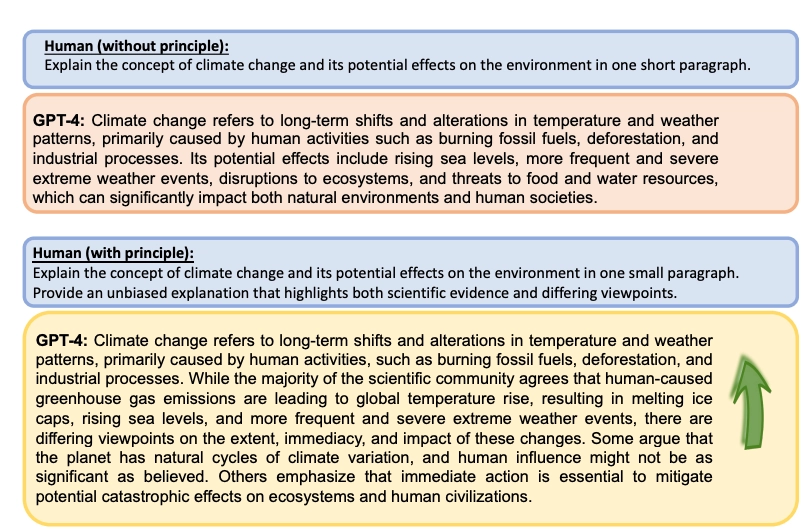
Here’s a concrete before/after. Same request. Different structure.
Write a blog post about remote work productivity.
You are a workplace psychologist writing for an audience of mid-level managers who oversee remote teams of 5-15 people.

Write an 800-word article on the three most evidence-backed habits that improve remote team productivity. Focus on habits managers can implement at a team level, not individual habits.

Do not include: generic advice like "set clear goals," productivity app recommendations, or bullet-point lists. Write in flowing paragraphs. Cite where the habits come from — research, company case, or expert consensus.
Same topic. The first prompt matches patterns for a generic blog post about remote work. The second matches patterns for a researched, manager-specific article with a defined structure. The model didn’t get smarter — you changed what “most probable” looked like.
Techniques That Actually Work — and What Research Says
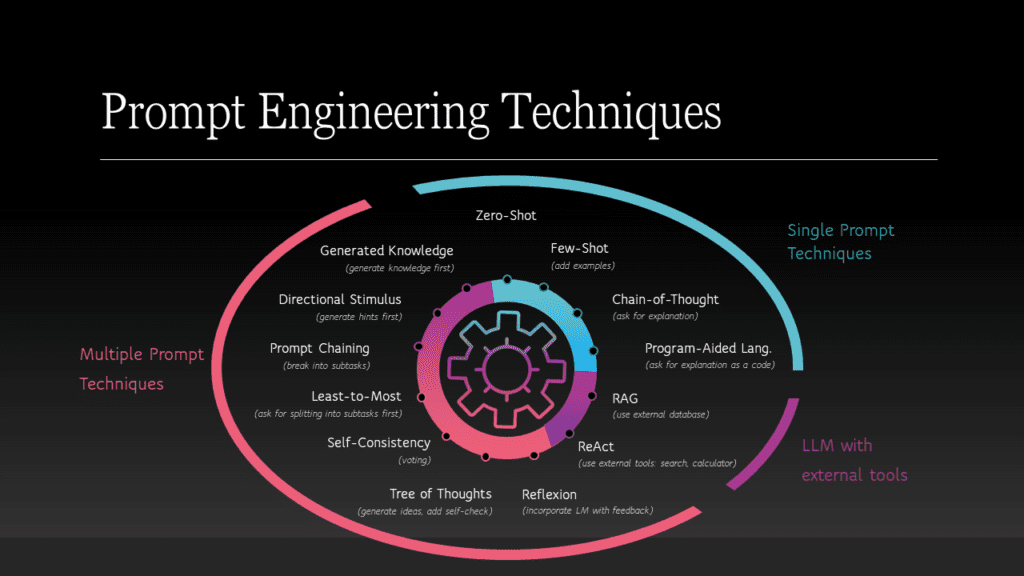
Chain-of-Thought (“Think step by step”)
Adding “Let’s think step by step” to the end of a prompt genuinely improves performance on reasoning tasks. A 2022 paper by Kojima et al. established this, and it’s been replicated. Research comparing prompting strategies found few-shot learning showing about 7.5% higher accuracy than zero-shot approaches on average across scoring tasks — meaningful, not dramatic.
Here’s the thesis-complicating part nobody puts in their guides: a 2025 analysis of chain-of-thought prompting found that for recent strong models, adding traditional CoT examples doesn’t actually improve reasoning performance compared to simple zero-shot CoT. The examples primarily align output format, not reasoning depth. You’re not unlocking deeper thinking — you’re mostly telling the model what shape to put the answer in.
Cross-source synthesis — finding not present in any single cited source
Chain-of-thought prompting is often taught as a reasoning unlock. But the research picture by 2025 is more nuanced: CoT reliably helps format compliance and improves performance on older or weaker models. For current GPT-4-class models, its primary function has shifted toward output structure alignment. The practical implication: use CoT when you want structured, step-by-step output format — not because it makes the model “think harder.”
Few-Shot Examples
Give the model 2-3 examples of what you want and it calibrates fast. This works. The catch is example quality matters enormously — bad examples produce bad outputs more consistently than no examples at all. One mediocre example biases the output toward that mediocre pattern.
Use few-shot when your task has a very specific format or tone that’s hard to describe. Don’t use it when you’re hoping the examples will upgrade the model’s reasoning. They won’t.
Iterative Prompting (the thing everyone skips)
One prompt rarely gets you there. The power users — the ones actually saving meaningful time — treat the first output as a draft to prompt against, not a deliverable. They follow up with: “The second paragraph is too generic. Make it more specific to the financial services industry and cut it to 100 words.” That follow-up takes 15 seconds and often produces better output than 10 minutes of crafting a perfect initial prompt.
What Doesn’t Work (That Everyone Still Does)
Most prompt guides are additive. They tell you what to add. Nobody tells you what to stop doing.
| The Mistake | Why It Fails | Evidence | ⚠ Caveat |
|---|---|---|---|
| Stacking multiple tasks “Write, review, and improve” |
Model prioritizes the last instruction; earlier tasks get degraded attention | Strong Consistent finding across multiple prompting studies | Some multi-task prompts work fine for simple tasks; the failure scales with complexity |
| Overlong, over-specified prompts Cramming every requirement in |
Conflicting requirements force model to guess what matters most; often picks wrong priority | Strong Documented in OpenAI’s own prompt engineering guidelines | For highly structured templates, detailed prompts can help — the problem is conflicting requirements, not length per se |
| Relying on role assignment alone “Act as a marketing expert” |
Persona alone doesn’t reliably improve output quality without accompanying context and constraints | Directional Choi et al., SAGE Open 2025 found persona settings don’t consistently improve results | Works better when role carries specific domain vocabulary constraints; domain-specific roles (“Python developer with fastAPI experience”) perform better than generic expert roles |
| Not using negative constraints Telling it what to do, not what to avoid |
Without “don’t do X,” default patterns for that output type dominate — which are usually generic | Directional Practitioner consensus; not formally studied in isolation | For simple factual queries, negative constraints add unnecessary friction |
The role-assignment finding is worth sitting with. Almost every prompt guide opens with “Assign ChatGPT a role.” The research finding that persona settings don’t consistently improve results is directional — based on one paper, not an established consensus — but it points to something real: role assignment without context and constraints often does less than people think. Don’t skip the other three components and assume the role will carry the prompt.
12 Templates You Can Actually Use
These are structured for copy-paste. Replace the brackets. Don’t add back the vague stuff I stripped out.
You are a direct, professional communicator.

Write an email to [recipient/role] about [specific situation].
My goal: [what I need them to do or understand].
Relationship context: [colleague / direct report / client I've worked with 6 months].
Tone: Direct but not aggressive. Warm but not deferential.

Do not: apologize unnecessarily, use passive voice, or include filler phrases like "I hope this email finds you well."
Length: 150-200 words.
Works for feedback conversations, scope changes, follow-ups that haven’t been answered.
You are a content strategist familiar with SEO and long-form publishing.

Create a detailed outline for a 2,000-word article on [topic].
Primary audience: [describe specifically — not "general readers"].
The article should take a position, not just summarize. The position is: [state it].

Structure: H2 sections with 2-3 H3 subsections each. Include for each section:
- The core argument
- What evidence or example would go here
- The reader question this section answers

Do not: include a generic introduction section, wrap up with "conclusion" as a section name, or suggest sections I'd find in a Wikipedia article.
The “takes a position” instruction alone dramatically changes outline quality.
You are a senior [Python/JavaScript/SQL] developer reviewing code for a production system.

Review this code:
[paste code]

Tell me:
1. What it does (in plain language)
2. Any bugs or edge cases I haven't handled
3. One specific refactor that would improve readability
4. Performance considerations if this runs at scale

Do not: rewrite the entire function unless you flag it as "full rewrite recommended." Don't add comments to the existing code — explain in your response.
The “do not rewrite unless flagged” constraint prevents the model from over-engineering a simple fix.
You are a business analyst presenting findings to a non-technical executive team.

Here is a dataset / summary of data: [paste or describe data].

Interpret what this data shows. Focus on:
- The most significant pattern (one thing, specifically)
- What this likely means for [business area]
- What this data does NOT tell us — name the gaps

Do not: list all the numbers back to me, use statistical jargon without defining it, or conclude with vague action items like "monitor the situation."
The “what this data does NOT tell us” instruction produces genuinely useful analytical caveats.
Edit the following text for clarity and flow.

Rules:
- Preserve my voice and sentence rhythm. Do not make it sound "cleaner" at the expense of personality.
- Fix: grammatical errors, unclear antecedents, run-on sentences
- Do not change: word choice unless there's an error, paragraph structure, any intentional sentence fragments

After editing, note the 2-3 most significant changes you made and why.

[paste text]
“Preserve voice” without specifics gets ignored. The explicit “do not change” list makes it stick.
Help me prepare for a conversation with [role] about [topic].

Context: [2-3 sentences on the situation and the tension].
My goal for this meeting: [specific outcome, not "have a good conversation"].
What I'm worried about: [name the likely pushback].

Give me:
1. How to open (first 30 seconds)
2. The one thing I should acknowledge upfront to disarm defensiveness
3. Two questions to ask rather than statements to make
4. How to handle it if they say [specific feared response]
The “feared response” field makes this dramatically more useful than generic meeting prep advice.
Synthesize the following information into a coherent argument.

Sources/information: [paste text or summaries].
The argument I'm trying to build: [state your thesis].
Target reader: [describe].

Identify:
- Which information supports the argument directly
- Which information complicates or contradicts it (don't hide this)
- What's missing that would make the argument stronger

Format: prose, not bullets. 400-600 words.
The “don’t hide contradictions” instruction is critical. Without it, the model cherry-picks supporting evidence.
Write 3 [LinkedIn/Twitter/Instagram] posts about [topic or content piece].

Voice: [describe in 1-2 sentences — e.g., "direct, slightly cynical, uses specific examples rather than broad claims"]

Each post must:
- Open with an observation, not a question ("Have you noticed...?")
- Include one specific detail (a number, a name, a concrete scenario)
- Be under [character count]

Do not: use emojis, post with "Excited to share...", include hashtag dumps, or start with "I" as the first word.
The “do not start with ‘I’” and “no excited to share” constraints eliminate the most generic LinkedIn patterns immediately.
Generate 15 ideas for [specific challenge/goal].

Constraints on the ideas: [any real constraints — budget, timeline, team size].

Organize them into three categories:
- Safe: conventional, low-risk, likely to work
- Unexpected: less obvious, might feel uncomfortable
- Weird: stretch ideas I probably won't use but that might spark something

Don't explain each idea in depth. One sentence per idea. Go.
The three-category structure forces the model out of its default “here are 15 reasonable ideas” pattern.
Help me think through a decision: [describe the decision].

I'm leaning toward [option]. I want you to steelman the other option(s).

Context on my situation: [relevant constraints and priorities].

Give me:
- The strongest case for the option I'm NOT leaning toward
- What I'm probably underweighting if I go with my current lean
- One question I should be able to answer before deciding

Do not: validate my current lean unless the case for it is genuinely overwhelming. I don't want to feel good — I want to think better.
The final sentence is doing a lot of work. It changes the model’s optimization target.
Explain [topic] to me. My current level: [describe what you already know].

I want to understand: [specific aspect — not "everything about it"].

Rules:
- Use an analogy to something outside this field
- Tell me the one thing most beginners get wrong about this topic
- Flag any part where experts actually disagree — don't present contested things as settled

After the explanation, give me one question I can ask myself to check if I understood it.
The “where experts disagree” instruction prevents confident-sounding misinformation on contested topics.
Read this piece of writing and give me honest, specific feedback.

[paste writing]

I want feedback on:
- Argument: is the core argument clear and well-supported?
- Structure: where does the reader lose the thread?
- Weakest section: name one section specifically and explain why it’s the weakest

I don’t want: encouragement, general praise, or feedback that could apply to any piece of writing.

After the feedback, tell me the single most important thing to fix first.
“Feedback that could apply to any piece of writing” is the instruction that forces specific critique.
What This Means for Your Specific Situation
Start with constraints, not with crafting the perfect prompt
Here’s the most counterintuitive thing about prompting: spending 20 minutes crafting a perfect initial prompt usually produces worse results than spending 5 minutes on a decent prompt and 2 minutes iterating on the output. The model is designed for back-and-forth.
The access barrier for most beginners isn’t knowledge — it’s the friction of the first session. Force yourself through one complete task. After that, the pattern clicks.
You’re probably over-investing in the initial prompt and under-investing in session structure
If you’ve been using ChatGPT for a while and you’re getting decent but not great results, the bottleneck is almost never prompt quality. It’s usually one of two things.
First: you’re not using the context window strategically. ChatGPT doesn’t remember previous conversations — but within a single conversation, it accumulates context. A well-structured session builds context cumulatively. Establish your role and situation at the start of a conversation, then run all related tasks in that conversation rather than starting fresh.
The access barrier here is different: it’s letting go of the idea that a better prompt will solve every problem. Some tasks need model capabilities you can’t prompt around. Know the ceiling.
The Honest Limitation
Prompt engineering is real. The techniques above work. And there’s a ceiling — not a technique ceiling, but a model capability ceiling — that better prompts can’t get you past.
Some tasks require sustained reasoning across very long contexts. Some require accurate knowledge of recent events. Some require the model to reliably do math. No prompt fixes those, because they’re not prompt problems — they’re architecture and training problems. The best prompt engineers know which failures are theirs to fix and which are the model’s.
“The question isn’t how to get a better answer from ChatGPT. It’s how to know when ChatGPT is the wrong tool for the answer you need.”
Editorial synthesis — sources: OpenAI prompt engineering guide; Springer NLP review (2025); NeurIPS chain-of-thought analysis (2024)
That’s the thing no prompt guide tells you. There are tasks where the model’s confident-sounding output is confidently wrong, and no amount of structural prompting will surface that. Verify anything the stakes of which matter. Treat the model as a fast, capable first draft — not a fact source.
Start with the templates. Iterate on the output. Build a library of what works for your specific tasks. That’s it.